
Source & license
Upstream license: MIT
License TL;DR
You can use it, change it, self-host it and sell it. Keep the original copyright and license notice with copies of the code. You don’t have to publish your changes. The authors don’t promise it will work.
Explain MIT in plain English →Summary of the main license. Separate packages and assets can have different terms.
Inspect repository ↗Read this project’s actual license ↗Repository owner
See the upstream repository for the original creator and contributors.
Maintain this project? Maintainer verification →Cloudflare hosting
Free tier eligible within limits
The documented EdgeKey deployment can use Cloudflare Free allowances for a small workload under the request, CPU and service-specific quotas below. This is conditional eligibility, not a measured zero-cost deployment; optional features, domains and external providers can add costs.
Hosting requirements
- Workers Free allows 100,000 requests per day shared across the account and 10 ms CPU per invocation; measure CPU-heavy authentication, parsing and rendering before assuming it fits.
- Keep aggregate D1 use below 5 million rows read/day, 100,000 rows written/day and 5 GB total storage; a request can touch many rows.
- Use a small personal or team workload; domain registration and optional third-party providers are separate costs. Provision your own IDs, secrets and migrations.
Sources checked 01/10/2026
Repository snapshot: fa69913. Hosting eligibility reflects the deployment documentation and listed assumptions.
- gumroad ↗
EdgeKey 是一套有vike框架开发,可直接部署到 Cloudflare 的一体化全栈卡密商城系统:同一套代码同时包含前端页面、SSR 渲染、后端 API / 数据变更入口,并由 Cloudflare Workers 运行。
- shopify ↗
EdgeKey 是一套有vike框架开发,可直接部署到 Cloudflare 的一体化全栈卡密商城系统:同一套代码同时包含前端页面、SSR 渲染、后端 API / 数据变更入口,并由 Cloudflare Workers 运行。
- workers ↗
{ "$schema": "./node_modules/wrangler/config-schema.json", "name": "edge-key", "compatibility_date": "2026-03-12", "main": "virtual:photon:cloudflare:server-entry", "compatibility_flags": ["nodejs_compat", "global_fetch_strictly_public"], "observability": { "enabled": true, "head_sampling_rate": 0.1 }, "d1_databases": [ { "binding": "DB", "database_name": "edgekey-db", "migrations_dir": "prisma/migrations", // "database_id": "24390dbc-b9c6-4ae6
- d1 ↗
ompat", "global_fetch_strictly_public"], "observability": { "enabled": true, "head_sampling_rate": 0.1 }, "d1_databases": [ { "binding": "DB", "database_name": "edgekey-db", "migrations_dir": "prisma/migrations", // "database_id": "24390dbc-b9c6-4ae6-8c7f-507fb2eb36f2", // 执行 wrangler d1 命令必须,但是与cf一键部署冲突所以注释 } ], "triggers": { "crons": ["*/5 * * * *"] } }
- free-tier-eligible ↗
{ "$schema": "./node_modules/wrangler/config-schema.json", "name": "edge-key", "compatibility_date": "2026-03-12", "main": "virtual:photon:cloudflare:server-entry", "compatibility_flags": ["nodejs_compat", "global_fetch_strictly_public"], "observability": { "enabled": true, "head_sampling_rate": 0.1 }, "d1_databases": [ { "binding": "DB", "database_name": "edgekey-db", "migrations_dir": "prisma/migrations", // "database_id": "24390dbc-b9c6-4ae6
- free-tier-eligible ↗
ompat", "global_fetch_strictly_public"], "observability": { "enabled": true, "head_sampling_rate": 0.1 }, "d1_databases": [ { "binding": "DB", "database_name": "edgekey-db", "migrations_dir": "prisma/migrations", // "database_id": "24390dbc-b9c6-4ae6-8c7f-507fb2eb36f2", // 执行 wrangler d1 命令必须,但是与cf一键部署冲突所以注释 } ], "triggers": { "crons": ["*/5 * * * *"] } }
- free-tier-eligible ↗
up>1, 2, 3, 4</sup> | Duration | CPU time | | --- | --- | --- | --- | | **Free** | 100,000 per day | No charge for duration | 10 milliseconds of CPU time per invocation | | **Standard** | 10 million included per month <br> +$0.30 per additional million | No charge or limit for duration | 30 million CPU milliseconds included per month<br> +$0.02 per additional million CPU milliseconds<br><br> Max of [5 minutes of CPU time](https://developers.cloudflare.com/workers/platform/limits/#account-plan-limits) per invocation (default: 30 seconds)<br> Max of 15 minutes of CPU time per [Cron Trigger](https://developers.cloudflare.com/workers/configuration/cron-triggers/) or [Queue Consumer](https://developers.cloudflare.co
- free-tier-eligible ↗
oudflare.com/workers/platform/pricing/#workers) | | --- | --- | --- | | Rows read | 5 million / day | First 25 billion / month included + $0.001 / million rows | | Rows written | 100,000 / day | First 50 million / month included + $1.00 / million rows | | Storage (per GB stored) | 5 GB (total) | First 5 GB included + $0.75 / GB-mo | Track your D1 usage To accurately track your usage, use the [meta object](https://developers.cloudflare.com/d1/worker-api/return-object/), [GraphQL Analytics API](https://developers.cloudflare.com/d1/observability/metrics-analytics/#query-via-the-graphql-api), or the [Cloudflare dashboard ↗︎](https://dash.cloudflare.com/?to=/:account/workers/d1/). Select your D1 database, then vie
- MIT ↗
MIT License Copyright (c) 2026 ggyy Permission is hereby granted, free of charge, to any person obtaining a copy of this software and associated documentation files (the "Software"), to deal in the Software without restriction, including without limitation the rights to use, copy, modify, merge, publish, distribute, sublicense, and/or sell copies of the Software, and to permit persons to whom the Software is furnished to do so, subject to the following conditions: The above copyright notice and this permission notice shall be included in all copies or substantial portions of the Software. THE SOFTWARE IS PROVIDED "AS IS", WITHOUT WARRANTY OF ANY KIND, EXPRESS OR IMPLIED, INCLUDING BUT NOT LIMITED TO THE WARRANTIES OF MERCHANTABILITY, FITNESS FOR A PARTICULAR PURPOSE AND NONINFRINGEMENT
- architecture ↗
{ "$schema": "./node_modules/wrangler/config-schema.json", "name": "edge-key", "compatibility_date": "2026-03-12", "main": "virtual:photon:cloudflare:server-entry", "compatibility_flags": ["nodejs_compat", "global_fetch_strictly_public"], "observability": { "enabled": true, "head_sampling_rate": 0.1 }, "d1_databases": [ { "binding": "DB", "database_name": "edgekey-db", "migrations_dir": "prisma/migrations", // "database_id": "24390dbc-b9c6-4ae6
- architecture ↗
ompat", "global_fetch_strictly_public"], "observability": { "enabled": true, "head_sampling_rate": 0.1 }, "d1_databases": [ { "binding": "DB", "database_name": "edgekey-db", "migrations_dir": "prisma/migrations", // "database_id": "24390dbc-b9c6-4ae6-8c7f-507fb2eb36f2", // 执行 wrangler d1 命令必须,但是与cf一键部署冲突所以注释 } ], "triggers": { "crons": ["*/5 * * * *"] } }
What it can replace
Compare the workflow you need. These mappings describe overlap; full feature parity requires a separate comparison.
 Gumroad ↗
Digital-key product listings, stock, order records and fulfillment; managed payment processing, tax services, marketplaces and full storefront-platform parity are excluded.
See supporting source ↗ Shopify ↗
Digital-key product listings, stock, order records and fulfillment; managed payment processing, tax services, marketplaces and full storefront-platform parity are excluded.
See supporting source ↗How it works
The shape of EdgeKey on Cloudflare, and how it stacks up against the rented tools it replaces.
Architecture
Diagram of deployment declarations at the reviewed commit. Each app has its own entrypoint; declared resources do not prove runtime calls. Follow file and line sources below.
View upstream source ↗Configuration and workflow sources
Reviewed commit fa69913b89a3. Files were read as data; upstream applications and CI jobs were not executed.
Deployment configuration · 1 files
Cloudflare Workers · compatibility 2026-03-12
edge-key · default
Entrypoint: virtual:photon:cloudflare:server-entry
Cron triggers (UTC): */5 * * * *
DB→ D1
Named environments are separate deployments. Bindings are shown only where declared. Configured routes are URL patterns, not verified application endpoints.
Runtime source · handlers, binding usage and workflow steps
Observed TypeScript/JavaScript declarations from Worker entrypoints and resolved relative imports. Calls and workflow steps may run conditionally; their listed order is not a proven end-to-end request flow. Router declarations may be mounted under a prefix or may not be registered. This shows code wiring, not a successful deployment or runtime test. Dynamic wiring, aliases and generated code may not resolve.
No direct runtime declarations resolved from this snapshot. Generated framework bundles or dynamic entrypoints need manual tracing.
Build and deployment pipeline · 1 GitHub Actions workflows
Repository CI declarations, separate from runtime request processing. Job dependencies and conditions are shown as written; long commands are shortened with an ellipsis; a workflow file does not prove a recent successful run.
Triggers: workflow_dispatch, workflow_call
update · no job dependencies declared
- Checkout instance repository
actions/checkout@v4 - Sync from upstream
set -euo pipefail # Keep instance-specific Cloudflare bindings and compatibility flags. if [ -f wrangler.jsonc ]; then cp wrangler.jsonc "$RUNNER_TEMP/wrangler.current.jsonc" fi git fetch https://github.com/34892002/edgeKey.git main git reset --hard FETCH_HEAD if [ -f "$RUNNER_TEMP/wrangler.current.jsonc" ]; then cp "$RUNNER_TEMP/wrangler.current.jsonc" wrangler.jsonc fi git config user.name "EdgeKey Updater" git config user.email "actions@github.com" if git diff --quiet; then echo "EdgeKey is …
build: bun run db:generate && vike builddeploy: bun run db:migrations:remote && bun run db:seed:remote && wrangler deploy
Repository README
View original on GitHub ↗Full upstream document by @34892002 · README.md · snapshot fa69913


EdgeKey
EdgeKey 是一套有vike框架开发,可直接部署到 Cloudflare 的一体化全栈卡密商城系统:同一套代码同时包含前端页面、SSR 渲染、后端 API / 数据变更入口,并由 Cloudflare Workers 运行。
CFFK 发卡系统
由于 EdgeKey 现有技术框架及 UI 组件体系的限制,已难以满足新版本对功能扩展、交互体验与界面一致性的要求。因此 CFFK 基于全新的技术栈重新设计与开发并且拥有 EdgeKey 的所有功能 ;因为底层框架不同,所有项目必须采用独立仓库维护, CFFK 将持续完善功能、交互体验与整体架构。后续 EdgeKey 则会转为轻量化版本继续维护,专注于 Bug 修复与稳定性优化,但是不再进行大型功能迭代。
感谢 EdgeKey 社区提供的反馈、建议,以及每一位贡献者提交的 PR。
功能特性
- 🚀 真正的零成本 — 不用购买服务器和域名,基于 Cloudflare 全球边缘网络运行。一键部署,即刻上线。把钱花在刀刃上,把时间还给自己。
- 🌍 零成本运维 — 基于 Workers + D1,免费额度足够满足日常运营,无需担心额外的账单扣费。
- 🛍️ 商品管理 — 支持分类、商品上下架、库存模式(有限/无限)、最小/最大购买数量。
- 🔑 卡密管理 — 批量导入卡密,支付后自动发货,支持库存实时预警。
- 📦 订单管理 — 包含订单列表、手动补发、自动关闭过期订单及详细的支付日志。
- 💳 多支付网关 — 内置 BEpusdt (USDT)、Epay (聚合支付),支持插件式扩展更多接口。
- 📧 邮件通知 — 支持 SMTP / API / Cloudflare Email 三种通道,内置详细的邮件发送日志。
- ⚙️ 站点设置 — 灵活配置站点名称、Logo、公告及客服联系方式。
- 🔐 管理后台 — 安全可靠的管理员账号体系。
[!TIP] 关于 0 成本运行: 在配合支付渠道(usdt、自建等)、个人邮箱 SMTP 以及免费图床的理想状态下,本项目可实现 100% 零成本 运营。
技术文档 & 资源推荐
- 一键部署教程
- CDN加速配置
- 支付:BEpusdt、 易支付 、支付宝 、支付宝当面付 、Stripe 、HashPay
- S3存储:backblaze 免费提供 10GB 空间免绑卡/手机号验证。本项目已完美适配 Cloudflare(小黄云),接入后流量费全免;未接入 CF 的用户请选用其他 S3 或图床
- 图床: 91星空图床 免费1G、邮箱注册即用
- 邮件: resend 免费用户每日可发 100 封邮件,支持自定义域名发信,免信用卡与手机号验证,开箱即用。
- 更新日志
项目截图
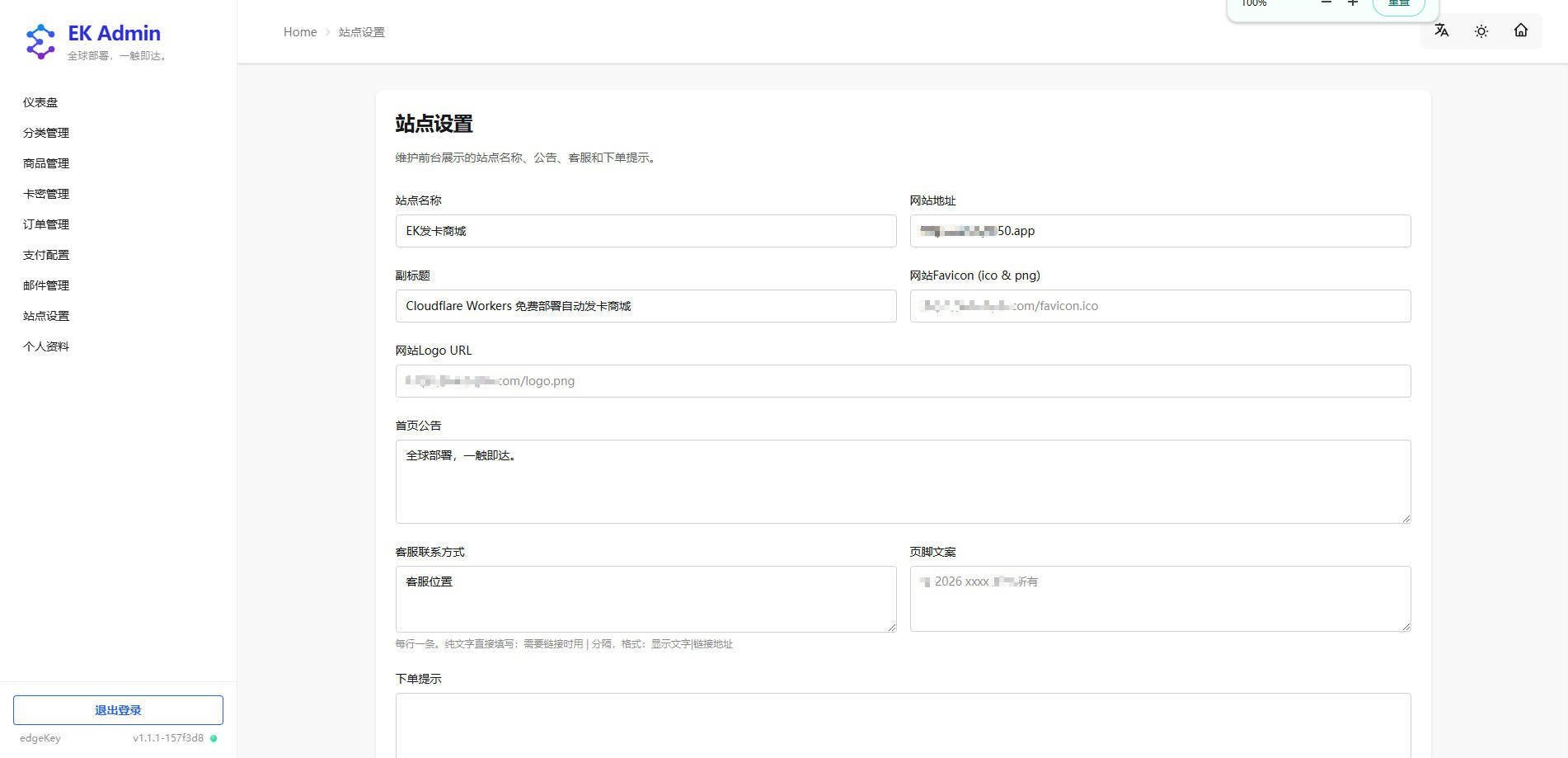
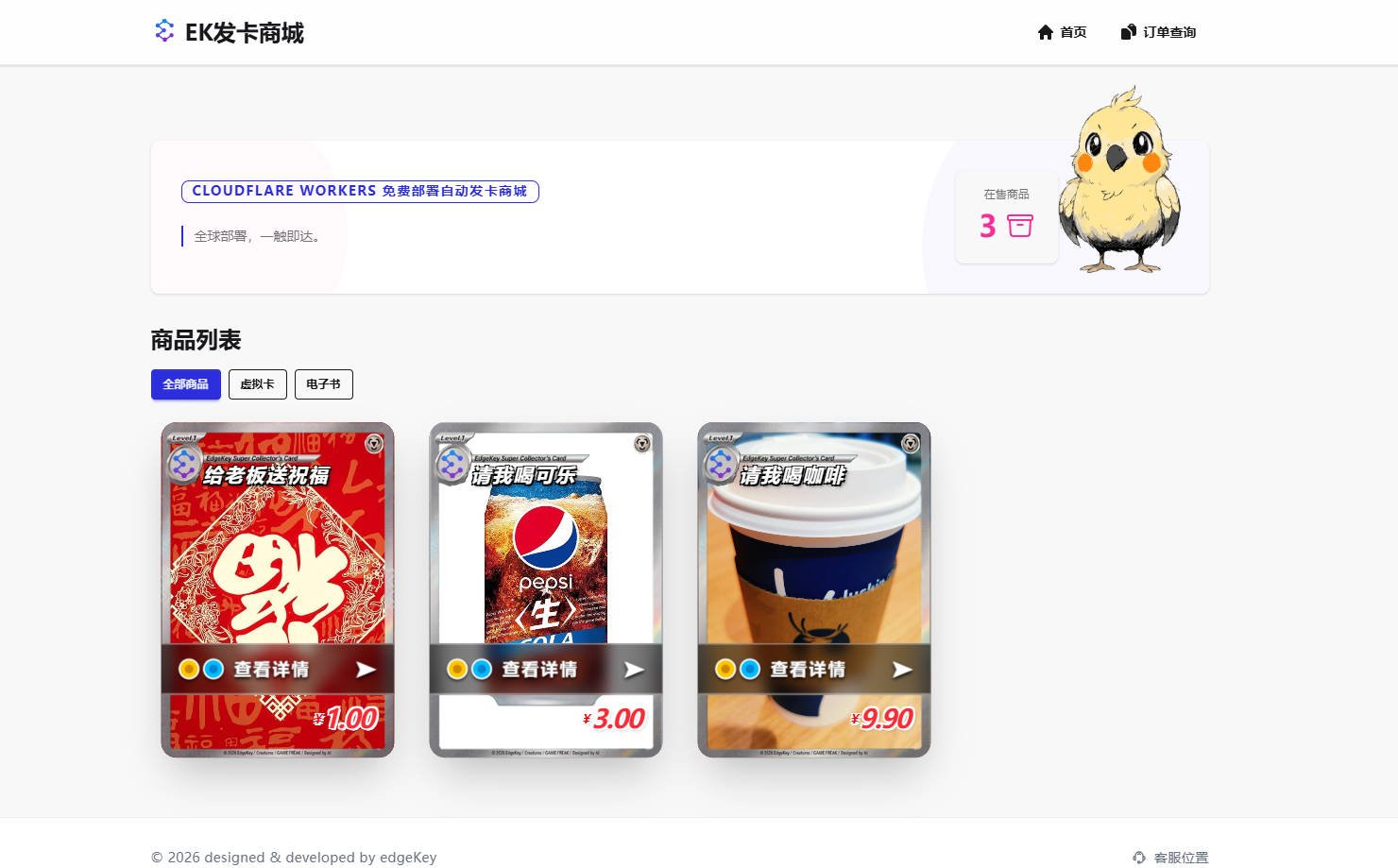
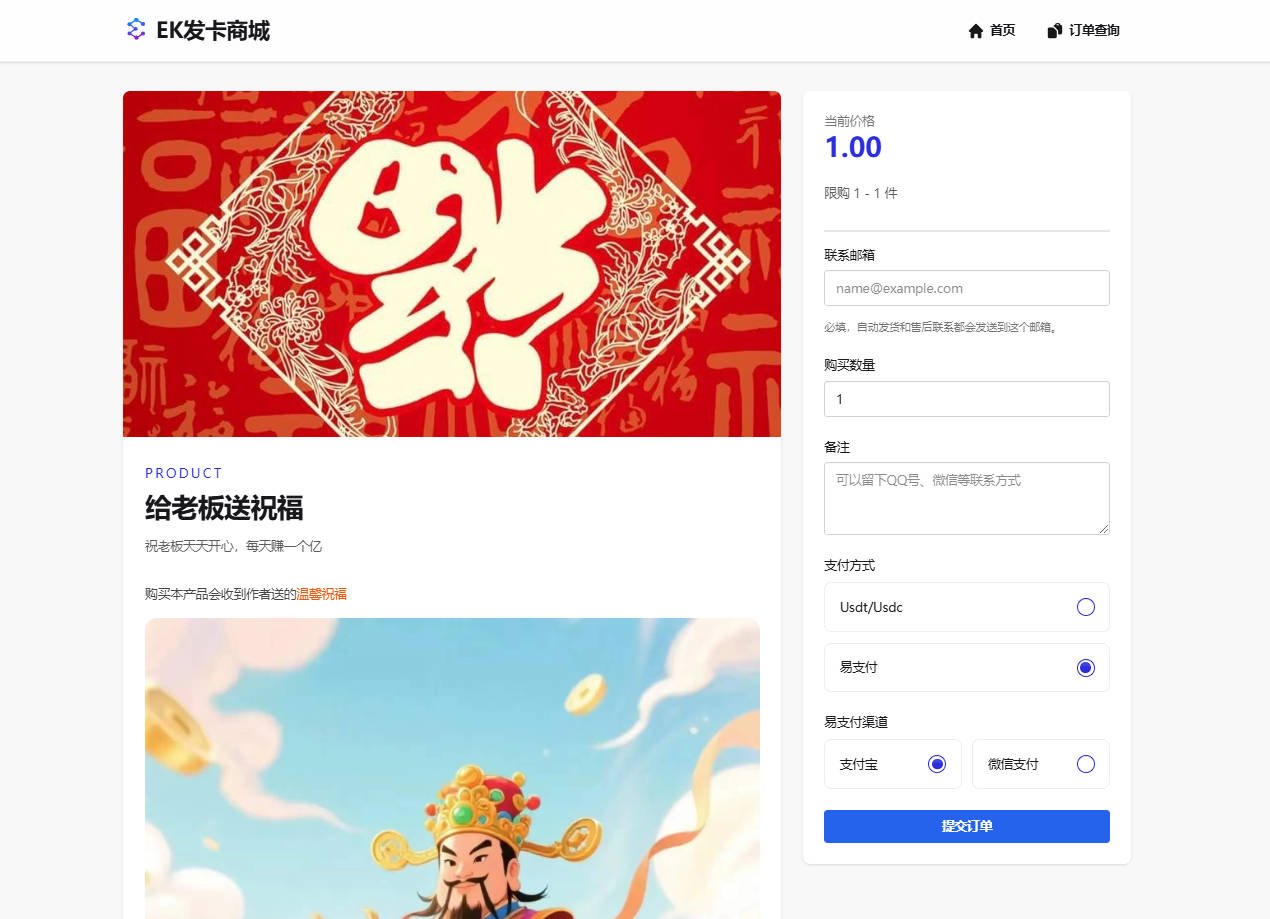
快速开始
本项目支持三种部署方式,按推荐程度排序:
| 方式 | 适合场景 | 便捷程度 |
|---|---|---|
| 一键部署(推荐) | 首次部署,无需本地环境 | ⭐⭐⭐ 最简单,点击按钮全自动完成 |
| Git 自动部署 | 持续迭代,代码推送自动更新 | ⭐⭐ 配置一次后全自动 |
| 手动部署 | 二开需求,细节掌控 | ⭐ 需要本地环境和命令行操作 |
详细步骤见下方各章节说明。
一键部署到 Cloudflare Workers
点击按钮后,会打开 Cloudflare Workers 部署向导,操作提示:
- 登录并授权 Git 账户(github、gitlab),它会自动在你的git账号创建一个新仓库。
- 为了增强安全性,请在向导中修改默认的密钥(
AUTH_SECRET)。- 如果你不绑定已有的D1数据库,它会自动完成新建数据库并初始化数据(管理员账号等)的操作,无需手动干预。
- 部署成功之后在页面的日志里面可以找到 "Deployed edgekey triggers (0.38 sec) https://edgekey.你的账号.workers.dev" 这样的日志,其中 "https://edgekey.你的账号.workers.dev" 就是你的项目网址。
- https://edgekey.你的账号.workers.dev/admin 为管理后台登陆地址,默认管理员账号:admin,密码:admin123456,切记登陆后立即修改密码!
一键部署常见问题
如果 Cloudflare 提示【无法获取存储库内容】类似的异常信息,多半是很久之前绑定过github但授权状态过期或者异常,解绑后重新绑定授权即可。
一键部署与手动部署存在 wrangler.jsonc 文件的配置冲突,执行 wrangler d1 开头的命令需要配置 database_id: 数据库id ,填写数据库ID,否则会报错。受到影响的命令有 npm run up 和 npm run db: 开头的命令。
一键部署后续更新方法
a.首次更新
git remote add upstream https://github.com/34892002/edgeKey.git
git fetch upstream
git merge upstream/main --allow-unrelated-histories
git push origin main
b.后续更新
git fetch upstream
git merge upstream/main
git push origin main
在你的仓库执行上面的命令更新你的仓库到最新代码,最后git push origin main推送到你的仓库,cloudflare检测到就会自动触发部署
通过 Git 连接 Cloudflare 自动部署
如果你使用 Cloudflare Workers 的 Git 集成(连接 GitHub/GitLab 仓库自动部署),需要先完成以下前置步骤:
Cloudflare Turnstile(管理员登录验证码)
项目现已支持在 管理员登录页 接入 Cloudflare Turnstile 小组件,用于拦截自动化爆破登录。
需要在 Cloudflare Dashboard 的 Turnstile 中创建站点,并配置以下环境变量:
TURNSTILE_SITE_KEY:前端小组件站点 KeyTURNSTILE_SECRET_KEY:服务端校验 Secret Key
使用命令给当前项目配置Turnstile
wrangler secret put TURNSTILE_SECRET_KEY
wrangler secret put TURNSTILE_SECRET_KEY
说明:
- 两个变量都未配置时,Turnstile 默认关闭,不影响现有登录流程
- 两个变量都正确配置后,后台登录页会自动显示 Turnstile 小组件,并在服务端强制校验
- 如果只配置了其中一个变量,系统会自动视为未启用,避免出现半配置状态
0. 前置:在 Cloudflare Dashboard 创建 D1 数据库
数据库表结构和种子数据会在首次部署时由 deploy 脚本自动完成初始化,无需手动操作。
1. 部署命令
由于 wrangler.jsonc 中的 database_id 需要与你的实际D1 数据库绑定,Git 自动部署时请在 Cloudflare 的"构建配置"中将部署命令设置为:
sed -i 's/"database_name": "edgekey-db"/"database_name": "edgekey-db", "database_id": "你的database_id"/' wrangler.jsonc && bun run deploy
2. 配置 AUTH_SECRET 环境变量
在 Cloudflare Workers Git 集成的"高级设置"中:
- 添加变量名
AUTH_SECRET - 输入你的密钥字符串作为变量值
- 勾选"加密"选项
构建与部署(手动)
首次部署到 Cloudflare 前,需要先在云端创建并初始化 D1 数据库:
登录并创建数据库
bunx wrangler login
bunx wrangler d1 create edgekey-db
绑定 Database ID 将上一步终端输出的
database_id填入wrangler.jsonc。
"d1_databases": [
	{
		"binding": "DB",
		"database_name": "edgekey-db",
		"database_id": "这里填入你刚创建数据库的UUID", // <-- 必须添加这一行
		"migrations_dir": "prisma/migrations"
	}
]
按顺序初始化云端表结构
bun run db:migrations:remote初始化管理员账号与初始化种子数据
bun run db:seed:remote配置 AUTH_SECRET 输入命令执行,根据命令行提示输入你要使用的密钥字符串。```bash bunx wrangler secret put AUTH_SECRET
生成 Prisma Client 并一键部署
bun run db:generate
bun run up
bun run up 等价于先构建再发布:
vike buildwrangler deploy
部署配置见 wrangler.jsonc(其中 main 指向 Photon 的 Cloudflare server-entry 虚拟入口)。
安全性说明(重要)
当前项目使用管理员账号密码登录。用于生产环境前请务必:
- Cloudflare 生产环境必须配置
AUTH_SECRET,未配置会抛出异常并禁止管理员登录 - 配置方式详见上方"一键部署"、"通过 Git 连接 Cloudflare 自动部署"、"构建与部署(手动)"各章节说明
- 生产环境配置AUTH_SECRET命令
wrangler secret put AUTH_SECRET - 默认管理员账号为
admin / admin123456,首次登录后请立即修改密码
忘记密码?
在 Cloudflare Dashboard 中通过 D1 Console 将密码重置为 admin123456:
执行以下 SQL 如何执行sql:
UPDATE Admin SET passwordHash = '$2b$10$viMe8RgcpM30gmmF9OpOcuA/QgleSIUk5VRtqjOulfSIbgK5jQCI6' WHERE username = 'admin';
- 登录后台后立即修改密码
忘记双重认证验证码?
如果已启用双重认证,但验证器 App 丢失或无法获取验证码,可以在 Cloudflare Dashboard 中通过 D1 Console 临时关闭该管理员账号的双重认证。 执行以下 SQL 如何执行sql:
UPDATE "Admin"
SET "twoFactorEnabled" = false,
    "twoFactorSecret" = NULL,
    "twoFactorEnabledAt" = NULL
WHERE "username" = 'admin';
关闭后请立即登录后台,前往 安全设置 重新绑定身份验证器 App。该操作需要数据库管理权限,仅作为账号恢复手段使用。
Cloudflare平台操作
如何创建数据库
- 进入 dash.cloudflare.com → 存储和数据库 → D1 数据库
- 页面右侧点击 创建数据库 进入创建 D1 数据库页面
- 名称填写数据库名称,数据位置没有特殊需求一般选择 自动...最近的可用区域
如何获取数据库ID
- 进入 dash.cloudflare.com → 存储和数据库 → D1 数据库
- 页面右侧会展示你创建的所有数据库
- 找到你要操作的数据库名称 比如
edgekey-db点击对应的UUID即可复制id
如何执行SQL
- 进入 dash.cloudflare.com → 存储和数据库 → D1 数据库
- 页面右侧会展示你创建的所有数据库,点击你要操作的数据库名称 比如
edgekey-db - 点击顶部标签 → 控制台
本地开发
推荐使用 Bun(也可替换为 npm/pnpm/yarn)。
bun install
由于本项目使用了 Cloudflare D1 数据库,在首次启动本地开发服务器前,必须先初始化本地的 D1 模拟器表结构:
# 1. 生成 Prisma Client(首次安装依赖后必须执行)
bun run db:generate

# 2. 按顺序将所有迁移脚本应用到本地 Wrangler 模拟器
bun run db:migrations:local

# 3. 初始化管理员账号与初始化种子数据
bun run db:seed

# 4. 准备.env 文件
# 请在 `env.example` 中填写必要的环境变量,例如 `AUTH_SECRET`。
# 然后复制 `env.example` 到 `env` 文件。

# 5. 启动开发服务器
bun run dev
开发技术文档与规范
鸣谢
感谢下列开源项目
- Ebpusdt — 加密货币交易支持
- HashPay — 一款运行在 Cloudflare Wokers 上的加密货币收款网关
- worker-mailer — Workers环境SMTP邮件支持
🏝️ 社区交流
- Telegram 群组:https://t.me/edgeKeyChannel
- Telegram 频道:https://t.me/edgeKeyGroup
Frequently asked about EdgeKey
What is EdgeKey?+
EdgeKey is a self-hosted Gumroad/Shopify alternative built on the Cloudflare developer platform. Manage a digital-key storefront, inventory and automatic order delivery on Cloudflare.
What does EdgeKey replace?+
EdgeKey is listed as an alternative to Gumroad, Shopify. Compare the features and tradeoffs before migrating.
What Cloudflare primitives does EdgeKey use?+
EdgeKey is built on D1, Workers.
How much does EdgeKey cost to run?+
The documented EdgeKey deployment can use Cloudflare Free allowances for a small workload under the request, CPU and service-specific quotas below. This is conditional eligibility, not a measured zero-cost deployment; optional features, domains and external providers can add costs. Workers Free allows 100,000 requests per day shared across the account and 10 ms CPU per invocation; measure CPU-heavy authentication, parsing and rendering before assuming it fits. Keep aggregate D1 use below 5 million rows read/day, 100,000 rows written/day and 5 GB total storage; a request can touch many rows. Use a small personal or team workload; domain registration and optional third-party providers are separate costs. Provision your own IDs, secrets and migrations. Check current Cloudflare pricing before deploying.
Is EdgeKey open source?+
The upstream repository declares the MIT license. Read its terms at https://raw.githubusercontent.com/34892002/edgeKey/fa69913b89a3dbd916be931fb4e06a0ae80958f4/LICENSE. Source code and contributor credit are available at https://github.com/34892002/edgeKey.
Discussion · 0
sign in to comment →