
Granit Publish
Build a static knowledge site from Markdown notes and host it on Pages.
Granit Publish is a self-hosted Obsidian Publish alternative built on Cloudflare (Pages). Free tier eligible within limits. Inspect the source and license in the linked repository.
Source & license
Upstream license: MIT
License TL;DR
You can use it, change it, self-host it and sell it. Keep the original copyright and license notice with copies of the code. You don’t have to publish your changes. The authors don’t promise it will work.
Explain MIT in plain English →Summary of the main license. Separate packages and assets can have different terms.
Inspect repository ↗Read this project’s actual license ↗Repository owner
See the upstream repository for the original creator and contributors.
Maintain this project? Maintainer verification →Cloudflare hosting
Free tier eligible within limits
The generated static site can use free Cloudflare Pages asset hosting; local build resources, deployment/file limits and optional domains remain operator responsibilities.
Hosting requirements
- Scope covers only generated static sites; install/run the Go CLI locally or on your own build service, not on a Worker.
- Deploy dist to Cloudflare Pages without Functions: official Pages pricing makes non-Function static requests free and unlimited.
- Follow Pages file/deployment limits and budget optional build-service resources or custom domain registration separately.
- Review the selected source folder for private notes and attachments; the generator copies publishable assets into public output.
- Dynamic Pages Functions requests share the Workers account allowance; only requests that do not invoke Functions count as free unlimited static asset requests.
Sources checked 01/10/2026
Repository snapshot: 7f34f14. Hosting eligibility reflects the deployment documentation and listed assumptions.
- obsidian-publish ↗
rch shim — deployable to GitHub Pages, Cloudflare Pages, fleetdeck, S3, or any static-file host. > Inspired by Obsidian Publish. Keeps the wikilink graph, backlinks, > tag pages, and per-note outline; trades Obsidian's hosted service > and live graph for a self-hosted, version-controllable, JS-free site > you fully own. --- ## Table of contents - [Quick start](#quick-start) - [What gets generated](#what-gets-generated) - [CLI reference](#cli-reference) - [Configuration file](#configuration-file) - [Frontmatter directives](#frontmatter-directives) - [Wikilinks]
- pages ↗
is plain static files — drop `dist/` into: | Host | Command | |---|---| | **Cloudflare Pages** | `npx wrangler pages deploy ./dist` | | **Netlify** | `netlify deploy --prod --dir ./dist` | | **AWS S3** | `aws s3 sync ./dist s3://my-bucket --delete` | | **Vercel** | `vercel deploy ./dist --prod` | | **rsync / scp** | `rsync -avz --delete ./dist/ user@host:/var/www/notes/` | No special configuration — every link is relative, every asset is local. --- ## Image assets Any non-markdown file in the source folder (PNG, JPG, GIF, WEBP, SVG, PDF, mp4, mp3, zip, etc.)
- free-tier-eligible ↗
is plain static files — drop `dist/` into: | Host | Command | |---|---| | **Cloudflare Pages** | `npx wrangler pages deploy ./dist` | | **Netlify** | `netlify deploy --prod --dir ./dist` | | **AWS S3** | `aws s3 sync ./dist s3://my-bucket --delete` | | **Vercel** | `vercel deploy ./dist --prod` | | **rsync / scp** | `rsync -avz --delete ./dist/ user@host:/var/www/notes/` | No special configuration — every link is relative, every asset is local. --- ## Image assets Any non-markdown file in the source folder (PNG, JPG, GIF, WEBP, SVG, PDF, mp4, mp3, zip, etc.)
- free-tier-eligible ↗
s.cloudflare.com/workers/platform/pricing/#how-to-switch-usage-models). ### Static asset requests On both free and paid plans, requests to static assets are free and unlimited. A request is considered static when it does not invoke Functions. Refer to [Functions invocation routes](https://developers.cloudflare.com/pages/functions/routing/#functions-invocation-routes) to learn more about when Functions are invoked. ## Free Plan Requests to your Pages Functions count towards your quota for the Workers Free plan. For example, you could use 50,000 Functions reques
- MIT ↗
MIT License Copyright (c) 2024 Artaeon Permission is hereby granted, free of charge, to any person obtaining a copy of this software and associated documentation files (the "Software"), to deal in the Software without restriction, including without limitation the rights to use, copy, modify, merge, publish, distribute, sublicense, and/or sell copies of the Software, and to permit persons to whom the Software is furnished to do so, subject to the following conditions: The above copyright notice and this
- architecture ↗
is plain static files — drop `dist/` into: | Host | Command | |---|---| | **Cloudflare Pages** | `npx wrangler pages deploy ./dist` | | **Netlify** | `netlify deploy --prod --dir ./dist` | | **AWS S3** | `aws s3 sync ./dist s3://my-bucket --delete` | | **Vercel** | `vercel deploy ./dist --prod` | | **rsync / scp** | `rsync -avz --delete ./dist/ user@host:/var/www/notes/` | No special configuration — every link is relative, every asset is local. --- ## Image assets Any non-markdown file in the source folder (PNG, JPG, GIF, WEBP, SVG, PDF, mp4, mp3, zip, etc.)
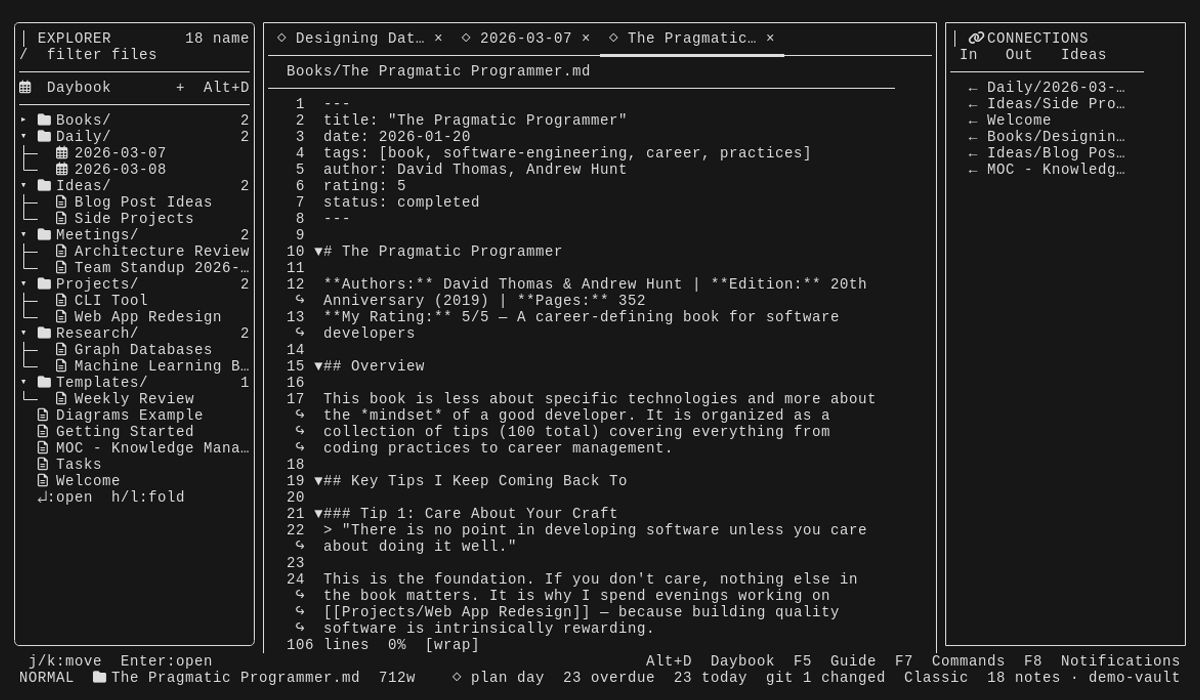
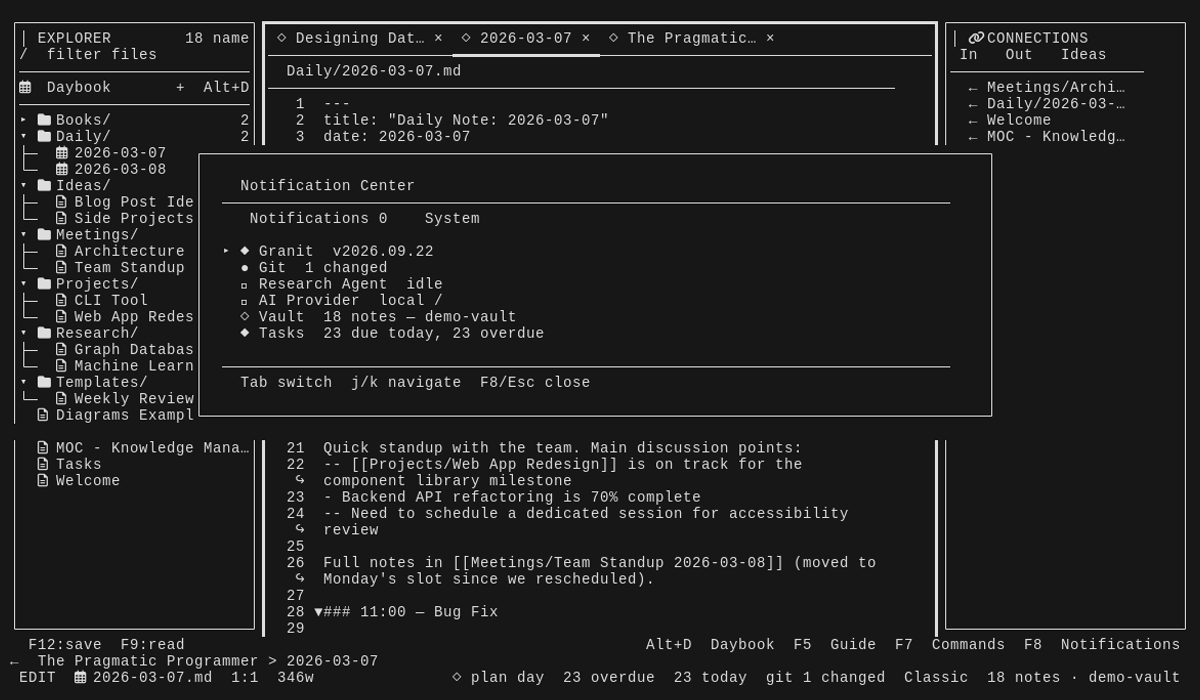
Upstream screenshot · Artaeon/granit repository contributors ↗. Depicts the upstream project. We have not deployed and tested a fresh installation here.
What it can replace
Compare the workflow you need. These mappings describe overlap; full feature parity requires a separate comparison.
 Obsidian Publish ↗
Editorial workflow alternative: Static publication of Markdown notes with wikilinks, backlinks and tag pages; no hosted editing, private vault sync or live graph parity.
See supporting source ↗How it works
The shape of Granit Publish on Cloudflare, and how it stacks up against the rented tools it replaces.
Architecture
Diagram based on the linked repository documentation. See the sources and hosting assumptions above.
View upstream source ↗No additional bindings recorded.
Configuration and workflow sources
Reviewed commit 7f34f1435bfc. Files were read as data; upstream applications and CI jobs were not executed.
Deployment configuration · 0 files
No Wrangler file found in the collected snapshot. The documented architecture above needs separate deployment verification.
Named environments are separate deployments. Bindings are shown only where declared. Configured routes are URL patterns, not verified application endpoints.
Runtime source · handlers, binding usage and workflow steps
Observed TypeScript/JavaScript declarations from Worker entrypoints and resolved relative imports. Calls and workflow steps may run conditionally; their listed order is not a proven end-to-end request flow. Router declarations may be mounted under a prefix or may not be registered. This shows code wiring, not a successful deployment or runtime test. Dynamic wiring, aliases and generated code may not resolve.
No direct runtime declarations resolved from this snapshot. Generated framework bundles or dynamic entrypoints need manual tracing.
Build and deployment pipeline · 3 GitHub Actions workflows
Repository CI declarations, separate from runtime request processing. Job dependencies and conditions are shown as written; long commands are shortened with an ellipsis; a workflow file does not prove a recent successful run.
Triggers: push, pull_request
build · no job dependencies declared
- actions/checkout@3d3c42e5aac5ba805825da76410c181273ba90b1
actions/checkout@3d3c42e5aac5ba805825da76410c181273ba90b1 - actions/setup-go@b7ad1dad31e06c5925ef5d2fc7ad053ef454303e
actions/setup-go@b7ad1dad31e06c5925ef5d2fc7ad053ef454303e - Build
go build ./cmd/... ./internal/... - Secret scan
go run github.com/zricethezav/gitleaks/v8@v8.28.0 git --no-banner --redact=100 --config .gitleaks.toml . - Verify binary
go build -o granit ./cmd/granit/ ./granit version - Vet
go vet ./cmd/... ./internal/... - Lint
golangci/golangci-lint-action@ba0d7d2ec06a0ea1cb5fa41b2e4a3ab91d21278a - Test
go test ./cmd/... ./internal/... - Vulnerability scan
./scripts/check-vulnerabilities.sh
Triggers: push
deploy · no job dependencies declared
- actions/checkout@3d3c42e5aac5ba805825da76410c181273ba90b1
actions/checkout@3d3c42e5aac5ba805825da76410c181273ba90b1 - Setup Pages
actions/configure-pages@45bfe0192ca1faeb007ade9deae92b16b8254a0d - Upload artifact
actions/upload-pages-artifact@fc324d3547104276b827a68afc52ff2a11cc49c9 - Deploy to GitHub Pages
actions/deploy-pages@cd2ce8fcbc39b97be8ca5fce6e763baed58fa128
Triggers: workflow_run
release · no job dependencies declared
Condition: github.event.workflow_run.conclusion == 'success' && github.event.workflow_run.event == 'push' && github.event.workflow_run.head_branch == 'main' && github.event.workflow_run.head_repository.full_name == github.repository
- Check out the tested commit
actions/checkout@3d3c42e5aac5ba805825da76410c181273ba90b1 - Decide whether a release is needed
set -euo pipefail git fetch --force --tags origin existing_tag=$(git tag --points-at HEAD --list 'v*' --sort=-version:refname | sed -n '1p') if [ -n "$existing_tag" ]; then if gh release view "$existing_tag" --repo "$GITHUB_REPOSITORY" >/dev/null 2>&1; then echo "release=false" >> "$GITHUB_OUTPUT" echo "Commit already has published release $existing_tag" exit 0 fi echo "release=true" >> "$GITHUB_OUTPUT" echo "tag=$existing_tag" >> "$GITHUB_OUTPUT" echo "Reusing unpublished tag $existing_tag" ex… - actions/setup-go@b7ad1dad31e06c5925ef5d2fc7ad053ef454303e
actions/setup-go@b7ad1dad31e06c5925ef5d2fc7ad053ef454303eCondition: steps.gate.outputs.release == 'true' - Build concise release notes
./scripts/release-notes.sh "$PREVIOUS_TAG" "${{ github.event.workflow_run.head_sha }}" "$CURRENT_REF" .release-notes.mdCondition: steps.gate.outputs.release == 'true' - Tag the tested commit
set -euo pipefail if ! git rev-parse --verify --quiet "refs/tags/$TAG" >/dev/null; then git config user.name github-actions[bot] git config user.email 41898282+github-actions[bot]@users.noreply.github.com git tag -a "$TAG" -m "Granit $TAG" "${{ github.event.workflow_run.head_sha }}" git push origin "refs/tags/$TAG" fiCondition: steps.gate.outputs.release == 'true' - Run GoReleaser
goreleaser/goreleaser-action@f06c13b6b1a9625abc9e6e439d9c05a8f2190e94Condition: steps.gate.outputs.release == 'true'
build: vite build
build: vite build
Repository README
View original on GitHub ↗Full upstream document by @Artaeon · README.md · snapshot 7f34f14
Granit
A local-first knowledge and productivity workspace for the terminal.
Granit brings notes, tasks, projects, calendars, habits, reviews, and focused
work into one keyboard-driven interface. Your vault remains a directory of
plain Markdown files: readable without Granit, easy to back up, and compatible
with tools such as Obsidian, Vim, and VS Code. Individual notes become opaque
.md.enc files only when you explicitly encrypt them.




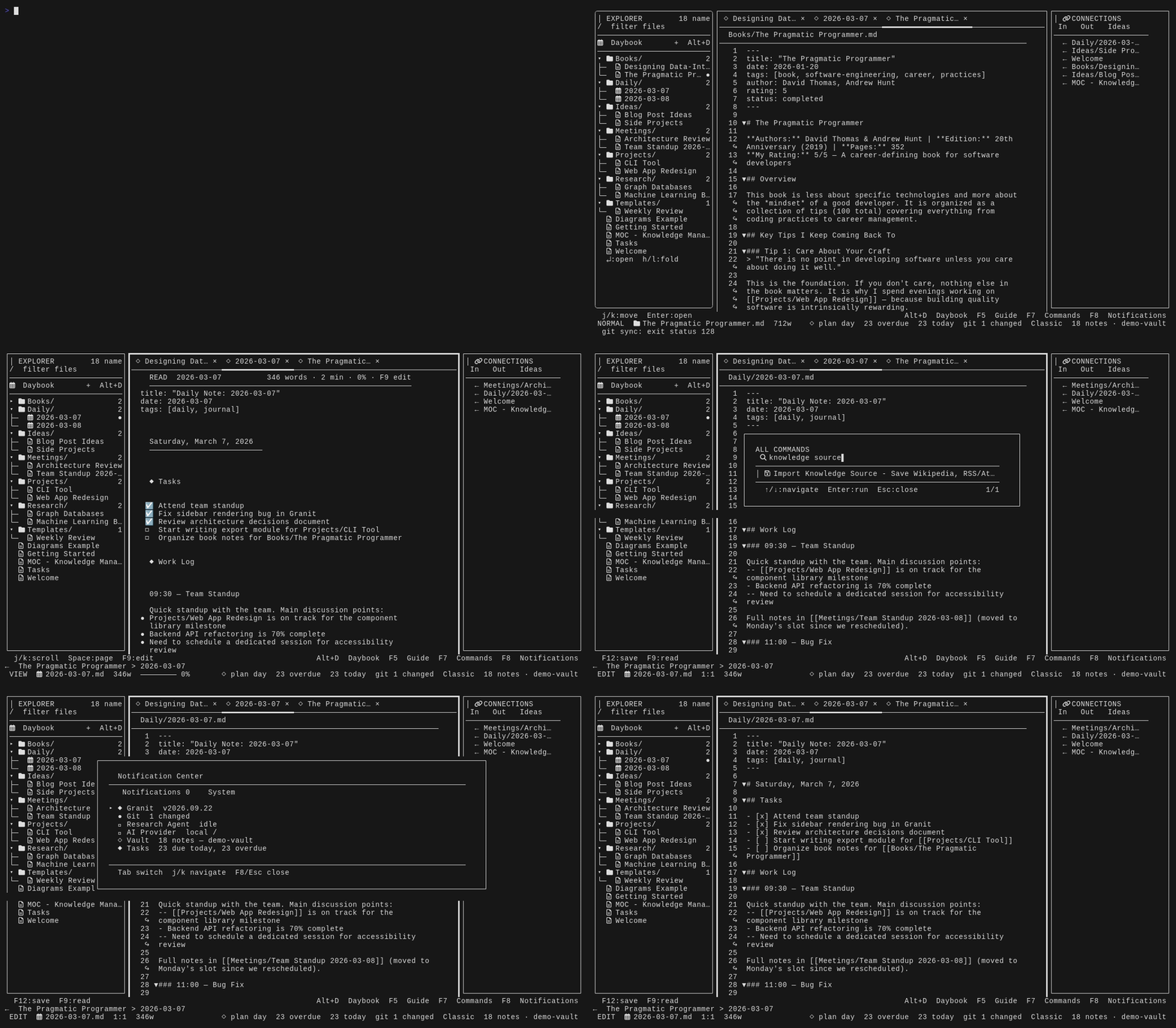
[!IMPORTANT] The Bubble Tea TUI is Granit's active product. The older Svelte web UI is retained in
web/for history and existing users, but it is deprecated and no longer receives product development.
| Granit's contract | |
|---|---|
| Source of truth | Plain Markdown files in a folder you control |
| Primary interface | Go and Bubble Tea terminal application |
| Core requirements | A terminal; no account, server, or AI provider |
| Optional integrations | Git, Ollama, Pandoc, calendar providers, external plugins |
| Project stage | Active pre-1.0 development; TUI is the maintained product |
Why Granit
- Local first. Notes stay on your machine unless you explicitly configure a network-backed integration.
- Plain Markdown. Granit enriches a normal folder instead of locking your writing into a proprietary database.
- Keyboard driven. Navigation, capture, planning, and review are designed for a fast terminal workflow.
- One coherent workspace. Notes and execution live together: a task can remain in its source note while appearing in planning, calendar, and project views.
- Useful offline. Core writing, search, organization, and planning do not require an account or hosted service.
- Extensible. Themes, layouts, process-backed plugins, commands, profiles, typed objects, and optional AI providers adapt Granit to different workflows.
Install
From source
Granit requires Go 1.26 or newer. The module may automatically select a newer patched Go toolchain.
git clone https://github.com/Artaeon/granit.git
cd granit
make build
./bin/granit init ~/Documents/Granit
./bin/granit open ~/Documents/Granit
With go install
go install github.com/artaeon/granit/cmd/granit@latest
granit open ~/Documents/Granit
Optional tools unlock specific integrations:
| Tool | Used for |
|---|---|
| Git | vault history and synchronization |
| Ollama | fully local AI workflows |
| Pandoc | document export |
| aspell or hunspell | spell checking |
wl-clipboard or xclip |
system clipboard integration on Linux |
| Trusted external plugins | optional private or public connectors kept outside Granit core |
See the installation guide for system-wide installs, cross-compilation, and optional dependencies.
Quick start
Open an existing Markdown folder directly:
granit ~/Notes
Or initialize a fresh vault:
granit init ~/Notes
granit open ~/Notes
After more than one vault has been registered, running granit without a path
opens the vault selector immediately. The last dedicated vault is highlighted,
while missing entries are marked and broad filesystem roots such as the home
directory require explicit confirmation. Set GRANIT_VAULT or pass a path when
you intentionally want a direct launch.
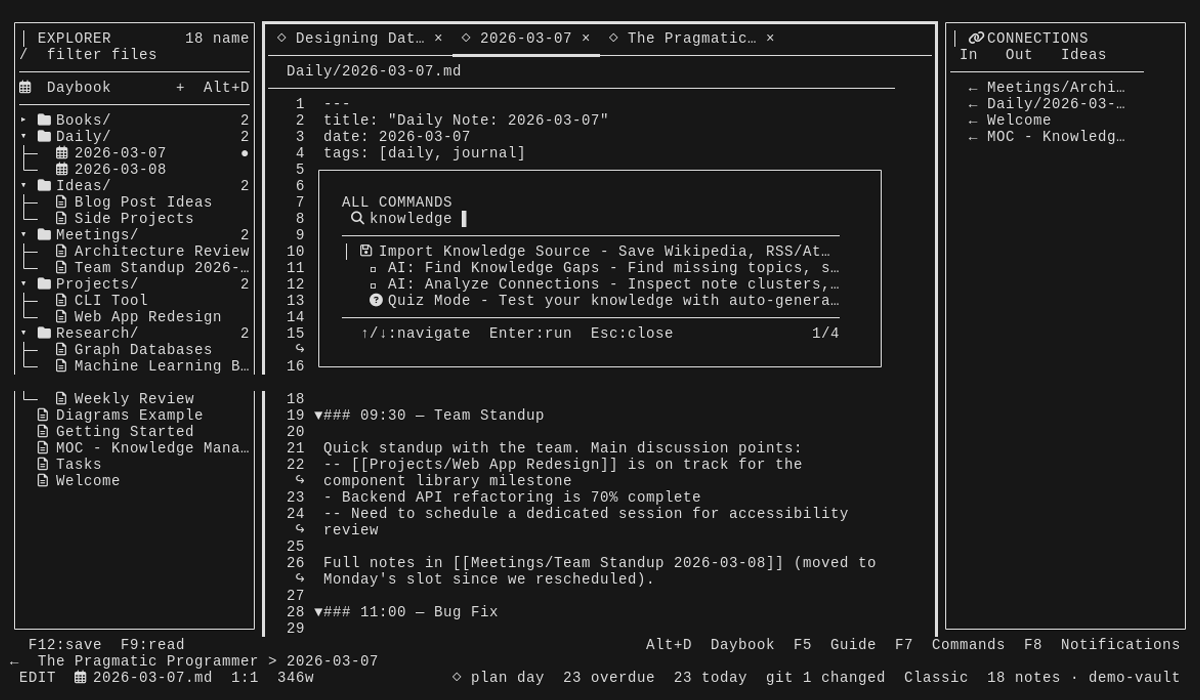
The command palette is the best way to discover Granit. Press F7 (or the
legacy Ctrl+X shortcut) to browse a small set of workflow categories, or
start typing to search every command immediately. Function-key fallbacks work
well in terminals that reserve common Ctrl/Alt chords.
Press F8—or click the fixed control at the bottom-right—to open the
Notification Center. It keeps reminders, app events, available versions,
release notes, and Git/AI/task system status reviewable after transient toasts
disappear. Session notifications remain local and are not written to the vault.
| Shortcut | Action |
|---|---|
F7 / Ctrl+X |
Open the command palette |
F9 / Ctrl+E |
Toggle read and edit mode |
F10 / Alt+H |
Open Today |
F12 / Ctrl+S |
Save the current note |
Ctrl+P |
Quickly open a note |
Ctrl+N |
Create a note |
Ctrl+K |
Open tasks |
Ctrl+L |
Open the calendar |
Alt+I |
Capture to inbox, Daybook, or tasks |
Alt+C |
Open the Command Center |
Alt+D |
Open today's Daybook |
Alt+P |
Structure a free-form daily plan |
Alt+Shift+P |
Pin the active or Explorer-selected note on the right |
Alt+Enter / F11 |
Open Write Flow for selected text or the current line |
Alt+E |
Start the Daily Review |
Alt+Z |
Enter distraction-free focus mode |
Alt+L |
Choose a workspace layout |
Ctrl+W |
Close the active tab |
F5 |
Show all shortcuts |
F8 |
Open the Notification Center |
The complete reference lives in docs/KEYBINDINGS.md.
Stay in the writing flow
Select a phrase with Shift+Arrow, then press Alt+Enter (or F11). The
context menu can turn those words into a linked note, link existing knowledge,
add a task below the sentence, search the vault, ask the configured AI, start
opt-in web/Wikipedia research, or import a URL/feed. The same menu is available
by typing /flow; /source opens the knowledge importer directly.
Creating a linked note is one compact form: title, vault-relative folder, tags, and whether to continue beside the source. Granit replaces the selected words with a wikilink, gives the new note an origin backlink and context section, then opens it for writing while the Daybook or source note stays pinned on the right. Tasks created through Write Flow remain in the source note, so Tasks, Calendar, backlinks, and the Daybook all retain their shared context.
The workspace
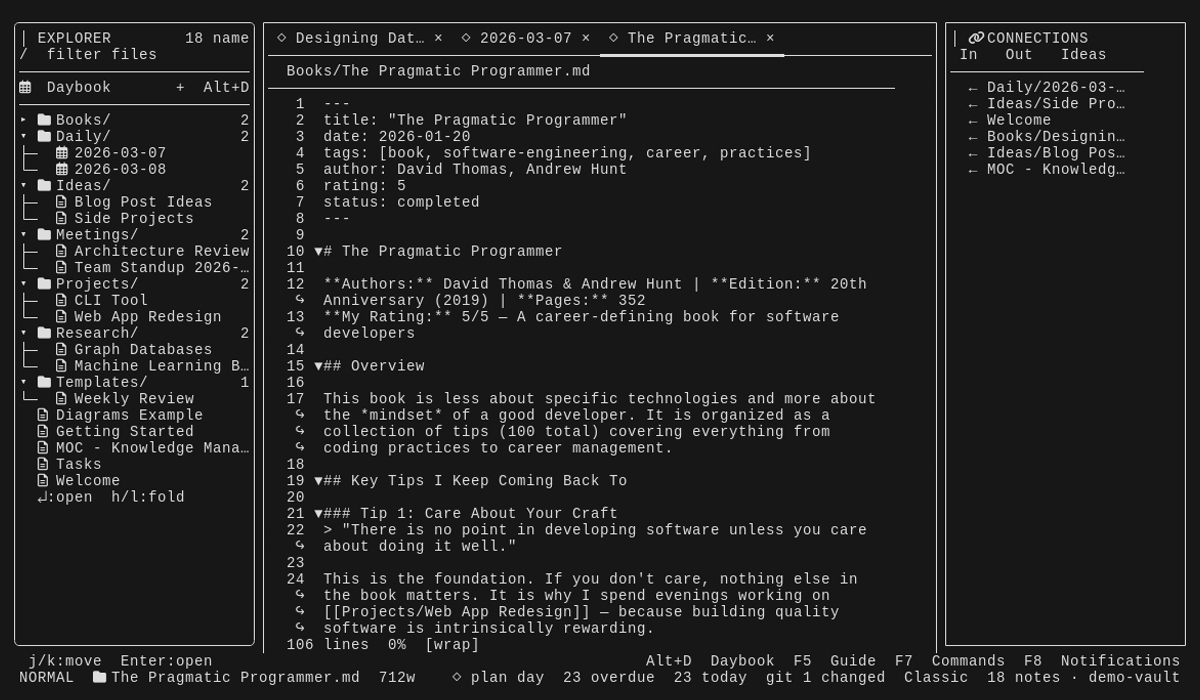
Granit opens as a multi-pane workspace with a file explorer, editor, contextual panels, tabs, a responsive action line, and a status line. The top workspace bar identifies note versus feature tabs and shows the active tab position. Major tools open as tabs in the main pane, so switching between a note, tasks, a project, and a calendar follows the same mental model.
The interface follows a compact Power UI language: one line for contextual
actions, one line for state, consistent surface and section headers, and a
command palette for everything that does not deserve a permanent button. The
footer keeps Guide, Commands, and Notifications anchored on the right; those
controls work with both keyboard and mouse.
Complex workspaces progressively collapse from multi-pane to Writer and then a
focused single surface as the terminal narrows; the configured layout returns
automatically when space is available again.
Alt+L opens four plain-language workflow presets—Workspace, Planner,
Research, and Overview—while specialized layouts remain available through
configuration. Press 1–4 in the picker to apply a preset immediately.
The Explorer keeps large vaults legible with stable hierarchy guides, compact folder counts, responsive truncation, and a bounded pinned section. The active note, pins, and Git state remain visible in a right-aligned metadata column even when focus moves to the editor. Vim-style folding, fuzzy filtering, persistent folder state, and reachable tree/list and Files/Types switches keep navigation fast without turning the sidebar into a second command palette. Today's Daybook has a permanent row above the file tree, so the day's source of truth never disappears inside a collapsed folder.
Any note can remain pinned as a rendered companion on the right while the left
editor follows normal Explorer and tab navigation. In the Explorer,
Alt+Shift+P pins or replaces the selected note without opening it first; from
the editor it pins or focuses the companion. Its local controls scroll, swap the
two notes, or close the pane. Pinned notes work in all four primary workspace
layouts; Planner temporarily replaces its calendar/task rail, and a narrow
terminal shows pin hidden in the status line until enough room is available.
The pin is stored per vault and the existing free-form Split View remains
available for temporary two-note reading.
The Home workspace summarizes what matters now without becoming another inbox: today's tasks, overdue work, captures, habits, active projects, upcoming blocks, and recent notes. Its daily-flow strip connects capture, focus, Tasks, Calendar, and Daily Review without adding another navigation layer. Empty sections point to the action that fills them, while the interactive Command Center remains available for acting on current work.
New installations use the granit-carbon / granit-paper dark and light
pair. Settings presents 17 curated palettes: Granit's product family, selected
editor themes, and five accessibility variants. Historical theme names remain
configuration-compatible without crowding the primary UI. The Theme Gallery
provides reversible live previews, realistic UI states, and WCAG feedback for
both text and selected rows before a choice is saved.
Current interface
| Workspace | Command discovery |
|---|---|
 |
 |
Notes and writing
- Markdown editor and rendered reading mode
- tabs, pinned notes, history, backlinks, outline, and split panes
- wikilinks, tags, frontmatter, embeds, snippets, and templates
- syntax highlighting, tables, diagrams, folding, spell checking, and Vim mode
- quick capture, scratchpad, daily jots, and automatic external-file refresh
- atomic writes and recoverable trash/history workflows
Tasks and planning
- tasks remain
- [ ]lines in their source Markdown files - Plan, Upcoming, All, Done, Calendar, Kanban, Inbox, Stale, Project, Quick, Tag, and Review views
- due dates, priorities, estimates, recurrence, dependencies, notes, snoozing, time blocks, saved filters, and bulk actions
- project and goal association without duplicating the source task
- calendar, daily planner, morning routine, daily review, and weekly review
- free-form daily planning: write the day in plain language, structure it with the offline planner, Ollama, or a configured provider, review the proposed agenda, then explicitly apply new tasks, events, and time blocks
Daybook
The Daybook is the day's source of truth: a date-based Markdown note that stays portable while Granit turns it into a connected daily workspace. Its reading view expands a small Markdown marker into a live, chronological activity feed covering created and edited notes, added and completed tasks, events, focused work sessions, Pomodoros, habits, jots, and other local activity. Source notes remain linked and canonical; Granit does not copy their contents into each Daybook file. Older and custom daily-note templates gain the live view without being rewritten on disk.
Note creation and edit times are preserved in a vault-local Activity Ledger, including writes from TUI workflows, supported CLI commands, and external editors observed while Granit is running. The ledger stores timestamps, event kinds, stable event IDs, and vault-relative paths only—never note bodies, titles, prompts, or credentials. Existing vaults continue to use frontmatter and file-time inference for activity that predates the ledger.
Alt+P opens one free-form planning brief. Ctrl+S or F5 structures it and
shows a compact agenda plus an exact sync preview. Applying the preview stores
the original brief in today's note, creates only missing task/event entities,
and synchronizes Planner blocks. No model is required: the deterministic local
planner understands line items, priorities, durations, and timed appointments.
Projects and personal systems
- projects, goals, milestones, habits, streaks, and focus sessions
- typed objects for people, books, meetings, ideas, articles, places, recipes, and custom vault-defined types
- saved views and object browsing
- time tracking, Pomodoro sessions, reading lists, and recurring tasks
- workspace profiles and multiple layouts for writing, research, review, and planning
Knowledge tools
- full-text, fuzzy, content, universal, and natural-language search surfaces
- secure source import for Wikipedia, public web pages, and RSS/Atom feeds; imports remain ordinary Markdown with URL and retrieval provenance
- optional connector commands and AI providers supplied by trusted plugins
- backlinks, graph views, mind maps, smart connections, and knowledge-gap discovery
- canvas, Zettelkasten helpers, thread weaving, timelines, and Dataview-style queries
- flashcards, quizzes, language learning, and research workflows
Automation and AI
AI features are optional. Granit supports local Ollama workflows and configured remote providers for tasks such as summarization, rewriting, planning, semantic assistance, and multi-step agents. Write-capable agent tools are separated from read tools and require the relevant feature to opt in.
For local workflows, open Settings → AI. Choose ollama to use a model
served by the configured Ollama endpoint, or local for Granit's network-free
keyword and rule-based fallbacks. The Ollama selector prefers models installed
on that server, shows their installed size, Refresh Ollama Models updates
the list, and e accepts a custom model name. Granit checks readiness at
startup only when ollama is the selected provider and never downloads a model
without an explicit Setup action.
Without an AI provider, Granit's editor, vault, tasks, projects, calendar, search, and daily workflows continue to work normally.
External connector plugins
Product-specific and private connectors live outside the public Granit core.
Clone a trusted plugin repository locally and run granit plugin install .;
the Plugin Manager can then enable its commands, hooks, or plugin:<id> AI
provider. Repository URLs and connector credentials are not stored by Granit.
See the plugin guide for the manifest, process protocol, and
security model.
Backup and encryption
Run Vault Backup from the command palette to create, inspect, restore, or
delete local snapshots. New vaults default to one complete snapshot per local
calendar day with 14 generations retained. Settings → Files can switch this to
on_save (throttled to one snapshot per 15 minutes) or disable the schedule.
Snapshots include regular vault files such as Markdown, encrypted notes, images, attachments, and Granit sidecars. Git internals, trash, symlinks, and the backup directory itself are excluded. A restore validates the entire ZIP and its checksums before writing, rejects unsafe paths and file types, and creates a pre-restore safety snapshot. Restored files are overlaid; files that are absent from the archive are not deleted.
Use Encrypt/Decrypt Note for selected sensitive notes. New encrypted files
use AES-256-GCM with an Argon2id-derived key and an authenticated, versioned
envelope. Existing v1 files remain readable. Encrypted notes stay out of
plaintext search and appear as read-only locked views until decrypted. The
passphrase is session-only and cannot be recovered if forgotten.
[!NOTE] In-vault snapshots protect against editing mistakes and bad restores, but not against disk loss, theft, or deletion of the whole vault. Keep an independent off-device backup and use full-disk encryption where needed.
CLI workflows
The TUI is complemented by commands that compose well with shell scripts:
granit search "project atlas" ~/Notes
granit todo "Review launch notes" --due tomorrow --priority high
echo "Follow up with project owner" | granit clip
granit today --json
granit review --week --md
granit backup ~/Notes
granit sync ~/Notes
granit publish build ~/Notes/Research
granit source add https://en.wikipedia.org/wiki/Personal_knowledge_management
granit update --check
Official Linux and macOS release binaries can update themselves with
granit update. Granit requires the release checksum manifest, verifies the
download with SHA-256, validates the archive, and replaces the executable only
after every check succeeds. When an opted-in update check finds a release, open
the Notification Center with F8 and press u to use the same verified
installer from the TUI. Use the same package manager again instead if it owns
your Granit installation.
Run granit help for the complete command reference.
Data model
Markdown remains canonical. Granit adds sidecars only for state that does not fit naturally inside a note.
vault/
├── Daily/
│   └── 2026-09-18.md
├── Projects/
│   └── Granit.md
├── Sources/
│   └── personal-knowledge-management-a1b2c3d4.md
├── Tasks.md
├── inbox.md
├── .granit.json
└── .granit/
    ├── backups/
    ├── tabs.json
    ├── history/
    ├── types/
    └── views/
You can edit the Markdown with another tool at any time. Granit's watcher detects external changes and refreshes the vault index.
Architecture
                       ┌──────────────────┐
                       │  Granit CLI/TUI  │
                       │ Bubble Tea + Go  │
                       └────────┬─────────┘
                                │
               ┌────────────────┼────────────────┐
               │                │                │
       ┌───────▼────────┐ ┌─────▼────────────┐ ┌─▼──────────────────┐
       │ Markdown vault │ │ Domain services  │ │ Optional adapters │
       │ notes+sidecars │ │ tasks/index/etc. │ │ Git/AI/publishing │
       └────────────────┘ └──────────────────┘ └────────────────────┘
The main packages are:
cmd/granit— CLI entry point and automation-friendly commandsinternal/tui— application shell and interactive workspacesinternal/vault— Markdown loading, indexing, and link graphinternal/tasks— canonical task model and persistenceinternal/objects— typed objects and saved viewsinternal/plugins— validated external plugin manifest and installation layerinternal/knowledge— bounded, provenance-aware Wikipedia, web, and feed importinternal/selfupdate— release checks, checksum verification, and atomic updatesinternal/agentruntime— optional tool-using AI runtimeinternal/atomicio— crash-safe writes
See docs/ARCHITECTURE.md for a deeper code tour.
Privacy and security
- Granit does not include telemetry, analytics, or advertising SDKs.
- Network access happens only when a configured feature needs it, such as Git sync, publishing, calendar synchronization, web research, source import, or an AI provider.
- Release checks are off by default.
granit update, Check for Updates, or enabling Settings → Advanced → Check for Updates explicitly permits a GitHub release request; automatic checks are cached for 24 hours. - Vault writes use same-directory temporary files, synchronization, and atomic rename to avoid partially written notes.
- Scheduled local snapshots cover the complete vault and every restore creates a validated safety checkpoint first.
- Optional per-note encryption uses AES-256-GCM and Argon2id; encrypted content is excluded from plaintext indexes and editor buffers.
- Configuration and vault state are local. Never commit API keys, tokens,
personal vault contents, or
.granitstate from a private vault. - Daybook history is stored owner-only in
.granit/activity.jsonl, is bounded to the newest 100,000 events, and is covered by normal vault backups. - External plugins and Lua scripts are third-party code. Review them before installation; connector credentials remain owned by the plugin.
Please report vulnerabilities according to SECURITY.md.
Project status
Granit is in active pre-1.0 development. The TUI is undergoing a focused UX and architecture refresh without removing its existing feature set. Markdown files remain portable, but sidecar schemas and interface details may change before 1.0. Keep independent backups and review CHANGELOG.md when upgrading.
The former web application is deprecated. Its source and documentation remain available for historical reference, but new development targets the TUI.
Documentation
| Document | Purpose |
|---|---|
| Installation | build, install, update, and optional tools |
| Configuration | global and per-vault settings |
| Architecture | codebase and data-flow tour |
| Shared data model | entity identity, capture, search, automation, and plugin boundaries |
| Features | detailed feature reference |
| Complete feature catalog | exhaustive capability and use-case inventory |
| Knowledge sources | Wikipedia, web, and RSS/Atom import, provenance, search, and safety |
| Keybindings | complete keyboard reference |
| AI guide | optional providers and local models |
| Agent runtime | tools, permissions, and write gating |
| Typed objects | object types and saved views |
| Plugins | executable connector API, commands, hooks, and AI providers |
| Themes | built-in and custom TUI themes |
| Publishing | static-site publishing from a vault folder |
Community and support
- Read SUPPORT.md for troubleshooting and the right place to ask a question or report a problem.
- Read CONTRIBUTING.md before proposing code or documentation changes.
- Use SECURITY.md for private vulnerability reporting; do not disclose security issues in a public ticket.
- Follow the active direction and known priorities in ROADMAP.md.
Public reports must use synthetic examples. Never attach a private vault, credentials, personal configuration, or an unsanitized diagnostic log.
Development
git clone https://github.com/Artaeon/granit.git
cd granit
go test ./...
go build -o bin/granit ./cmd/granit
Contributions are welcome. Keep changes focused, add regression tests for behavioral changes, preserve Markdown compatibility, and avoid unnecessary dependencies.
License
MIT · Plain Markdown, your filesystem, your workflow.
Frequently asked about Granit Publish
What is Granit Publish?+
Granit Publish is a self-hosted Obsidian Publish alternative built on the Cloudflare developer platform. Build a static knowledge site from Markdown notes and host it on Pages.
What does Granit Publish replace?+
Granit Publish is listed as an alternative to Obsidian Publish. Compare the features and tradeoffs before migrating.
What Cloudflare primitives does Granit Publish use?+
Granit Publish is built on Pages.
How much does Granit Publish cost to run?+
The generated static site can use free Cloudflare Pages asset hosting; local build resources, deployment/file limits and optional domains remain operator responsibilities. Scope covers only generated static sites; install/run the Go CLI locally or on your own build service, not on a Worker. Deploy dist to Cloudflare Pages without Functions: official Pages pricing makes non-Function static requests free and unlimited. Follow Pages file/deployment limits and budget optional build-service resources or custom domain registration separately. Review the selected source folder for private notes and attachments; the generator copies publishable assets into public output. Dynamic Pages Functions requests share the Workers account allowance; only requests that do not invoke Functions count as free unlimited static asset requests. Check current Cloudflare pricing before deploying.
Is Granit Publish open source?+
The upstream repository declares the MIT license. Read its terms at https://raw.githubusercontent.com/Artaeon/granit/7f34f1435bfc2e3640d99fe5f1becefa2520da75/LICENSE. Source code and contributor credit are available at https://github.com/Artaeon/granit.
Discussion · 0
sign in to comment →