
Source & license
Upstream license: MIT
License TL;DR
You can use it, change it, self-host it and sell it. Keep the original copyright and license notice with copies of the code. You don’t have to publish your changes. The authors don’t promise it will work.
Explain MIT in plain English →Summary of the main license. Separate packages and assets can have different terms.
Inspect repository ↗Read this project’s actual license ↗Repository owner
See the upstream repository for the original creator and contributors.
Maintain this project? Maintainer verification →Cloudflare hosting
Free tier eligible within limits
The documented MoeMail deployment can use Cloudflare Free allowances for a small workload under the request, CPU and service-specific quotas below. This is conditional eligibility, not a measured zero-cost deployment; optional features, domains and external providers can add costs.
Hosting requirements
- Workers Free allows 100,000 requests per day shared across the account and 10 ms CPU per invocation; measure CPU-heavy authentication, parsing and rendering before assuming it fits.
- Pages static requests are free; Pages Functions count against the same Workers account request/CPU allowances.
- Keep aggregate D1 use below 5 million rows read/day, 100,000 rows written/day and 5 GB total storage; a request can touch many rows.
- Keep KV below 100,000 reads/day, 1,000 writes, deletes and list operations/day each, and 1 GB; cache refreshes and backups consume writes.
- Inbound Email Routing can use Workers Free, but processing consumes Workers quotas and requires a domain; arbitrary-recipient outbound email requires Workers Paid.
- Use a small personal or team workload; domain registration and optional third-party providers are separate costs. Provision your own IDs, secrets and migrations.
Sources checked 01/10/2026
Repository snapshot: 5722ceb. Hosting eligibility reflects the deployment documentation and listed assumptions.
- temp-mail ↗
- 🔒 **Privacy Protection**: Protect your real email address from spam and unnecessary subscriptions - ⚡ **Real-time Receipt**: Automatic polling, receive email notifications instantly - ⏱️ **Flexible Validity**: Supports 1 hour, 24 hours, 3 days, or permanent validity - 🎨 **Theme Switching**: Supports light and dark modes - 📱 **Responsive Design**: Perfectly adapted for desktop and mobile devices - 🔄 **Auto Cleanup**: Automatically cleans up expired mailboxes and emails - 📱 **PWA Support**: Support PWA installation - 💸 **Free Self-hosting**: Built on Cloudflare, capable of free self-hosting without any cost - 🎉 **Cute UI**: Simple and cute UI interface - 📤 **Sending Function**: Support sending emails using temporary addresses, based on Resend service - 🔔 **Webhook Notification**: Support receiving new email notifications via webhook - 🛡️ **Permission System**: Role-based access control system - 🔑 **OpenAPI**: Support accessing OpenAPI via API Key - 🤖 **Agent-first CLI**: CLI tool designed for AI agents to automate email workflows - 🌍 **Multi-language Support**: Supports Chinese and English interfaces, freely switchable
- mailinator ↗
- 🔒 **Privacy Protection**: Protect your real email address from spam and unnecessary subscriptions - ⚡ **Real-time Receipt**: Automatic polling, receive email notifications instantly - ⏱️ **Flexible Validity**: Supports 1 hour, 24 hours, 3 days, or permanent validity - 🎨 **Theme Switching**: Supports light and dark modes - 📱 **Responsive Design**: Perfectly adapted for desktop and mobile devices - 🔄 **Auto Cleanup**: Automatically cleans up expired mailboxes and emails - 📱 **PWA Support**: Support PWA installation - 💸 **Free Self-hosting**: Built on Cloudflare, capable of free self-hosting without any cost - 🎉 **Cute UI**: Simple and cute UI interface - 📤 **Sending Function**: Support sending emails using temporary addresses, based on Resend service - 🔔 **Webhook Notification**: Support receiving new email notifications via webhook - 🛡️ **Permission System**: Role-based access control system - 🔑 **OpenAPI**: Support accessing OpenAPI via API Key - 🤖 **Agent-first CLI**: CLI tool designed for AI agents to automate email workflows - 🌍 **Multi-language Support**: Supports Chinese and English interfaces, freely switchable
- workers ↗
y_date": "2024-03-20", "compatibility_flags": ["nodejs_compat"], "main": "workers/email-receiver.ts", "d1_databases": [ { "binding": "DB", "migrations_dir": "drizzle", "database_name": "moemail", "database_id": "${DATABASE_ID}" } ] }
- pages ↗
y_date": "2024-03-20", "compatibility_flags": ["nodejs_compat"], "pages_build_output_dir": ".vercel/output/static", "d1_databases": [ { "binding": "DB", "database_name": "moemail", "database_id": "${DATABASE_ID}", "migrations_dir": "drizzle" } ], "kv_namespaces": [ { "binding": "SITE_CONFIG", "id": "${KV_NAMESPACE_ID}" } ] }
- d1 ↗
ejs_compat"], "pages_build_output_dir": ".vercel/output/static", "d1_databases": [ { "binding": "DB", "database_name": "moemail", "database_id": "${DATABASE_ID}", "migrations_dir": "drizzle" } ], "kv_namespaces": [ { "binding": "SITE_CONFIG", "id": "${KV_NAMESPACE_ID}" } ] }
- kv ↗
d": "${DATABASE_ID}", "migrations_dir": "drizzle" } ], "kv_namespaces": [ { "binding": "SITE_CONFIG", "id": "${KV_NAMESPACE_ID}" } ] }
- email-workers ↗
"$schema": "node_modules/wrangler/config-schema.json", "name": "moemail", "compatibility_date": "2024-03-20", "compatibility_flags": ["nodejs_compat"], "pages_build_output_dir": ".vercel/output/static", "d1_databases": [ { "binding": "DB", "database_name": "moemail", "database_id": "${DATABASE_ID}", "migrations_dir": "drizzle" } ], "kv_namespaces": [ { "binding": "SITE_CONFIG", "id": "${KV_NAMESPACE_ID}" } ] }
- free-tier-eligible ↗
y_date": "2024-03-20", "compatibility_flags": ["nodejs_compat"], "main": "workers/email-receiver.ts", "d1_databases": [ { "binding": "DB", "migrations_dir": "drizzle", "database_name": "moemail", "database_id": "${DATABASE_ID}" } ] }
- free-tier-eligible ↗
y_date": "2024-03-20", "compatibility_flags": ["nodejs_compat"], "pages_build_output_dir": ".vercel/output/static", "d1_databases": [ { "binding": "DB", "database_name": "moemail", "database_id": "${DATABASE_ID}", "migrations_dir": "drizzle" } ], "kv_namespaces": [ { "binding": "SITE_CONFIG", "id": "${KV_NAMESPACE_ID}" } ] }
- free-tier-eligible ↗
ejs_compat"], "pages_build_output_dir": ".vercel/output/static", "d1_databases": [ { "binding": "DB", "database_name": "moemail", "database_id": "${DATABASE_ID}", "migrations_dir": "drizzle" } ], "kv_namespaces": [ { "binding": "SITE_CONFIG", "id": "${KV_NAMESPACE_ID}" } ] }
- free-tier-eligible ↗
up>1, 2, 3, 4</sup> | Duration | CPU time | | --- | --- | --- | --- | | **Free** | 100,000 per day | No charge for duration | 10 milliseconds of CPU time per invocation | | **Standard** | 10 million included per month <br> +$0.30 per additional million | No charge or limit for duration | 30 million CPU milliseconds included per month<br> +$0.02 per additional million CPU milliseconds<br><br> Max of [5 minutes of CPU time](https://developers.cloudflare.com/workers/platform/limits/#account-plan-limits) per invocation (default: 30 seconds)<br> Max of 15 minutes of CPU time per [Cron Trigger](https://developers.cloudflare.com/workers/configuration/cron-triggers/) or [Queue Consumer](https://developers.cloudflare.co
- free-tier-eligible ↗
outes) to learn more about when Functions are invoked. ## Free Plan Requests to your Pages Functions count towards your quota for the Workers Free plan. For example, you could use 50,000 Functions requests and 50,000 Workers requests to use your full 100,000 daily request usage. The free plan daily request limit resets at midnight UTC. Was this helpful? YesNo ## On this page [Docs](https://developers.cloudflare.com/) ```json {"@context":"https://schema.org","@type":"TechArticle","@id":"https://developers.cloudflare.com/pages/functions/pricing/#page","headline":"Pricing","description":"Pages Functions requests are billed as Cloudflare Workers
- free-tier-eligible ↗
oudflare.com/workers/platform/pricing/#workers) | | --- | --- | --- | | Rows read | 5 million / day | First 25 billion / month included + $0.001 / million rows | | Rows written | 100,000 / day | First 50 million / month included + $1.00 / million rows | | Storage (per GB stored) | 5 GB (total) | First 5 GB included + $0.75 / GB-mo | Track your D1 usage To accurately track your usage, use the [meta object](https://developers.cloudflare.com/d1/worker-api/return-object/), [GraphQL Analytics API](https://developers.cloudflare.com/d1/observability/metrics-analytics/#query-via-the-graphql-api), or the [Cloudflare dashboard ↗︎](https://dash.cloudflare.com/?to=/:account/workers/d1/). Select your D1 database, then vie
- free-tier-eligible ↗
cing/). | | Free plan<sup>1</sup> | Paid plan | | --- | --- | --- | | Keys read | 100,000 / day | 10 million/month, + $0.50/million | | Keys written | 1,000 / day | 1 million/month, + $5.00/million | | Keys deleted | 1,000 / day | 1 million/month, + $5.00/million | | List requests | 1,000 / day | 1 million/month, + $5.00/million | | Stored data | 1 GB | 1 GB, + $0.50/ GB-month | <sup>1</sup> The Workers Free plan includes limited Workers KV usage. All limits reset daily at 00:00 UTC. If you exceed any one of these limits, further operations of that type will fail with an error. Note Workers KV pricing for read, write and delete operations is on a per-key basis. Bulk read operations are billed by the amount
- free-tier-eligible ↗
g is based on your Cloudflare plan and email usage. ## Plan pricing Email Routing is available on both the Workers Free and Workers Paid plans. Sending to arbitrary recipients requires the Workers Paid plan. Sending to [verified destination addresses](https://developers.cloudflare.com/email-service/configuration/email-routing-addresses/#destination-addresses) in your account is free on all plans, including when only Email Routing is configured. | | Workers Free | Workers Paid | | --- | --- | --- | | **Outbound emails (Email Sending)** | Not available | 3,000 included per month, then $0.35 per 1,000 emails | | **Inbound emails (Email Routing)** | Unlimited | Unlimited | The 3,000 included emails apply per a
- MIT ↗
MIT License Copyright (c) 2024 [BeilunYang](https://github.com/beilunyang) Permission is hereby granted, free of charge, to any person obtaining a copy of this software and associated documentation files (the "Software"), to deal in the Software without restriction, including without limitation the rights to use, copy, modify, merge, publish, distribute, sublicense, and/or sell copies of the Software, and to permit persons to whom the Software is furnished to do so, subject to the following conditions: The above copyright notice and this permission notice shall be included in all copies or substantial portions of the Software. THE SOFTWARE IS PROVIDED "AS IS", WITHOUT WARRANTY OF ANY KIND, EXPRESS OR IMPLIED, INCLUDING BUT NOT LIMITED TO THE WARRANTIES OF MERCHANTABILITY, FITNESS FOR A
- architecture ↗
y_date": "2024-03-20", "compatibility_flags": ["nodejs_compat"], "main": "workers/email-receiver.ts", "d1_databases": [ { "binding": "DB", "migrations_dir": "drizzle", "database_name": "moemail", "database_id": "${DATABASE_ID}" } ] }
- architecture ↗
y_date": "2024-03-20", "compatibility_flags": ["nodejs_compat"], "pages_build_output_dir": ".vercel/output/static", "d1_databases": [ { "binding": "DB", "database_name": "moemail", "database_id": "${DATABASE_ID}", "migrations_dir": "drizzle" } ], "kv_namespaces": [ { "binding": "SITE_CONFIG", "id": "${KV_NAMESPACE_ID}" } ] }
- architecture ↗
ejs_compat"], "pages_build_output_dir": ".vercel/output/static", "d1_databases": [ { "binding": "DB", "database_name": "moemail", "database_id": "${DATABASE_ID}", "migrations_dir": "drizzle" } ], "kv_namespaces": [ { "binding": "SITE_CONFIG", "id": "${KV_NAMESPACE_ID}" } ] }
- architecture ↗
d": "${DATABASE_ID}", "migrations_dir": "drizzle" } ], "kv_namespaces": [ { "binding": "SITE_CONFIG", "id": "${KV_NAMESPACE_ID}" } ] }
What it can replace
Compare the workflow you need. These mappings describe overlap; full feature parity requires a separate comparison.
 Temp Mail ↗
Creating disposable inboxes and receiving/viewing messages; commercial testing suites, managed SLA and optional outbound-provider service are excluded.
See supporting source ↗ Mailinator ↗
Creating disposable inboxes and receiving/viewing messages; commercial testing suites, managed SLA and optional outbound-provider service are excluded.
See supporting source ↗How it works
The shape of MoeMail on Cloudflare, and how it stacks up against the rented tools it replaces.
Architecture
Services observed in deployment configuration. Routes, jobs and runtime behavior still need verification.
View upstream source ↗Configuration and workflow sources
Reviewed commit 5722ceb2fca1. Files were read as data; upstream applications and CI jobs were not executed.
Deployment configuration · 3 files
Cloudflare Pages · example/template, excluded from overview · compatibility 2024-03-20
moemail · default
DB→ D1SITE_CONFIG→ KV
Cloudflare Workers · example/template, excluded from overview · compatibility 2024-03-20
email-receiver-worker · default
Entrypoint: workers/email-receiver.ts
DB→ D1
Cloudflare Workers · example/template, excluded from overview · compatibility 2024-03-20
cleanup-worker · default
Entrypoint: workers/cleanup.ts
Cron triggers (UTC): 0 * * * *
DB→ D1
Named environments are separate deployments. Bindings are shown only where declared. Configured routes are URL patterns, not verified application endpoints.
Runtime source · handlers, binding usage and workflow steps
Observed TypeScript/JavaScript declarations from Worker entrypoints and resolved relative imports. Calls and workflow steps may run conditionally; their listed order is not a proven end-to-end request flow. Router declarations may be mounted under a prefix or may not be registered. This shows code wiring, not a successful deployment or runtime test. Dynamic wiring, aliases and generated code may not resolve.
- L70 · email handler exported · calls handleEmail
Environment references: env.DB
- L14 · scheduled handler exported · references DB · calls Date.now, console.log, run, bind, env.DB.prepare, console.error
Environment references: env.DB
- L19 · callWebhook calls (conditional paths may differ): setTimeout, controller.abort, fetch, JSON.stringify, clearTimeout
Build and deployment pipeline · 3 GitHub Actions workflows
Repository CI declarations, separate from runtime request processing. Job dependencies and conditions are shown as written; long commands are shortened with an ellipsis; a workflow file does not prove a recent successful run.
Triggers: push, workflow_dispatch
deploy · no job dependencies declared
- actions/checkout@v4
actions/checkout@v4 - Get previous tag
echo "tag=$(git describe --tags --abbrev=0 HEAD^)" >> $GITHUB_OUTPUTCondition: github.event_name == 'push' - Setup pnpm
pnpm/action-setup@v2 - Setup Node.js
actions/setup-node@v4 - Install Dependencies
pnpm install --frozen-lockfile - Run deploy script
pnpm dlx tsx scripts/deploy/index.ts - Post deployment cleanup
rm -f .env*.* rm -f wrangler*.json
Triggers: push, workflow_dispatch
publish · no job dependencies declared
- actions/checkout@v4
actions/checkout@v4 - Setup pnpm
pnpm/action-setup@v2 - Setup Node.js
actions/setup-node@v4 - Setup Bun
oven-sh/setup-bun@v2 - Install CLI dependencies
cd packages/cli && pnpm install - Build
cd packages/cli && bun build ./src/index.ts --outdir ./dist --target=node - Publish to npm
cd packages/cli && npm publish --access public
Triggers: push, workflow_dispatch
publish · no job dependencies declared
- actions/checkout@v4
actions/checkout@v4 - Setup pnpm
pnpm/action-setup@v2 - Setup Node.js
actions/setup-node@v4 - Setup Bun
oven-sh/setup-bun@v2 - Install MCP dependencies
cd packages/mcp && pnpm install - Build
cd packages/mcp && bun build ./src/index.ts --outdir ./dist --target=node - Publish to npm
cd packages/mcp && npm publish --access public
build: next buildbuild:pages: npx @cloudflare/next-on-pagesdeploy:email: wrangler deploy --config wrangler.email.jsondeploy:cleanup: wrangler deploy --config wrangler.cleanup.jsondeploy:pages: npm run build:pages && wrangler pages deploy .vercel/output/static --branch main
build: bun build ./src/index.ts --outdir ./dist --target=node
build: bun build ./src/index.ts --outdir ./dist --target=node
Repository README
View original on GitHub ↗Full upstream document by @beilunyang · README.md · snapshot 5722ceb

MoeMail
A cute temporary email service built with NextJS + Cloudflare technology stack 🎉
English | 简体中文

Live Demo • Documentation • Features • Tech Stack • Local Run • Deployment • Email Domain Config • Permission System • System Settings • Sending Emails • Webhook Integration • OpenAPI • CLI Tool • MCP Server • Environment Variables • Github OAuth Config • Google OAuth Config • Contribution • License • Community • Support
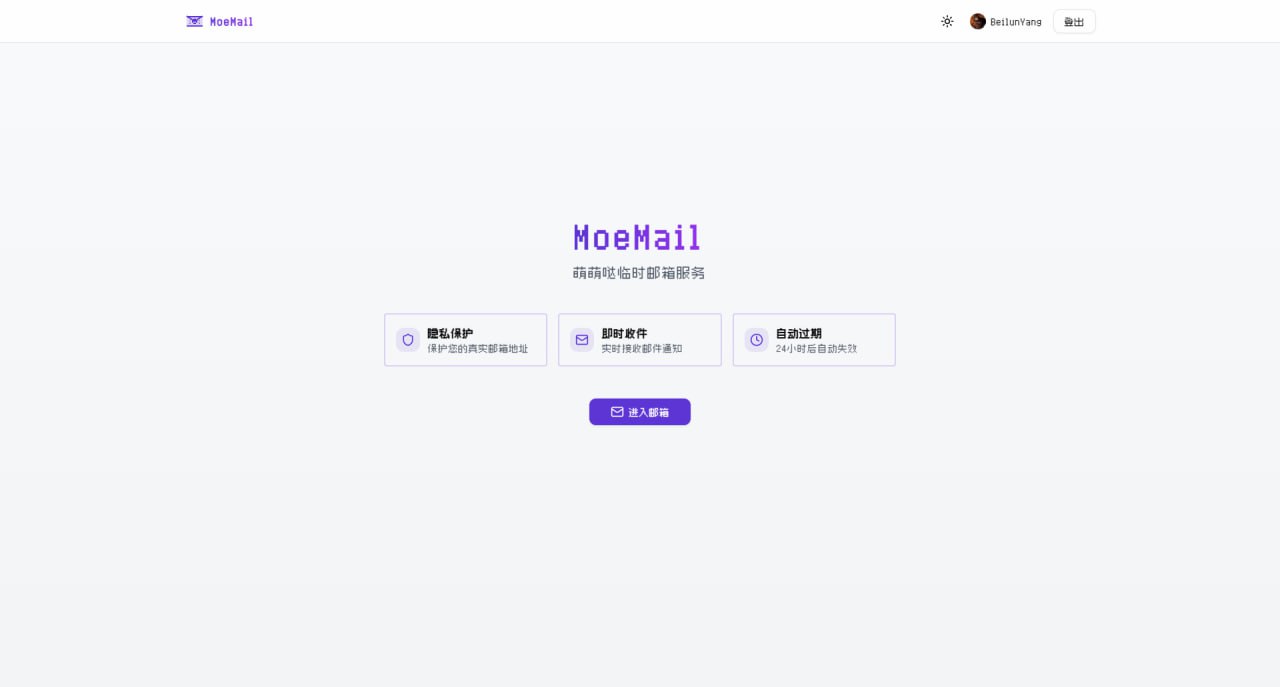
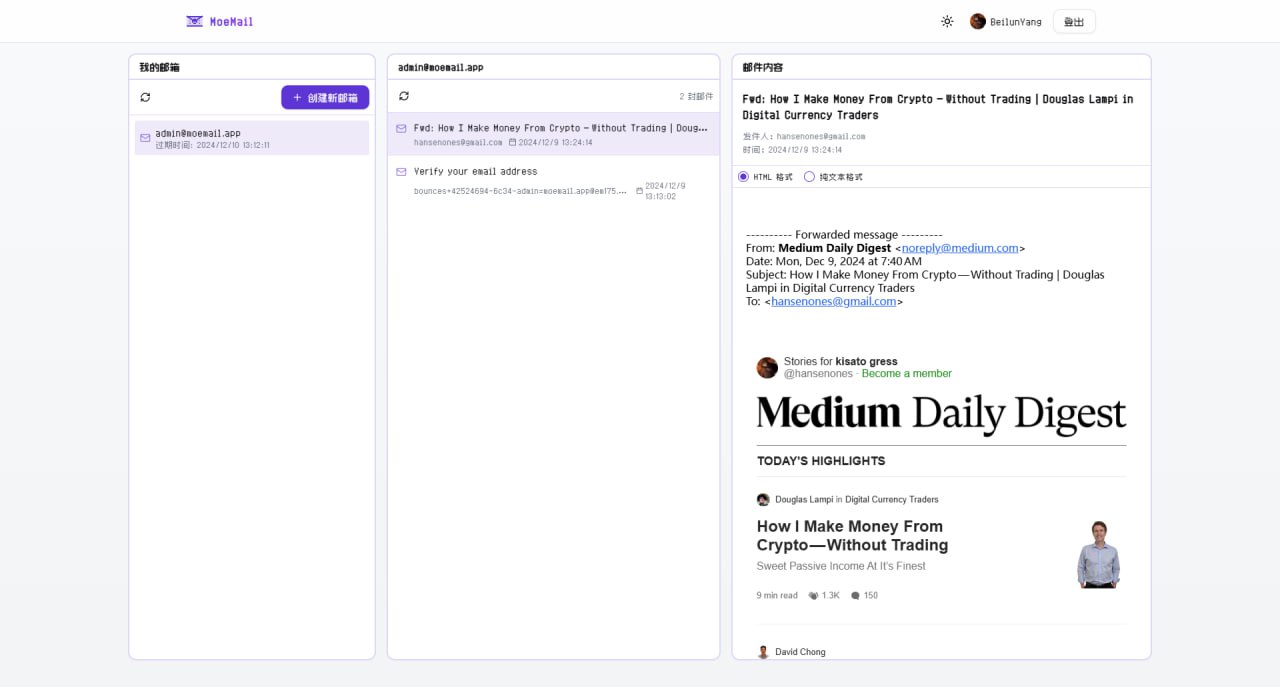
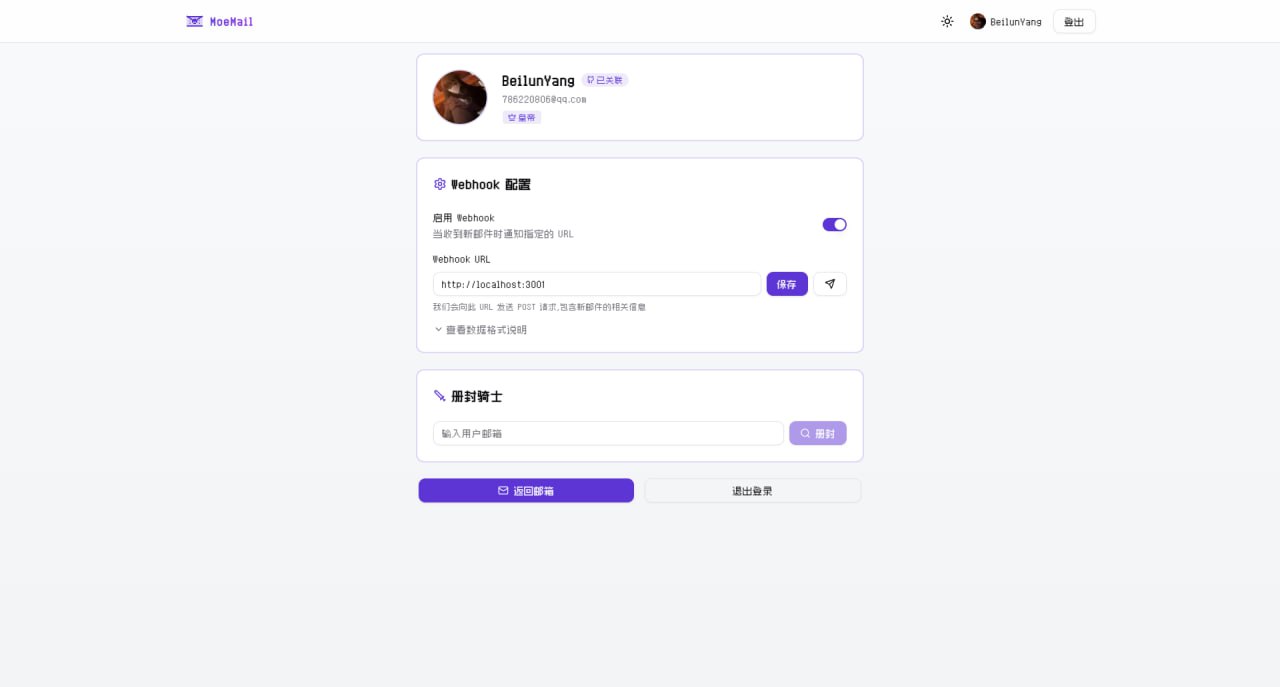
Live Demo
Documentation
Full Documentation: https://docs.moemail.app
The documentation site contains detailed usage guides, API documentation, deployment tutorials, and other complete information.
Features
- 🔒 Privacy Protection: Protect your real email address from spam and unnecessary subscriptions
- ⚡ Real-time Receipt: Automatic polling, receive email notifications instantly
- ⏱️ Flexible Validity: Supports 1 hour, 24 hours, 3 days, or permanent validity
- 🎨 Theme Switching: Supports light and dark modes
- 📱 Responsive Design: Perfectly adapted for desktop and mobile devices
- 🔄 Auto Cleanup: Automatically cleans up expired mailboxes and emails
- 📱 PWA Support: Support PWA installation
- 💸 Free Self-hosting: Built on Cloudflare, capable of free self-hosting without any cost
- 🎉 Cute UI: Simple and cute UI interface
- 📤 Sending Function: Support sending emails using temporary addresses, based on Resend service
- 🔔 Webhook Notification: Support receiving new email notifications via webhook
- 🛡️ Permission System: Role-based access control system
- 🔑 OpenAPI: Support accessing OpenAPI via API Key
- 🤖 Agent-first CLI: CLI tool designed for AI agents to automate email workflows
- 🌍 Multi-language Support: Supports Chinese and English interfaces, freely switchable
Tech Stack
- Framework: Next.js (App Router)
- Platform: Cloudflare Pages
- Database: Cloudflare D1 (SQLite)
- Authentication: NextAuth with GitHub/Google Login
- Styling: Tailwind CSS
- UI Components: Custom components based on Radix UI
- Email Handling: Cloudflare Email Workers
- Type Safety: TypeScript
- ORM: Drizzle ORM
- Internationalization: next-intl
Local Run
Prerequisites
- Node.js 18+
- Pnpm
- Wrangler CLI
- Cloudflare Account
Installation
- Clone the repository:
git clone https://github.com/beilunyang/moemail.git
cd moemail
- Install dependencies:
pnpm install
- Setup Wrangler:
cp wrangler.example.json wrangler.json
cp wrangler.email.example.json wrangler.email.json
cp wrangler.cleanup.example.json wrangler.cleanup.json
Set Cloudflare D1 database name and database ID.
- Setup Environment Variables:
cp .env.example .env.local
Set AUTH_GITHUB_ID, AUTH_GITHUB_SECRET, AUTH_SECRET.
- Create local database schema:
pnpm db:migrate-local
Development
- Start development server:
pnpm dev
- Test Email Worker: Currently cannot run and test locally, please use Wrangler to deploy the email worker and test.
pnpm deploy:email
- Test Cleanup Worker:
pnpm dev:cleanup
pnpm test:cleanup
- Generate Mock Data (Mailboxes and Messages):
pnpm generate-test-data
Deployment
Video Tutorial
https://www.youtube.com/watch?v=Vcw3nqsq2-E
Local Wrangler Deployment
- Create .env file
cp .env.example .env
Set Environment Variables in the .env file.
Run deployment script
pnpm dlx tsx ./scripts/deploy/index.ts
Github Actions Deployment
This project supports automated deployment using GitHub Actions. It supports the following triggers:
- Auto Trigger: Automatically triggers deployment flow when a new tag is pushed.
- Manual Trigger: Manually trigger in the GitHub Actions page.
Deployment Steps
Add the following Secrets in GitHub repository settings:
CLOUDFLARE_API_TOKEN: Cloudflare API TokenCLOUDFLARE_ACCOUNT_ID: Cloudflare Account IDAUTH_GITHUB_ID: GitHub OAuth App IDAUTH_GITHUB_SECRET: GitHub OAuth App SecretAUTH_SECRET: NextAuth Secret, used to encrypt session, please set a random stringCUSTOM_DOMAIN: Custom domain for the website (Optional, if empty, uses Cloudflare Pages default domain)PROJECT_NAME: Pages project name (Optional, if empty, defaults to moemail)DATABASE_NAME: D1 database name (Optional, if empty, defaults to moemail-db)KV_NAMESPACE_NAME: Cloudflare KV namespace name, used for site settings (Optional, if empty, defaults to moemail-kv)
Choose trigger method:
Method 1: Push Tag Trigger
# Create a new tag
git tag v1.0.0

# Push tag to remote repository
git push origin v1.0.0
Method 2: Manual Trigger
- Go to the Actions page of the repository
- Select "Deploy" workflow
- Click "Run workflow"
Deployment progress can be viewed in the Actions tab of the repository.
Notes
- Ensure all Secrets are set correctly.
- When using tag trigger, the tag must start with
v(e.g., v1.0.0).
Email Domain Configuration
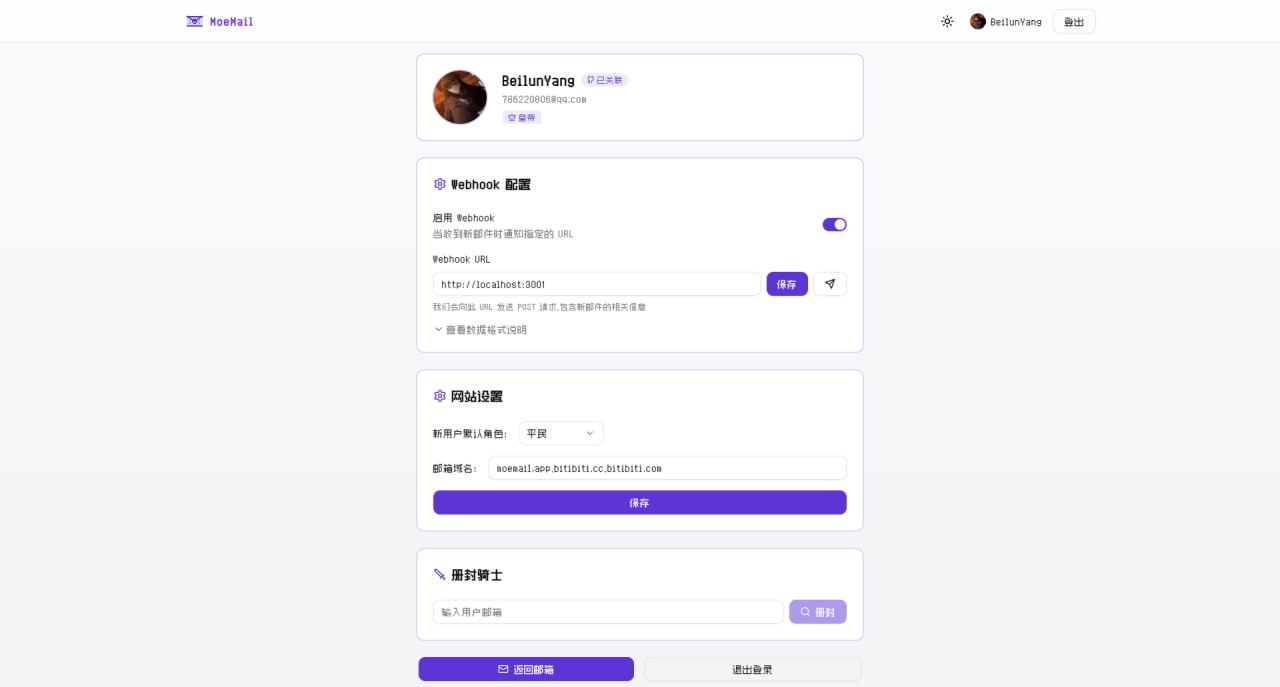
In the MoeMail User Profile page, you can configure the site's email domains. Supports multiple domain configurations, separated by commas.
Cloudflare Email Routing Configuration
To make email domains effective, you also need to configure email routing in the Cloudflare console to forward received emails to the Email Worker.
- Login to Cloudflare Console
- Select your domain
- Click "Email" -> "Email Routing" in the left menu
- If it shows "Email Routing is currently disabled", please click "Enable Email Routing"
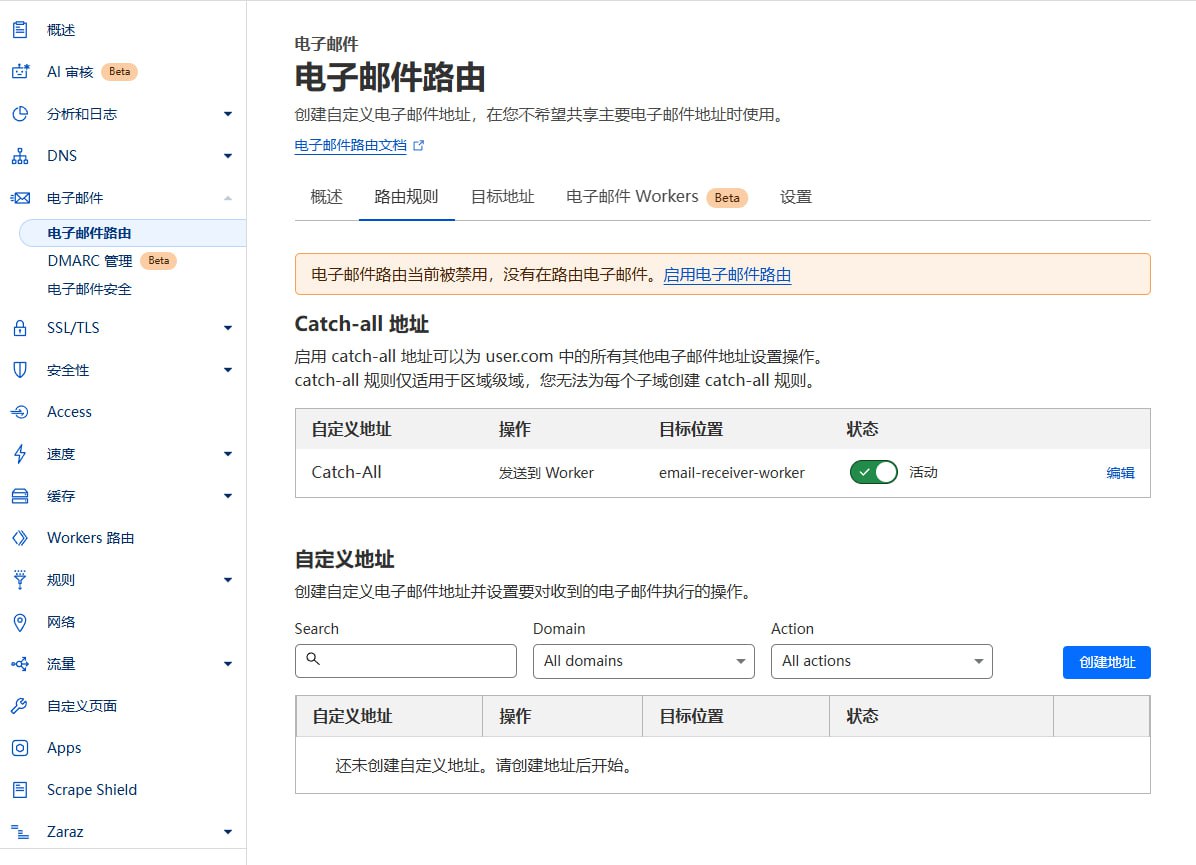
- After clicking, it will prompt you to add Email Routing DNS records, click "Add records and enable"
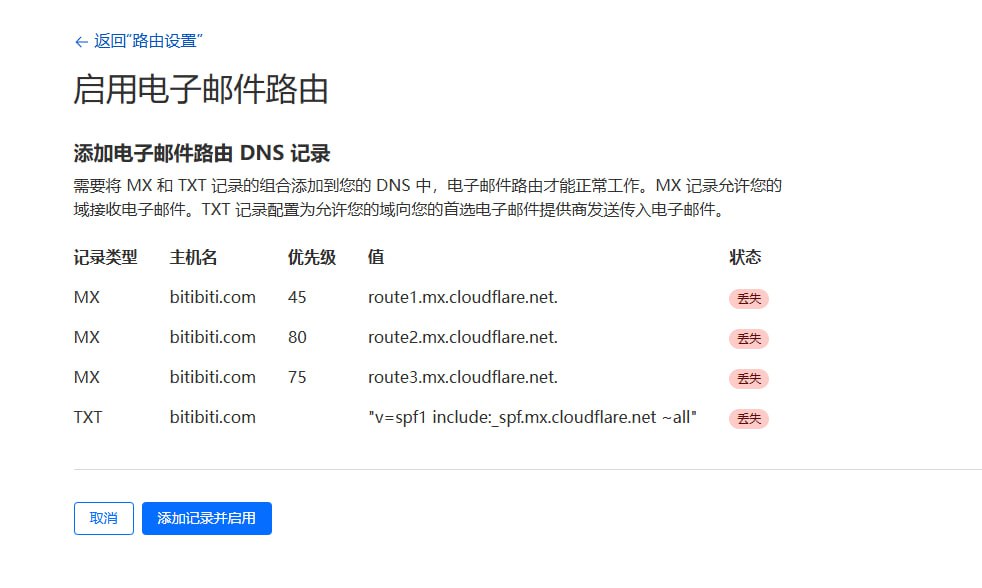
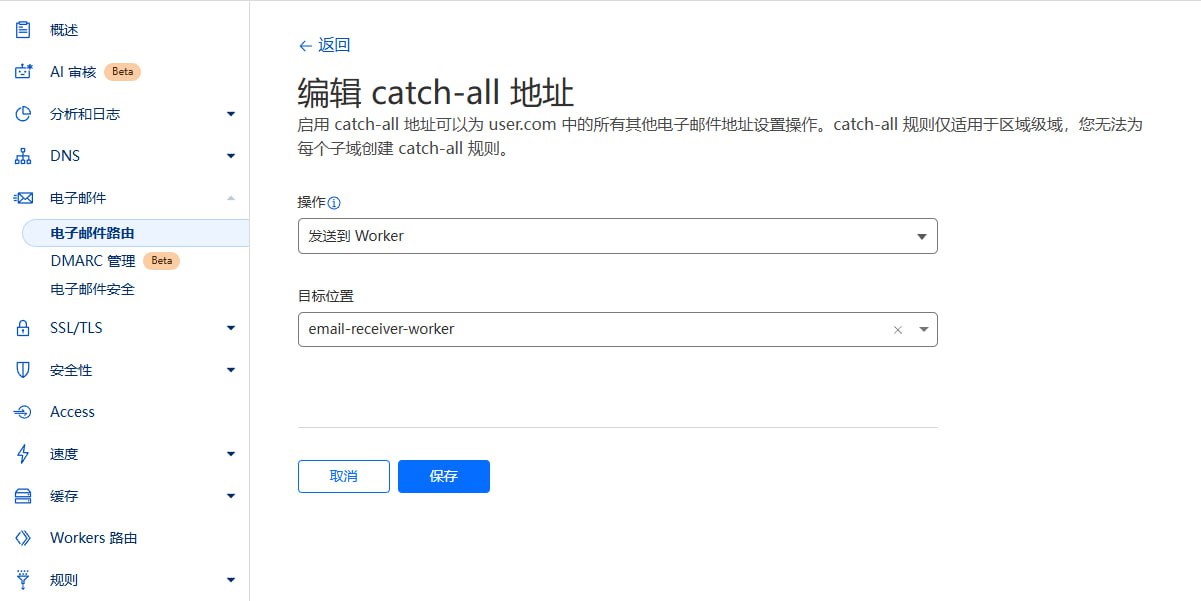
- Configure Routing Rules:
- Catch-all address: Enable "Catch-all"
- Edit Catch-all address
- Action: Select "Send to Worker"
- Destination: Select the "email-receiver-worker" you just deployed
- Save
Notes
- Ensure domain DNS is hosted on Cloudflare.
- Email Worker must be successfully deployed.
- If Catch-All status is unavailable (stuck loading), please click
Destination addressesnext toRouting rules, and bind an email address there.
Permission System
The project uses a Role-Based Access Control (RBAC) system.
Role Configuration
New user default roles are configured by the Emperor in the site settings in the User Profile:
- Duke: New users get temporary email, Webhook config permissions, and API Key management permissions.
- Knight: New users get temporary email and Webhook config permissions.
- Civilian: New users have no permissions, need to wait for Emperor to promote to Knight or Duke.
Role Levels
The system includes four role levels:
Emperor
- Website Owner
- Has all permissions
- Only one Emperor per site
Duke
- Super User
- Can use temporary email features
- Can configure Webhook
- Can create API Key to call OpenAPI
- Can be demoted to Knight or Civilian by Emperor
Knight
- Advanced User
- Can use temporary email features
- Can configure Webhook
- Can be demoted to Civilian or promoted to Duke by Emperor
Civilian
- Regular User
- No permissions
- Can be promoted to Knight or Duke by Emperor
Role Upgrade
Become Emperor
- The first user to visit
/api/roles/init-emperorinterface will become the Emperor (Website Owner). - Once an Emperor exists, no other user can be promoted to Emperor.
- The first user to visit
Role Changes
- The Emperor can set other users as Duke, Knight, or Civilian in the User Profile page.
Permission Details
- Email Management: Create and manage temporary emails
- Webhook Management: Configure Webhooks for email notifications
- API Key Management: Create and manage API access keys
- User Management: Promote/Demote user roles
- System Settings: Manage global system settings
System Settings
System settings are stored in Cloudflare KV, including:
DEFAULT_ROLE: Default role for new users, values:CIVILIAN,KNIGHT,DUKEEMAIL_DOMAINS: Supported email domains, comma-separatedADMIN_CONTACT: Administrator contact infoMAX_EMAILS: Maximum number of emails per user
Emperor role can configure these in the User Profile page.
Sending Emails
MoeMail supports sending emails using temporary addresses, based on Resend service.
Features
- 📨 Send from Temp Email: Use created temporary emails as sender
- 🎯 Role Limits: Different roles have different daily sending limits
- 💌 HTML Support: Supports rich text email format
Role Sending Limits
| Role | Daily Limit | Description |
|---|---|---|
| Emperor | Unlimited | Admin has no limits |
| Duke | 5/day | Default 5 emails per day |
| Knight | 2/day | Default 2 emails per day |
| Civilian | Forbidden | No sending permission |
💡 Tip: The Emperor can customize the daily limits for Dukes and Knights in the Mail Service Configuration.
Configure Sending Service
Get Resend API Key
- Register at Resend
- Create API Key in console
- Copy API Key for later use
Configure Service
- Login as Emperor
- Go to User Profile
- In "Resend Service Configuration":
- Enable Sending Service switch
- Enter Resend API Key
- Set daily limits for Duke and Knight (Optional)
- Save configuration
Verify Configuration
- After saving, authorized users will see a "Send Email" button in the email list
- Click to open dialog and test
How to Send
Create Temp Email
- Create a new temporary email in Mailbox page
Send Email
- Find the email in the list
- Click "Send Email" button next to it
- Fill in:
- Recipient address
- Subject
- Content (supports HTML)
- Click "Send"
View History
- Sent emails are saved in the message list of the corresponding mailbox
- View all sent/received emails in mailbox detail page
Notes
- 📋 Resend Limits: Please note Resend's sending limits and pricing
- 🔐 Domain Verification: Using custom domains requires verification in Resend
- 🚫 Anti-Spam: Please follow email sending standards, avoid spamming
- 📊 Quota Monitoring: System counts daily usage, stops sending when limit reached
- 🔄 Quota Reset: Daily quota resets at 00:00
Webhook Integration
When a new email is received, the system sends a POST request to the configured and enabled Webhook URL.
Request Header
Content-Type: application/json
X-Webhook-Event: new_message
Request Body
{
  "emailId": "email-uuid",
  "messageId": "message-uuid",
  "fromAddress": "sender@example.com",
  "subject": "Email Subject",
  "content": "Email Text Content",
  "html": "Email HTML Content",
  "receivedAt": "2024-01-01T12:00:00.000Z",
  "toAddress": "your-email@moemail.app"
}
Configuration
- Click avatar to enter User Profile
- Enable Webhook
- Set notification URL
- Click Test button
- Save to receive notifications
Testing
The project provides a simple test server:
pnpm webhook-test-server
The test server listens on port 3001 (http://localhost:3001) and prints received Webhook details.
For external testing, use Cloudflare Tunnel:
pnpx cloudflared tunnel --url http://localhost:3001
Notes
- Webhook must respond within 10 seconds
- Non-2xx response triggers retry
OpenAPI
The project provides OpenAPI interfaces, accessible via API Key. API Keys can be created in User Profile (Requires Duke or Emperor role).
Using API Key
Add API Key to request header:
X-API-Key: YOUR_API_KEY
API Endpoints
Get System Config
GET /api/config
Response:
{
  "defaultRole": "CIVILIAN",
  "emailDomains": "moemail.app,example.com",
  "adminContact": "admin@example.com",
  "maxEmails": "10"
}
Generate Temp Email
POST /api/emails/generate
Content-Type: application/json

{
  "name": "test",
  "expiryTime": 3600000,
  "domain": "moemail.app"
}
Params:
name: Prefix (optional)expiryTime: Validity in ms. 3600000(1h), 86400000(24h), 604800000(7d), 0(Permanent)domain: From config
Response:
{
  "id": "email-uuid-123",
  "email": "test@moemail.app"
}
Get Email List
GET /api/emails?cursor=xxx
Get Messages for Email
GET /api/emails/{emailId}?cursor=xxx
Delete Email
DELETE /api/emails/{emailId}
Get Single Message
GET /api/emails/{emailId}/{messageId}
Create Email Share Link
POST /api/emails/{emailId}/share
Content-Type: application/json

{
  "expiresIn": 86400000
}
Get Email Share Links
GET /api/emails/{emailId}/share
Delete Email Share Link
DELETE /api/emails/{emailId}/share/{shareId}
Create Message Share Link
POST /api/emails/{emailId}/messages/{messageId}/share
Content-Type: application/json

{
  "expiresIn": 86400000
}
Get Message Share Links
GET /api/emails/{emailId}/messages/{messageId}/share
Delete Message Share Link
DELETE /api/emails/{emailId}/messages/{messageId}/share/{shareId}
CLI Tool
MoeMail provides an agent-first CLI tool for AI agents and automation workflows.
Install
npm i -g @moemail/cli
Quick Start
# Configure API endpoint and key
moemail config set api-url https://moemail.app
moemail config set api-key YOUR_API_KEY

# Create temporary email
moemail create --domain moemail.app --expiry 1h --json

# List mailboxes
moemail list --json

# List messages in a mailbox
moemail list --email-id <id> --json

# Wait for new messages (polling)
moemail wait --email-id <id> --timeout 120 --json

# Read message content
moemail read --email-id <id> --message-id <id> --json

# Send an email from the temporary address
moemail send --email-id <id> --to user@example.com --subject "Hello" --content "Body text" --json

# Delete a single message
moemail delete --email-id <id> --message-id <id>

# Delete the whole mailbox
moemail delete --email-id <id>
Agent Workflow
A typical AI agent verification flow in 3 tool calls:
# 1. Create mailbox
EMAIL=$(moemail create --domain moemail.app --expiry 1h --json)
EMAIL_ID=$(echo $EMAIL | jq -r '.id')
ADDRESS=$(echo $EMAIL | jq -r '.address')

# 2. Wait for verification email
MSG=$(moemail wait --email-id $EMAIL_ID --timeout 120 --json)
MSG_ID=$(echo $MSG | jq -r '.messageId')

# 3. Read content, extract verification code
CONTENT=$(moemail read --email-id $EMAIL_ID --message-id $MSG_ID --json)
AI Agent Skill
Install the built-in skill so AI agents (Claude Code, Codex, etc.) automatically know how to use MoeMail:
# Auto-detect installed agent platforms and install
moemail skill install

# Or specify a platform
moemail skill install --platform claude
moemail skill install --platform codex
For full documentation, see packages/cli/README.md.
MCP Server
MoeMail also ships an MCP server, so any MCP-capable client (Claude Desktop, Cursor, Cline, …) gets native temporary-email tools without shelling out to the CLI.
Tools
| Tool | Description |
|---|---|
create_email |
Create a temporary mailbox (1h / 24h / 3d / permanent) |
list_emails |
List mailboxes owned by the API key |
list_messages |
List messages in a mailbox |
read_message |
Read full text/HTML of a message |
wait_for_email |
Poll for a new message (bounded; returns status: "timeout" to retry) |
send_email |
Send from a temporary address |
delete_email |
Delete a mailbox |
delete_message |
Delete a single message |
Setup
Add the server to your MCP client config (e.g. Claude Desktop claude_desktop_config.json).
Credentials are passed via environment variables:
{
  "mcpServers": {
    "moemail": {
      "command": "npx",
      "args": ["-y", "@moemail/mcp"],
      "env": {
        "MOEMAIL_API_KEY": "YOUR_API_KEY",
        "MOEMAIL_API_URL": "https://moemail.app"
      }
    }
  }
}
For full documentation, see packages/mcp/README.md.
Environment Variables
Authentication
AUTH_GITHUB_ID: GitHub OAuth App IDAUTH_GITHUB_SECRET: GitHub OAuth App SecretAUTH_GOOGLE_ID: Google OAuth App IDAUTH_GOOGLE_SECRET: Google OAuth App SecretAUTH_SECRET: NextAuth Secret
Cloudflare
CLOUDFLARE_API_TOKEN: Cloudflare API TokenCLOUDFLARE_ACCOUNT_ID: Cloudflare Account IDDATABASE_NAME: D1 Database NameDATABASE_ID: D1 Database ID (Optional, auto-fetched if empty)KV_NAMESPACE_NAME: KV NameKV_NAMESPACE_ID: KV ID (Optional, auto-fetched if empty)CUSTOM_DOMAIN: Custom domainPROJECT_NAME: Pages Project Name
Github OAuth App Configuration
- Login Github Developer create new OAuth App
- Generate
Client IDandClient Secret - Configure:
Application name:<your-app-name>Homepage URL:https://<your-domain>Authorization callback URL:https://<your-domain>/api/auth/callback/github
Google OAuth App Configuration
- Visit Google Cloud Console create project
- Configure OAuth consent screen
- Create OAuth Client ID
- Type: Web application
- Authorized Javascript origins:
https://<your-domain> - Authorized redirect URIs:
https://<your-domain>/api/auth/callback/google
- Get
Client IDandClient Secret - Configure env vars
AUTH_GOOGLE_IDandAUTH_GOOGLE_SECRET
Contribution
Welcome to submit Pull Requests or Issues to help improve this project.
License
Community

|

|
| Follow official account for more project updates, AI, Blockchain, and Indie Dev news. | Add WeChat, remark "MoeMail" to join the WeChat community group. |
Support
If you like this project, please give it a Star ⭐️
Or sponsor it

Star History
Frequently asked about MoeMail
What is MoeMail?+
MoeMail is a self-hosted Mailinator/Temp Mail alternative built on the Cloudflare developer platform. Create disposable mailboxes and browse incoming messages on Cloudflare Pages.
What does MoeMail replace?+
MoeMail is listed as an alternative to Mailinator, Temp Mail. Compare the features and tradeoffs before migrating.
What Cloudflare primitives does MoeMail use?+
MoeMail is built on D1, Email Workers, KV, Pages, Workers.
How much does MoeMail cost to run?+
The documented MoeMail deployment can use Cloudflare Free allowances for a small workload under the request, CPU and service-specific quotas below. This is conditional eligibility, not a measured zero-cost deployment; optional features, domains and external providers can add costs. Workers Free allows 100,000 requests per day shared across the account and 10 ms CPU per invocation; measure CPU-heavy authentication, parsing and rendering before assuming it fits. Pages static requests are free; Pages Functions count against the same Workers account request/CPU allowances. Keep aggregate D1 use below 5 million rows read/day, 100,000 rows written/day and 5 GB total storage; a request can touch many rows. Keep KV below 100,000 reads/day, 1,000 writes, deletes and list operations/day each, and 1 GB; cache refreshes and backups consume writes. Inbound Email Routing can use Workers Free, but processing consumes Workers quotas and requires a domain; arbitrary-recipient outbound email requires Workers Paid. Use a small personal or team workload; domain registration and optional third-party providers are separate costs. Provision your own IDs, secrets and migrations. Check current Cloudflare pricing before deploying.
Is MoeMail open source?+
The upstream repository declares the MIT license. Read its terms at https://raw.githubusercontent.com/beilunyang/moemail/5722ceb2fca1d4f7a957ba09e93492d1c7b5d02f/LICENSE. Source code and contributor credit are available at https://github.com/beilunyang/moemail.
Discussion · 0
sign in to comment →