
Source & license
Upstream license: MIT
License TL;DR
You can use it, change it, self-host it and sell it. Keep the original copyright and license notice with copies of the code. You don’t have to publish your changes. The authors don’t promise it will work.
Explain MIT in plain English →Summary of the main license. Separate packages and assets can have different terms.
Inspect repository ↗Read this project’s actual license ↗Repository owner
See the upstream repository for the original creator and contributors.
Maintain this project? Maintainer verification →Cloudflare hosting
Free tier eligible within limits
A small family library can fit Workers, D1 and standard R2 free allowances, subject to actual CPU, request and storage use. Large video collections exceed the 10GB-month R2 storage allowance. Doubao audiobook generation is optional and separately billed; native app build/distribution requirements also apply.
Hosting requirements
- Use your own activation key and parent PIN; deploy the documented Worker, D1 schema and private R2 bucket.
- Native clients require their documented build/distribution tools. The documented free Apple-ID/side-loading path has certificate renewal constraints; paid distribution and optional text-to-speech are excluded from the hosting claim.
- Source and configuration review establishes a deployment path and conditional costs; this candidate was not executed or load-tested.
Sources checked 01/10/2026
Repository snapshot: 5f8c9f8. Hosting eligibility reflects the deployment documentation and listed assumptions.
- plex ↗
一套**家庭自用**的私有儿童视频流媒体:家长把视频上传到 Cloudflare R2,孩子在原生 App(**iPhone / iPad / Mac / Windows / Android**)里**看视频 + 听书**。家长可在桌面端(Windows/macOS)开发者模式里**自助上传本地视频或从网址(YouTube/Bilibili)下载入库**。
- workers ↗
/ macOS** (SwiftUI) and **Windows / Android** (Tauri); serverless backend on **Cloudflare Workers + R2 + D1**. Runs at roughly **$0** on the free tier. **为什么自己建**:商业视频平台充斥推荐流、广告和不适合孩子的内容,孩子很容易被无关视频吸引、无法专注。这个项目是一个**封闭内容花园**——孩子端没有外部搜索、没有外部入口、没有推荐算法、没有弹幕/社交,**只能看到家长放进去的内容**。 >
- r2 ↗
流媒体(五端原生 App + Serverless 后端)" width="920"> </p> 一套**家庭自用**的私有儿童视频流媒体:家长把视频上传到 Cloudflare R2,孩子在原生 App(**iPhone / iPad / Mac / Windows / Android**)里**看视频 + 听书**。家长可在桌面端(Windows/macOS)开发者模式里**自助上传本地视频或从网址(YouTube/Bilibili)下载入库**。 > **English** — *child-video* is a self-ho
- d1 ↗
serverless backend on **Cloudflare Workers + R2 + D1**.
- free-tier-eligible ↗
# child-video — 自建儿童视频流媒体 + 听书 <p align="center"> <img src="docs/assets/intro.png" alt="child-video — 一个封闭、专注、零打扰的家庭自建儿童视频/听书流媒体(五端原生 App + Serverless 后端)" width="920"> </p> 一套**家庭自用**的私有儿童视频流媒体:家长把视频上传到 Cloudflare R2,孩子在原生 App(**iPhone / iPad / Mac / Windows / Android**)里**看视频 + 听书**。家长可在桌面端(Windows/macOS)开发者模式里**自助上传本地视频或从网址(YouTube/Bilibili)下载入库**。 > **English** — *child-video* is a self-hosted, ad-free **kids' video + audiobook** streaming player with parental controls. Parents upload to their own **Cloudflare R2**; kids watch in a closed player — no recommendations, ads, comments, or external links. Native apps for **iOS / iPadOS / macOS** (SwiftUI) and **Windows / Android** (Tauri); serverless backend on **Cloudflare Workers + R2 + D1**. Runs at roughly **$0** on the free tier.
- free-tier-eligible ↗
| **Free** | 100,000 per day | No charge for duration | 10 milliseconds of CPU time per invocation |
- free-tier-eligible ↗
| Storage | 10 GB-month / month |
- free-tier-eligible ↗
| Rows read | 5 million / day | First 25 billion / month included + $0.001 / million rows |
- free-tier-eligible ↗
| Class A Operations | 1 million requests / month |
- free-tier-eligible ↗
| Class B Operations | 10 million requests / month |
- free-tier-eligible ↗
| Rows written | 100,000 / day | First 50 million / month included + $1.00 / million rows |
- MIT ↗
MIT License Copyright (c) 2026 child-podcast contributors Permission is hereby granted, free of charge, to any person obtaining a copy of this software and associated documentation files (the "Software"), to deal in the Software without restriction, including without limitation the rights to use, copy, modify, merge, publish, distribute, sublicense, and/or sell copies of the Software, and to permit persons to whom the Software is furnished to do so, subject to the following conditions: The above copyright notice and this permission notice shall be included in all copies or substantial portions of the Software. THE SOFTWARE IS PROVIDED "AS IS", WITHOUT WARRANTY OF ANY KIND, EXPRESS OR IMPLIED, INCLUDING BUT NOT LIMITED TO THE WARRANTIES OF MERCHANTABILITY, FITNESS FOR A PARTICULAR PURPOSE AND NONINFRINGEMENT. IN NO EVENT SHALL THE AUTHORS OR COPYRIGHT HOLDERS BE LIABLE FOR ANY CLAIM, DAMAGES OR OTHER LIABILITY, WHETHER IN AN ACTION OF CONTRACT, TORT OR OTHERWISE, ARISING FROM, OUT O
- architecture ↗
/ macOS** (SwiftUI) and **Windows / Android** (Tauri); serverless backend on **Cloudflare Workers + R2 + D1**. Runs at roughly **$0** on the free tier. **为什么自己建**:商业视频平台充斥推荐流、广告和不适合孩子的内容,孩子很容易被无关视频吸引、无法专注。这个项目是一个**封闭内容花园**——孩子端没有外部搜索、没有外部入口、没有推荐算法、没有弹幕/社交,**只能看到家长放进去的内容**。 >
- architecture ↗
流媒体(五端原生 App + Serverless 后端)" width="920"> </p> 一套**家庭自用**的私有儿童视频流媒体:家长把视频上传到 Cloudflare R2,孩子在原生 App(**iPhone / iPad / Mac / Windows / Android**)里**看视频 + 听书**。家长可在桌面端(Windows/macOS)开发者模式里**自助上传本地视频或从网址(YouTube/Bilibili)下载入库**。 > **English** — *child-video* is a self-ho
- architecture ↗
serverless backend on **Cloudflare Workers + R2 + D1**.
- architecture ↗
# child-video — 自建儿童视频流媒体 + 听书 <p align="center"> <img src="docs/assets/intro.png" alt="child-video — 一个封闭、专注、零打扰的家庭自建儿童视频/听书流媒体(五端原生 App + Serverless 后端)" width="920"> </p> 一套**家庭自用**的私有儿童视频流媒体:家长把视频上传到 Cloudflare R2,孩子在原生 App(**iPhone / iPad / Mac / Windows / Android**)里**看视频 + 听书**。家长可在桌面端(Windows/macOS)开发者模式里**自助上传本地视频或从网址(YouTube/Bilibili)下载入库**。 > **English** — *child-video* is a self-hosted, ad-free **kids' video + audiobook** streaming player with parental controls. Parents upload to their own **Cloudflare R2**; kids watch in a closed player — no recommendations, ads, comments, or external links. Native apps for **iOS / iPadOS / macOS** (SwiftUI) and **Windows / Android** (Tauri); serverless backend on **Cloudflare Workers + R2 + D1**. Runs at roughly **$0** on the free tier. **为什么自己建**:商业视频平台充斥推荐流、广告和不适合孩子的内容,孩子很容易被无关视频吸引、无法专注。这个项目是一个**封闭内容花园**——孩子端没有外部搜索、没有外部入口、没有推荐算法、没有弹幕/社交,**只能看到家长放进去的内容**。 > 月成本只有 R2 存储费(起步在免费额度内 = $0,约 500GB ≈ $7/月),出口流量永久免费,**无任何年费**(孩子端用 SideSto
- architecture ↗
/ macOS** (SwiftUI) and **Windows / Android** (Tauri); serverless backend on **Cloudflare Workers + R2 + D1**. Runs at roughly **$0** on the free tier. **为什么自己建**:商业视频平台充斥推荐流、广告和不适合孩子的内容,孩子很容易被无关视频吸引、无法专注。这个项目是一个**封闭内容花园**——孩子端没有外部搜索、没有外部入口、没有推荐算法、没有弹幕/社交,**只能看到家长放进去的内容**。 >
- architecture ↗
流媒体(五端原生 App + Serverless 后端)" width="920"> </p> 一套**家庭自用**的私有儿童视频流媒体:家长把视频上传到 Cloudflare R2,孩子在原生 App(**iPhone / iPad / Mac / Windows / Android**)里**看视频 + 听书**。家长可在桌面端(Windows/macOS)开发者模式里**自助上传本地视频或从网址(YouTube/Bilibili)下载入库**。 > **English** — *child-video* is a self-ho
- architecture ↗
serverless backend on **Cloudflare Workers + R2 + D1**.
What it can replace
Compare the workflow you need. These mappings describe overlap; full feature parity requires a separate comparison.
 Plex ↗
Owned-media playback and a curated family library with parental rules; no automatic Plex migration, cloud transcoding or complete media-server parity.
See supporting source ↗How it works
The shape of child-video on Cloudflare, and how it stacks up against the rented tools it replaces.
Architecture
Diagram based on the linked repository documentation. See the sources and hosting assumptions above.
View upstream source ↗Configuration and workflow sources
Reviewed commit 5f8c9f8f17b8. Files were read as data; upstream applications and CI jobs were not executed.
Deployment configuration · 1 files
Cloudflare Workers · example/template, excluded from overview · compatibility 2026-06-01
child-video-api · default
Entrypoint: src/index.js
DB→ D1BUCKET→ R2
Named environments are separate deployments. Bindings are shown only where declared. Configured routes are URL patterns, not verified application endpoints.
Runtime source · handlers, binding usage and workflow steps
Observed TypeScript/JavaScript declarations from Worker entrypoints and resolved relative imports. Calls and workflow steps may run conditionally; their listed order is not a proven end-to-end request flow. Router declarations may be mounted under a prefix or may not be registered. This shows code wiring, not a successful deployment or runtime test. Dynamic wiring, aliases and generated code may not resolve.
- L472 · fetch handler exported · calls handleActivate, json, handleAdminWatchStats, authDevice, handleLibrary, path.match, handleMedia, handleGetProgress, handlePostProgress, handleSaveRules, handleAdminUploadUrl, handleAdminManifestAdd
- L26 · sha256Hex calls (conditional paths may differ): crypto.subtle.digest, encode, join, map, padStart, b.toString
- L31 · randomToken calls (conditional paths may differ): crypto.getRandomValues, join, map, padStart, b.toString
- L39 · authDevice calls (conditional paths may differ): match, request.headers.get, searchParams.get, test, sha256Hex, first, bind, env.DB.prepare
- L67 · handleActivate calls (conditional paths may differ): json, console.warn, Number, request.headers.get, Date.now, first, bind, env.DB.prepare, Math.ceil, String, request.json, run, randomToken, crypto.randomUUID, sha256Hex
- L138 · handleLibrary calls (conditional paths may differ): env.BUCKET.get, json, JSON.parse, obj.text, map
- L157 · contentTypeOf calls (conditional paths may differ): key.endsWith
- L166 · handleMedia calls (conditional paths may differ): request.headers.get, env.BUCKET.head, json, cacheUrl.searchParams.set, cacheUrl.toString, cache.match, h.set, ctx.waitUntil, populateEdgeCache, range.match, parseInt, env.BUCKET.get, obj.writeHttpMetadata, headers.set, headers.has, contentTypeOf, String
- L239 · populateEdgeCache calls (conditional paths may differ): cache.match, env.BUCKET.get, full.writeHttpMetadata, headers.set, headers.get, contentTypeOf, String, cache.put
- L257 · handleGetProgress calls (conditional paths may differ): all, bind, env.DB.prepare, url.searchParams.get, first, slice, toISOString, Date.parse, json, ruleSummary
- L291 · handleSaveRules calls (conditional paths may differ): request.json, json, String, Number, run, bind, env.DB.prepare, norm
- L311 · parentPinOk calls (conditional paths may differ): String
- L316 · presignPut calls (conditional paths may differ): url.searchParams.set, String, aws.sign, url.toString
- L330 · handleAdminUploadUrl calls (conditional paths may differ): request.json, json, parentPinOk, slice, replace, crypto.randomUUID, Promise.all, presignPut
- L345 · handleAdminManifestAdd calls (conditional paths may differ): request.json, json, parentPinOk, trim, String, test, env.BUCKET.get, JSON.parse, obj.text, Array.isArray, slice, Number, toISOString, manifest.videos.findIndex, manifest.videos.push, env.BUCKET.put, JSON.stringify
- L384 · handleAdminWatchStats calls (conditional paths may differ): request.json, json, parentPinOk, env.BUCKET.get, JSON.parse, obj.text, Number, all, env.DB.prepare
- L422 · handlePostProgress calls (conditional paths may differ): request.json, json, checkRules, run, bind, env.DB.prepare, Math.floor, Date.now, first
Environment references: env.DB · env.ACTIVATION_KEY · env.PARENT_PIN · env.MAX_ACTIVATION_FAILS · env.ACTIVATION_LOCK_MIN · env.BUCKET · env.R2_ACCESS_KEY_ID · env.R2_SECRET_ACCESS_KEY · env.R2_ACCOUNT_ID · env.R2_BUCKET · env.WATCH_DONE_EPS_SEC
Build and deployment pipeline · 4 GitHub Actions workflows
Repository CI declarations, separate from runtime request processing. Job dependencies and conditions are shown as written; long commands are shortened with an ellipsis; a workflow file does not prove a recent successful run.
Triggers: push, workflow_dispatch
build · no job dependencies declared
- actions/checkout@v4
actions/checkout@v4 - actions/setup-node@v4
actions/setup-node@v4 - Setup JDK 17
actions/setup-java@v4 - Setup Android SDK
android-actions/setup-android@v3 - Install NDK r26 + 移除预装 r29(tauri-cli 会挑最高的 NDK,r29 preview 致构建失败)
sdkmanager "ndk;26.1.10909125" rm -rf "${ANDROID_SDK_ROOT:-$ANDROID_HOME}/ndk/29.0.14206865" || true NDK="${ANDROID_SDK_ROOT:-$ANDROID_HOME}/ndk/26.1.10909125" for k in NDK_HOME ANDROID_NDK_HOME ANDROID_NDK_ROOT ANDROID_NDK ANDROID_NDK_LATEST_HOME; do echo "$k=$NDK" >> "$GITHUB_ENV" done - Setup Rust + Android targets
dtolnay/rust-toolchain@stable - Cache cargo
swatinem/rust-cache@v2 - Install Tauri CLI(cargo 子命令,gradle rust 任务能稳定找到,避免 node 模块解析失败)
cargo install tauri-cli --version "^2" --locked - Tauri Android init
cargo tauri android init - Build APK(debug 签名,arm64 单架构瘦身,覆盖绝大多数手机)
cargo tauri android build --apk --debug --target aarch64 -v - Upload APK
actions/upload-artifact@v4
Triggers: push, workflow_dispatch
deploy · no job dependencies declared
- actions/checkout@v4
actions/checkout@v4 - actions/setup-node@v4
actions/setup-node@v4 - 生成 wrangler.jsonc(私密配置不入库,由仓库变量生成)
cat > worker/wrangler.jsonc <<JSON { "\$schema": "node_modules/wrangler/config-schema.json", "name": "child-video-api", "main": "src/index.js", "compatibility_date": "2026-06-01", "workers_dev": false, "routes": [{ "pattern": "${{ vars.CF_DOMAIN }}", "custom_domain": true }], "r2_buckets": [{ "binding": "BUCKET", "bucket_name": "child-video" }], "d1_databases": [ { "binding": "DB", "database_name": "child-video-db", "database_id": "${{ vars.D1_DATABASE_ID }}" } ], "observability": { "enabled": … - 安装依赖
npm install - 迁移 D1(幂等)+ 部署
npx wrangler d1 execute child-video-db --remote --file=./schema.sql -y npx wrangler deploy
Triggers: push, workflow_dispatch
cli · no job dependencies declared
- actions/checkout@v4
actions/checkout@v4 - actions/setup-node@v4
actions/setup-node@v4 - 打包 CLI
cd cli npm install --omit=dev npm pack mv *.tgz "$GITHUB_WORKSPACE/childvideo-cli.tgz" - actions/upload-artifact@v4
actions/upload-artifact@v4
ios-ipa · no job dependencies declared
- actions/checkout@v4
actions/checkout@v4 - 安装 xcodegen
brew install xcodegen - 生成工程
cd app && xcodegen generate - 构建 iOS(未签名)
cd app xcodebuild -project ChildVideo.xcodeproj -scheme ChildVideo_iOS \ -configuration Release -sdk iphoneos -derivedDataPath build/dd-ios \ CODE_SIGNING_ALLOWED=NO CODE_SIGNING_REQUIRED=NO CODE_SIGN_IDENTITY="" build - 打包未签名 .ipa
cd app/build/dd-ios/Build/Products/Release-iphoneos mkdir -p Payload cp -R ChildVideo.app Payload/ zip -qr "$GITHUB_WORKSPACE/childvideo-ios-unsigned.ipa" Payload - actions/upload-artifact@v4
actions/upload-artifact@v4
windows · no job dependencies declared
- actions/checkout@v4
actions/checkout@v4 - dtolnay/rust-toolchain@stable
dtolnay/rust-toolchain@stable - swatinem/rust-cache@v2
swatinem/rust-cache@v2 - 拉 sidecar(yt-dlp + ffmpeg,供家长上传/网址下载)
BIN="$GITHUB_WORKSPACE/windows/src-tauri/binaries" mkdir -p "$BIN" curl -fsSL -o "$BIN/yt-dlp-x86_64-pc-windows-msvc.exe" \ https://github.com/yt-dlp/yt-dlp/releases/latest/download/yt-dlp.exe curl -fsSL -o ffmpeg.zip \ https://github.com/BtbN/FFmpeg-Builds/releases/latest/download/ffmpeg-master-latest-win64-gpl.zip unzip -q ffmpeg.zip cp "$(find . -path '*win64*' -name ffmpeg.exe | head -1)" "$BIN/ffmpeg-x86_64-pc-windows-msvc.exe" - 构建 Tauri 安装包
tauri-apps/tauri-action@v0 - 重命名为干净 ASCII 安装包名(#40:中文 productName 致 NSIS 产物名带中文)
SRC=$(find windows/src-tauri/target/release/bundle/nsis -name '*-setup.exe' | head -1) cp "$SRC" "$GITHUB_WORKSPACE/childvideo-windows-x64-setup.exe" - actions/upload-artifact@v4
actions/upload-artifact@v4
android · no job dependencies declared
- actions/checkout@v4
actions/checkout@v4 - actions/setup-node@v4
actions/setup-node@v4 - Setup JDK 17
actions/setup-java@v4 - Setup Android SDK
android-actions/setup-android@v3 - NDK r26 + 移除预装 r29
sdkmanager "ndk;26.1.10909125" rm -rf "${ANDROID_SDK_ROOT:-$ANDROID_HOME}/ndk/29.0.14206865" || true NDK="${ANDROID_SDK_ROOT:-$ANDROID_HOME}/ndk/26.1.10909125" for k in NDK_HOME ANDROID_NDK_HOME ANDROID_NDK_ROOT ANDROID_NDK ANDROID_NDK_LATEST_HOME; do echo "$k=$NDK" >> "$GITHUB_ENV" done - dtolnay/rust-toolchain@stable
dtolnay/rust-toolchain@stable - swatinem/rust-cache@v2
swatinem/rust-cache@v2 - Install Tauri CLI
cargo install tauri-cli --version "^2" --locked - Init + Build APK(arm64)
cargo tauri android init cargo tauri android build --apk --debug --target aarch64 - 收集 APK
cp "$(find android/src-tauri/gen/android/app/build/outputs/apk -name '*.apk' | head -1)" "$GITHUB_WORKSPACE/childvideo-android.apk" - actions/upload-artifact@v4
actions/upload-artifact@v4
release · after cli, ios-ipa, windows, android
- 下载所有产物
actions/download-artifact@v4 - 发布 Release
softprops/action-gh-release@v2
Triggers: push, workflow_dispatch, release
build · no job dependencies declared
- actions/checkout@v4
actions/checkout@v4 - Setup Rust
dtolnay/rust-toolchain@stable - Rust cache
swatinem/rust-cache@v2 - 拉取 sidecar 二进制(yt-dlp + ffmpeg,供家长上传/网址下载)
BIN="$GITHUB_WORKSPACE/windows/src-tauri/binaries" mkdir -p "$BIN" curl -fsSL -o "$BIN/yt-dlp-x86_64-pc-windows-msvc.exe" \ https://github.com/yt-dlp/yt-dlp/releases/latest/download/yt-dlp.exe curl -fsSL -o ffmpeg.zip \ https://github.com/BtbN/FFmpeg-Builds/releases/latest/download/ffmpeg-master-latest-win64-gpl.zip unzip -q ffmpeg.zip cp "$(find . -path '*win64*' -name ffmpeg.exe | head -1)" "$BIN/ffmpeg-x86_64-pc-windows-msvc.exe" ls -la "$BIN" - Build Tauri (Windows x64 .msi / .exe)
tauri-apps/tauri-action@v0 - Upload installer artifact
actions/upload-artifact@v4
build: echo 静态前端(复用 ../windows/src),无需构建步骤
build: echo 静态前端,无需构建步骤
deploy: wrangler deploy
Repository README
View original on GitHub ↗Full upstream document by @bitoceango · README.md · snapshot 5f8c9f8
child-video — 自建儿童视频流媒体 + 听书
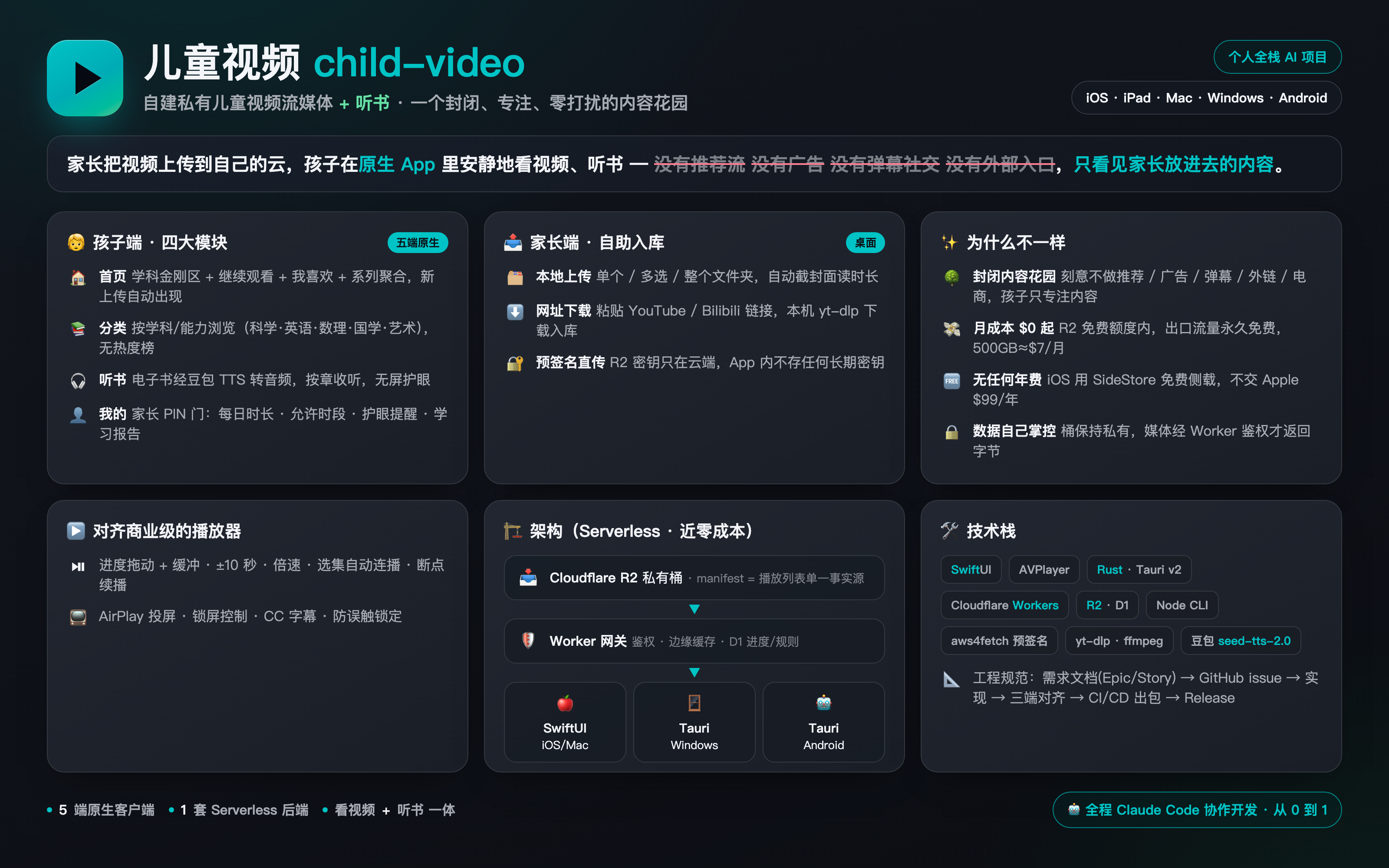
一套家庭自用的私有儿童视频流媒体:家长把视频上传到 Cloudflare R2,孩子在原生 App(iPhone / iPad / Mac / Windows / Android)里看视频 + 听书。家长可在桌面端(Windows/macOS)开发者模式里自助上传本地视频或从网址(YouTube/Bilibili)下载入库。
English — child-video is a self-hosted, ad-free kids' video + audiobook streaming player with parental controls. Parents upload to their own Cloudflare R2; kids watch in a closed player — no recommendations, ads, comments, or external links. Native apps for iOS / iPadOS / macOS (SwiftUI) and Windows / Android (Tauri); serverless backend on Cloudflare Workers + R2 + D1. Runs at roughly $0 on the free tier.
为什么自己建:商业视频平台充斥推荐流、广告和不适合孩子的内容,孩子很容易被无关视频吸引、无法专注。这个项目是一个封闭内容花园——孩子端没有外部搜索、没有外部入口、没有推荐算法、没有弹幕/社交,只能看到家长放进去的内容。
月成本只有 R2 存储费(起步在免费额度内 = $0,约 500GB ≈ $7/月),出口流量永久免费,无任何年费(孩子端用 SideStore 免费侧载,不交 Apple Developer $99/年)。
架构一览
家长下载视频 ──cpv 上传──▶ Cloudflare R2 (私有桶)
                              │  manifest.json = 播放列表单一事实源
                              ▼
                    Cloudflare Worker (鉴权流媒体网关 + 边缘缓存 + D1 进度/规则)
                              │  绑定自有域名(绕开被墙的 *.workers.dev)
              ┌───────────────┼───────────────┐
              ▼               ▼               ▼
   SwiftUI App           Tauri App        Tauri App
   (iPhone/iPad/Mac)     (Windows)        (Android)
   AVPlayer              WebView2         WebView
        └────── 共用:首页/分类/听书/我的 + 商业级播放器 ──────┘

家长桌面端(Windows/macOS)开发者模式:捆绑 yt-dlp+ffmpeg,本地处理 →
预签名直传 R2 → 写 manifest(密钥只在 Worker,App 内不存)。听书:cpv 调
豆包 seed-tts-2.0 把电子书转成音频,同一套 R2/Worker/App 链路。
两套前端代码:Apple 端 SwiftUI(
app/);Windows + Android 共用一套 Web UI(windows/src,Tauri v2 分别出安装包/APK)。功能"三端同时实现"为硬性规则(见CLAUDE.md)。
- 存储:R2 按字节计费 + 出口免费(明确否决按时长计费的 Cloudflare Stream)。
- 不转码:互联网视频多为 H.264/AAC,
cpv用 ffprobe 探测,只在必要时重封装/转码。 - 播放:MP4 渐进式 + HTTP Range,系统 AVPlayer 原生支持,零第三方播放内核。
- 边缘缓存:Worker 用免费 Cache API(按 R2 etag 作键,覆盖视频自动失效),降起播延迟。
- 封闭花园:孩子端无外部内容入口;家长 PIN + 每日时长上限 + 允许时段 + 护眼提醒。
完整设计见 docs/architecture.md。
下载 App
预编译安装包见 Releases(你需先自部署后端,首次启动填自己的 Worker 地址 + 激活密钥):
| 平台 | 产物 | 安装 |
|---|---|---|
| Windows | childvideo-windows-x64-setup.exe |
双击装。未签名 → SmartScreen 点「更多信息 → 仍要运行」 |
| macOS | 儿童视频_*_aarch64.dmg |
拖入 Applications。未签名/未公证 → 右键「打开」或 xattr -dr com.apple.quarantine |
| Android | app-universal-debug.apk |
手机开「允许安装未知来源」后装(debug 通用包,体积偏大) |
| iOS | *-unsigned.ipa |
⚠️ 不能直接装,需 SideStore/AltStore 自签侧载 |
Windows/macOS 含家长上传(开发者模式);Android 为纯消费端(看视频+听书)。
功能
孩子端 App(三大模块)
- 🏠 首页:学科金刚区 + 继续观看 + 我喜欢的 + 系列聚合(横排预览,多集进竖向网格)。自动刷新,新上传的视频自动出现。
- 📚 分类:按「学科/能力」(科学/英语/数理/国学/艺术…)二级浏览,无热度榜。
- 🎧 听书:电子书经豆包 seed-tts-2.0 转成音频,按章收听;独立书架(继续收听/分类/网格)+ 音频播放器(封面+章节+进度,无屏幕,护眼)。
- 👤 我的:家长 PIN 门 → 每日时长 / 允许时段 / 护眼提醒 / 学习报告(今日·本周)/ 设备管理。
播放器(对齐商业流媒体)
- 播放/暂停、进度拖动 + 缓冲、±10 秒、倍速(0.75–1.5,儿童克制档)、播完重播
- 音量滑块 + 静音、CC 字幕开关(内嵌字幕轨)、选集面板、上一集/下一集、同系列自动连播、断点续播、收藏
- AirPlay 投屏、Now Playing 锁屏/控制中心/耳机线控
- 防误触锁定(长按解锁)、护眼休息提醒
家长端(桌面 Windows/macOS,开发者模式·家长 PIN 门后)
- 📤 本地上传:选单个 / 多选 / 整个文件夹视频,自动截封面+读时长,预签名直传 R2 入库。
- ⬇ 网址下载:粘贴 YouTube / Bilibili 等链接,捆绑的 yt-dlp 在本机下载(自动用浏览器登录态绕 B 站风控),合并成 H.264/AAC mp4 入库。
- 安全:R2 密钥只在 Worker,App 走预签名、内不存密钥;入口藏在家长 PIN 门后,孩子端无感。
有意不做(违背封闭专注理念):算法推荐流、弹幕、评论/社交、热度榜、外链、电商/会员、孩子端 UGC 上传。
仓库结构
| 目录 | 内容 |
|---|---|
cli/ |
上传 CLI cpv(Node + S3 SDK):探测/转码/上传 R2/维护 manifest。专为 AI 调用设计。含 import-youtube.sh 一键导入 |
worker/ |
Cloudflare Worker:激活、媒体网关(Range + 边缘缓存)、进度、家长规则 + D1 schema |
app/ |
SwiftUI 多平台 App(iOS 17+ / macOS 14+,xcodegen 工程),含图标生成脚本 |
windows/ |
Tauri v2 桌面 App(Windows + macOS 共用):src/ 是 Web UI(首页/分类/听书/我的+播放器+家长上传),src-tauri/ 是 Rust 壳;CI 出 NSIS 安装包 / macOS .dmg |
android/ |
Tauri v2 Android 工程:复用 windows/src 的 Web UI,CI 出 APK(消费端:视频+听书) |
tests/ |
e2e-backend.sh 端到端后端验收测试(curl 断言,带退出码) |
docs/ |
架构设计 + requirements/(需求文档:PRD/Epic/Story、验收与测试计划) |
designs/ |
孩子端 UI 设计原型(可在浏览器打开的 HTML) |
⚠️ 开发流程(硬性规则)
任何新需求/功能/改动,必须先有需求文档(docs/requirements/,含 Epic 与 Story)→ 按 Story 建 GitHub issue → 再开发 → 提交关联 issue。详见 CONTRIBUTING.md。没有需求文档和 issue,不写代码。
快速开始
私密部署参数(域名 / Account ID / 数据库 ID 等)放在
deploy.local.json(已 gitignore,不进仓库)。下面用占位符。
0. 必需的人工步骤(无法自动化,先做好这些)
npm run setup 和 CI 能自动建桶/建库/迁移/部署,但下面这些必须你手动完成:
| 步骤 | 说明 |
|---|---|
| 注册 Cloudflare 账号 | 免费:dash.cloudflare.com |
npx wrangler login |
浏览器授权 wrangler(首次部署前必需) |
| 建 R2 API Token(给 CLI 上传用) | 控制台 → R2 → Manage R2 API Tokens → 建 S3 凭证,填进 ~/.zshrc 环境变量(见 cli/README.md)。⚠️ wrangler 部署不需要它,但 CLI 上传视频需要 |
| (可选)自定义域名 | 把域名托管到 Cloudflare;不绑就用免费 *.workers.dev(中国大陆可能被墙) |
| iOS 设备分发 | 见 §3:免费 Apple ID 自建(证书 7 天)或 SideStore 自动续签侧载 |
| (可选)开启 CI 自动部署 | 仓库 Settings → Actions 配 Secret CLOUDFLARE_API_TOKEN + Variables CF_ACCOUNT_ID/D1_DATABASE_ID/CF_DOMAIN,之后合并到 main 自动部署 worker |
1. 后端(Cloudflare)
先 npx wrangler login(浏览器登录,首次必需)。然后一键部署(推荐)——自动建 R2 桶 / 建 D1 并写回 id / 迁移表 / 设密钥 / 部署,只问你域名和密钥:
cd worker
npm install
npm run setup       # 默认免费 *.workers.dev(零域名);过程中可选绑定自定义域名
💡
*.workers.dev在中国大陆可能被墙;需要稳定访问时按提示绑定自定义域名(需已托管在 Cloudflare)。
或手动逐步
cd worker
npm install
cp wrangler.example.jsonc wrangler.jsonc       # 默认 workers.dev;要自定义域名改这里
npx wrangler r2 bucket create child-video       # 建 R2 桶
npx wrangler d1 create child-video-db           # 建 D1,把返回的 database_id 填进 wrangler.jsonc
npx wrangler d1 execute child-video-db --remote --file=./schema.sql
npx wrangler secret put ACTIVATION_KEY          # 设备激活密钥:长随机串(openssl rand -hex 24);不设则回退用 PARENT_PIN
npx wrangler secret put PARENT_PIN              # 家长门 PIN:改每日时长/允许时段规则用,可短数字
npx wrangler deploy
两个密钥(你自己定,部署时设置)
后端有两个完全由你自定义的密钥(互相独立,issue #17 起分离):
| 密钥 | 是什么 | 在哪用 | 怎么设 |
|---|---|---|---|
设备激活密钥 ACTIVATION_KEY |
一台设备首次"加入"你家库的口令 | App 激活页(家长把它给家人,在 Windows/Android/Mac/iOS 上激活设备时输入一次) | npm run setup 时回车=随机生成,或自己输任意值;改用 wrangler secret put ACTIVATION_KEY。建议长随机串 openssl rand -hex 24 |
家长门 PARENT_PIN |
进 App 内「家长中心」的 PIN | 改每日时长/允许时段规则、桌面端家长上传时输入 | npm run setup 时你输入,可短数字(如 1234);改用 wrangler secret put PARENT_PIN |
二者分工:激活密钥管"哪台设备能连你的库";家长 PIN管"谁能改规则/上传"。
setup结束会打印激活密钥,妥善保存。若不设ACTIVATION_KEY,激活会回退用PARENT_PIN(不推荐,二者最好分开)。
2. 上传 CLI
cd cli && npm install
# 配置 R2 S3 凭证(见 cli/README.md),然后:
node src/index.js doctor --json                # 自检 ffmpeg + R2 连通性
node src/index.js upload video.mp4 --title "标题" --series "系列名" --category "科学" --json
需要本机 ffmpeg(brew install ffmpeg)。
从 YouTube / Bilibili 等导入视频,三种方式任选:
- 桌面 App 内(最省事):家长中心 → 网址下载并上传,粘链接即可(自动用浏览器登录态绕 B 站风控)。
- CLI 批量(YouTube 播放列表整季):
brew install yt-dlp ffmpeg bash cli/import-youtube.sh "<播放列表URL>" "动物兄弟 第五季" "科学" # 720p+中文字幕 → 逐个上传import-youtube.sh已内置env -u NODE_OPTIONS+--extractor-args player_client=...绕过常见拦截;带--cookies-from-browser可下需登录内容。 - 任意下载器(如 SnapAny)下到本地 → 用桌面 App「选择本地视频上传」入库(万能兜底)。
3. App(孩子看 + 家长传)
最省事:下预编译包 → Releases(Windows .exe / macOS .dmg / Android .apk / iOS .ipa)。首次启动在激活页填你的 Worker 域名 + 设备激活密钥。
从源码构建:
Apple(iOS / macOS,SwiftUI ·
app/)cd app && brew install xcodegen cp Local.example.xcconfig Local.xcconfig # 可填 CV_SERVER_HOST=你的主机名,免每次手输 xcodegen generate && open ChildVideo.xcodeprojMac 直接 Run;iPhone/iPad 见
app/README.md(免费 Apple ID + SideStore)。Windows / macOS(Tauri ·
windows/,含家长上传)cd windows npx @tauri-apps/cli@2 build # 本机出 .exe(Win) / .app+.dmg(Mac);或 `dev` 开发模式跑桌面端进「我的 → 家长中心」(家长 PIN)后有 📤 上传视频:本地文件(单个/多选/整文件夹)+ ⬇ 网址下载(YouTube/Bilibili)。需把
yt-dlp/ffmpeg按 target-triple 命名放进windows/src-tauri/binaries/(CI 自动拉;本地手动放,见各 CI 步骤)。Android(Tauri ·
android/,纯消费端) 复用windows/src的 Web UI,由 CI 出 arm64 APK(.github/workflows/android-build.yml),见 Release。
所有端共用同一后端;首次启动填 Worker 域名 + 设备激活密钥即可(个人 Apple 构建可用
Local.xcconfig预填)。
测试
source ~/.zshrc
PIN=<你的PIN> bash tests/e2e-backend.sh        # 端到端后端验收,退出码 0=全过
覆盖:健康检查 / 鉴权 401 / PIN 403 / 激活 / 拉库 / 媒体 Range 206 / 边缘缓存 HIT / 进度读写 / 家长规则 / 超时段·超时长拦截 / 本周报告。验收清单见 docs/requirements/002-acceptance-e2e.md。
隐私与安全
- R2 桶保持私有,所有媒体请求经 Worker 校验设备令牌后才返回字节,R2 永不公开直连。
- 家长 PIN 是 Worker secret,R2 密钥是本机环境变量,孩子姓名等都不在仓库里(放本地
deploy.local.json)。 - 桌面端家长上传不内置任何长期密钥:R2 写权限只在 Worker;App 向 Worker(家长 PIN 校验)换短时效预签名 PUT URL 直传 R2,密钥永不进 App/安装包(开源可拆包也安全)。捆绑的 yt-dlp 读浏览器 cookies 仅在本机使用、不上传。
- 激活防爆破(issue #16):
/api/activate内置限流——同一 IP 连续失败 5 次即锁定 15 分钟(返回429),计数持久化在 D1;可用环境变量MAX_ACTIVATION_FAILS/ACTIVATION_LOCK_MIN调整。⚠️ 自定义域名会进公开的 Certificate Transparency 日志(域名不是秘密),安全只靠 PIN 强度 + 限流,请设强 PIN。(升级老部署需重跑schema.sql以建activation_attempts表。) - 零代码加固(可选,推荐叠加):Cloudflare 控制台 → Security → WAF → Rate limiting rules,对表达式
http.request.uri.path eq "/api/activate"设「每 IP 每分钟 ≤ 5 次,超出 Block」。 - R2 出口免费 = 没有带宽账单可被「盗刷」。
- 仅供家庭内部私密访问,请勿公开分享链接或二次分发受版权保护的内容。
License
Frequently asked about child-video
What is child-video?+
child-video is a self-hosted Plex alternative built on the Cloudflare developer platform. A parent-curated video and audiobook library for native family apps
What does child-video replace?+
child-video is listed as an alternative to Plex. Compare the features and tradeoffs before migrating.
What Cloudflare primitives does child-video use?+
child-video is built on D1, R2, Workers.
How much does child-video cost to run?+
A small family library can fit Workers, D1 and standard R2 free allowances, subject to actual CPU, request and storage use. Large video collections exceed the 10GB-month R2 storage allowance. Doubao audiobook generation is optional and separately billed; native app build/distribution requirements also apply. Use your own activation key and parent PIN; deploy the documented Worker, D1 schema and private R2 bucket. Native clients require their documented build/distribution tools. The documented free Apple-ID/side-loading path has certificate renewal constraints; paid distribution and optional text-to-speech are excluded from the hosting claim. Source and configuration review establishes a deployment path and conditional costs; this candidate was not executed or load-tested. Check current Cloudflare pricing before deploying.
Is child-video open source?+
The upstream repository declares the MIT license. Read its terms at https://raw.githubusercontent.com/bitoceango/civideo/5f8c9f8f17b82d9330f756f887632cc84dd0327c/LICENSE. Source code and contributor credit are available at https://github.com/bitoceango/civideo.
Discussion · 0
sign in to comment →