
Source & license
Upstream license: MIT
License TL;DR
You can use it, change it, self-host it and sell it. Keep the original copyright and license notice with copies of the code. You don’t have to publish your changes. The authors don’t promise it will work.
Explain MIT in plain English →Summary of the main license. Separate packages and assets can have different terms.
Inspect repository ↗Read this project’s actual license ↗Repository owner
See the upstream repository for the original creator and contributors.
Maintain this project? Maintainer verification →Cloudflare hosting
Free tier eligible within limits
A small Worker file manager with R2 Standard storage can fit included Cloudflare allowances. R2 subscription activation is required; storage, API operations and Worker CPU/requests are bounded. This is source-based eligibility, not measured zero-cost operation.
Hosting requirements
- Keep R2 Standard usage within 10 GB-month storage, 1 million Class A operations and 10 million Class B operations per month across the account. Infrequent Access is excluded; overages are billed.
- Keep Worker API execution within the account-wide 100,000 requests/day and 10 ms CPU per invocation on Free. Uploads, multipart operations, previews and optional email parsing need measured workload checks.
- Activate the R2 subscription in your own account and bind your own bucket(s). Replace the template bucket_name; do not reuse production buckets for writable development.
- Set explicit API protection before using private data. Cloudflare Access policy/plan eligibility requires a separate check; optional custom domains and inbound email routing have separate setup.
- Use the bundled static dashboard and reviewed runtime package. No D1, KV or external database is required by this core template. Unlimited storage, sharing or sessions are not promised.
Review findings & limitations
- The installation template is public and read-only by default. Read-only prevents changes; it does not make files private. Configure and test API authentication before binding confidential objects.
- The GitHub deploy helper prints the complete R2EXPLORER_CONFIG in Actions logs. Do not put Basic Auth passwords in repository variables or this logging path. Evaluate the documented Cloudflare Access option or private manual setup.
- Some deployment instructions reuse the live R2 bucket as preview_bucket_name. Use an isolated development bucket before enabling writes.
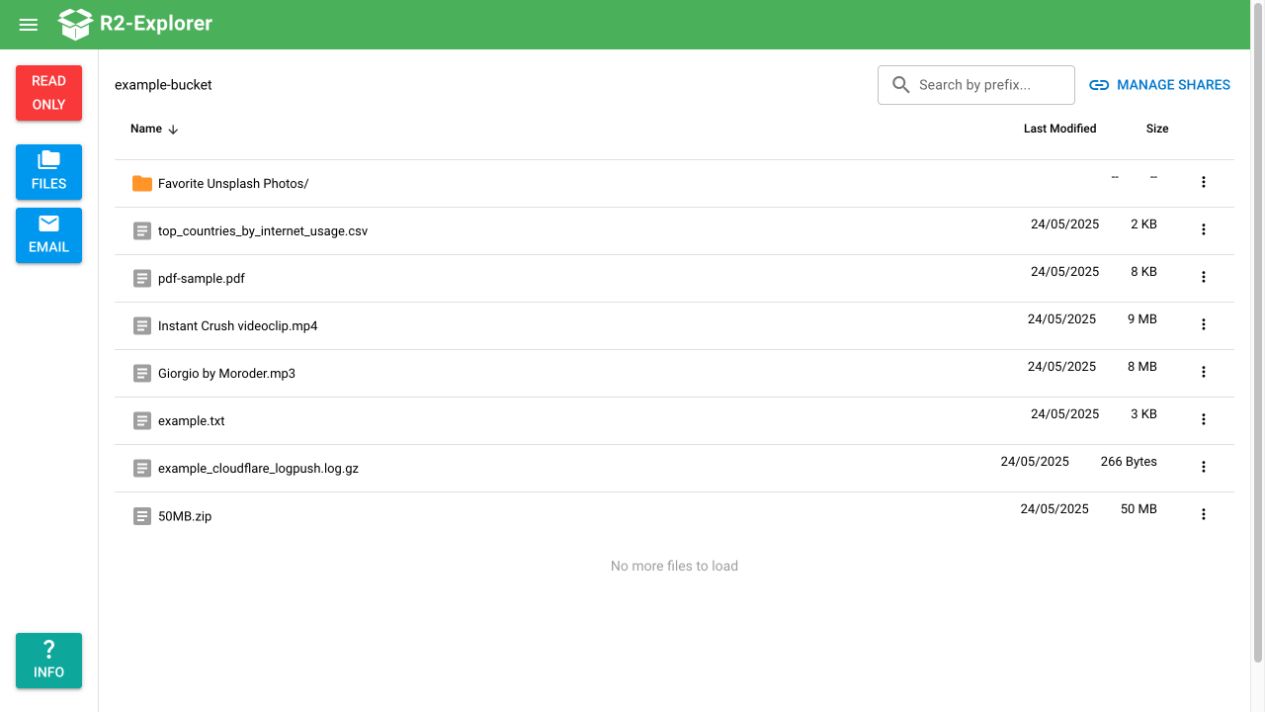
- The upstream demo screenshot shows a real read-only file list. Its running version was not established, and no fresh installation, write test or security audit was performed.
- Share routes bypass API authentication by design. Password parameters and read-modify-write download counters require security and concurrency review; no secure-sharing or one-time-delivery guarantee is established.
- Outbound email is unavailable at the reviewed commit. Optional inbound Email Routing is separate from the file manager. Desktop sync, Google Docs collaboration, file search and full Drive/Dropbox parity are not established.
- The template uses a package version range; the GitHub helper installs latest. Pin and review the package actually deployed. R2 activation, usage overages, optional Access and domain requirements remain operator responsibilities.
Sources checked 01/10/2026
Repository snapshot: 2c09ecb. Hosting eligibility reflects the deployment documentation and listed assumptions.
- google-drive ↗
R2-Explorer brings a familiar Google Drive-like interface to your Cloudflare R2 storage buckets, making file management simple and intuitive.
- dropbox ↗
Drag-and-drop file upload
- workers ↗
main = "src/index.ts"
- r2 ↗
binding = "BUCKET" bucket_name = "bucket"
- free-tier-eligible ↗
| **Free** | 100,000 per day | No charge for duration | 10 milliseconds of CPU time per invocation |
- free-tier-eligible ↗
| Storage | 10 GB-month / month |
- free-tier-eligible ↗
| Class A Operations | 1 million requests / month |
- free-tier-eligible ↗
| Class B Operations | 10 million requests / month |
- free-tier-eligible ↗
bucket_name = "bucket"
- MIT ↗
Permission is hereby granted, free of charge, to any person obtaining a copy of this software and associated documentation files (the "Software"), to deal in the Software without restriction, including without limitation the rights to use, copy, modify, merge, publish, distribute, sublicense, and/or sell copies of the Software, and to permit persons to whom the Software is furnished to do so, subject to the following conditions: The ab
- architecture ↗
run_worker_first = ["/api/*", "/share/*"]
- architecture ↗
binding = "BUCKET" bucket_name = "bucket"
- architecture ↗
openapi.get("/api/buckets/:bucket", ListObjects);
- architecture ↗
app.use("/api/*", readOnlyMiddleware);
- architecture ↗
openapi.get("/share/:shareId", GetShareLink);
- architecture ↗
return app.fetch(request, env as AppEnv, context);
Documented public demo screenshot · G4brym/R2-Explorer repository contributors ↗. Depicts the upstream project. We have not deployed and tested a fresh installation here.
What it can replace
Compare the workflow you need. These mappings describe overlap; full feature parity requires a separate comparison.
 Google Drive ↗
Web-based file browsing, uploads, folders and limited file sharing for operator-owned R2 buckets. The author explicitly describes a Google Drive-like interface. No Google Docs editing, collaborative permissions, desktop sync or complete Drive parity is established.
See supporting source ↗ Dropbox ↗
Basic browser file storage, browsing and sharing in your own R2 buckets. This is an editorial workflow comparison; desktop synchronization, team collaboration and complete Dropbox parity were not tested.
See supporting source ↗How it works
The shape of R2 Explorer on Cloudflare, and how it stacks up against the rented tools it replaces.
Diagram target: template/wrangler.toml. Other repository deployments are listed in the source evidence below; they are not required by this target.
Architecture
Diagram of deployment declarations at the reviewed commit. Each app has its own entrypoint; declared resources do not prove runtime calls. Follow file and line sources below.
View upstream source ↗Configuration and workflow sources
Reviewed commit 2c09ecbea00b. This configuration evidence comes from reading source files. Execution checks, when available, appear in the project's runtime review.
Deployment configuration · 4 files
Cloudflare Workers · example/template, excluded from overview · compatibility 2025-06-06
r2-explorer-docs · default
Build: npm run build
Static assets: ./.vitepress/dist/
Static assets→ Static assets
Cloudflare Workers · compatibility 2024-11-06
my-r2-explorer · default
Entrypoint: index.ts
Static assets: ../../dashboard/dist/spa · single-page-application · Worker first: ["/api/*","/share/*"]
teste→ R2ASSETS→ Static assets
Cloudflare Workers · documented installation template; operator setup required · compatibility 2024-11-06
Selected from the upstream installation instructions ↗. This is a template to configure in your account; no fresh deployment is established.
r2-explorer · default
Entrypoint: src/index.ts
Static assets: node_modules/r2-explorer/dashboard · single-page-application · Worker first: ["/api/*","/share/*"]
BUCKET→ R2ASSETS→ Static assets
Cloudflare Workers · compatibility 2024-11-06
r2-explorer-e2e · default
Entrypoint: e2e.ts
Static assets: ../../dashboard/dist/spa · single-page-application · Worker first: ["/api/*","/share/*"]
MY_BUCKET→ R2ASSETS→ Static assets
Named environments are separate deployments. Bindings are shown only where declared. Configured routes are URL patterns, not verified application endpoints.
Runtime source · handlers, binding usage and workflow steps
Observed TypeScript/JavaScript declarations from Worker entrypoints and resolved relative imports. Calls and workflow steps may run conditionally; their listed order is not a proven end-to-end request flow. Router declarations may be mounted under a prefix or may not be registered. This shows code wiring, not a successful deployment or runtime test. Dynamic wiring, aliases and generated code may not resolve.
- L63 · app.use("*")
- L75 · app.use("/api/*")
- L79 · app.use("/api/*")
- L83 · app.use("/api/*")
- L84 · app.use("/api/*")
- L96 · app.use("/api/*")
- L152 · app.all("*")
- L41 · R2Explorer calls (conditional paths may differ): extendZodWithOpenApi, app.use, c.set, next, fromHono, cors, cloudflareAccess, c.get, openapi.registry.registerComponent, basicAuth, Array.isArray, openapi.get, openapi.post, openapi.on, openapi.delete, app.all, Response.json, receiveEmail, app.fetch
- L3 · dashboardIndex calls (conditional paths may differ): c.text
- L17 · dashboardRedirect calls (conditional paths may differ): c.text, url.pathname.includes, c.env.ASSETS.fetch, next
Environment references: c.env.ASSETS
Environment references: process.env.WORKERS_CI · process.env.R2EXPLORER_WORKER_NAME · process.env.R2EXPLORER_BUCKETS · process.env.R2EXPLORER_CONFIG · process.env.R2EXPLORER_DOMAIN · process.env.CF_API_TOKEN · process.env.PWD
- L4 · readOnlyMiddleware calls (conditional paths may differ): c.get, includes, Response.json, next
- L6 · streamToArrayBuffer calls (conditional paths may differ): stream.getReader, reader.read, result.set
- L21 · receiveEmail calls (conditional paths may differ): Object.entries, streamToArrayBuffer, parser.parse, getCurrentTimestampMilliseconds, crypto.randomUUID, bucket.put, JSON.stringify, Date.now
- L10 · email handler exported · calls email, R2Explorer
- L13 · fetch handler exported · references BASIC_USERNAME, BASIC_PASSWORD · calls fetch, R2Explorer
Environment references: env.BASIC_USERNAME · env.BASIC_PASSWORD
- L4 · fetch handler exported · calls fetch, R2Explorer
- L1 · getCurrentTimestampMilliseconds calls (conditional paths may differ): Math.floor, Date.now
Build and deployment pipeline · 4 GitHub Actions workflows
Repository CI declarations, separate from runtime request processing. Job dependencies and conditions are shown as written; long commands are shortened with an ellipsis; a workflow file does not prove a recent successful run.
Triggers: workflow_dispatch, push
Deploy · no job dependencies declared
- actions/checkout@v7
actions/checkout@v7 - Setup node
actions/setup-node@v7 - Setup R2-Explorer
node packages/github-action/prepareDeploy.js - Get latest version
cd packages/github-action && npm install && npm install --save r2-explorer@latest - Deploy
cloudflare/wrangler-action@v4
Triggers: push, pull_request
build · no job dependencies declared
- actions/checkout@v7
actions/checkout@v7 - Set up Node.js
actions/setup-node@v7 - Install pnpm
npm install -g pnpm - Install dependencies
pnpm install - Check Lint
pnpm lint - Build everything
pnpm build - Run Dashboard Tests
cd packages/dashboard && pnpm test - Run Worker Tests
cd packages/worker && pnpm test - Package artifact
pnpm package - Archive package
actions/upload-artifact@v7
e2e · no job dependencies declared
- actions/checkout@v7
actions/checkout@v7 - Set up Node.js
actions/setup-node@v7 - Install pnpm
npm install -g pnpm - Install dependencies
pnpm install - Build dashboard
pnpm build-dashboard - Install Playwright browsers
pnpm exec playwright install --with-deps chromium - Run E2E tests
pnpm test:e2e - Upload Playwright report
actions/upload-artifact@v7Condition: ${{ !cancelled() }}
Triggers: pull_request
Require changeset · no job dependencies declared
- actions/checkout@v7
actions/checkout@v7 - actions/setup-node@v7
actions/setup-node@v7 - Install pnpm
npm install -g pnpm - Install dependencies
pnpm install - Check for changeset
pnpm changeset status --since=origin/main
Triggers: push
release · no job dependencies declared
- actions/checkout@v7
actions/checkout@v7 - actions/setup-node@v7
actions/setup-node@v7 - Install pnpm
npm install -g pnpm - Install dependencies
pnpm install - Check Lint
pnpm lint - Build everything
pnpm build - Validate package
pnpm --filter r2-explorer publint - Create Release Pull Request or Publish
changesets/action@v2 - Create GitHub Release
VERSION=$(echo '${{ steps.changesets.outputs.publishedPackages }}' | jq -r '.[] | select(.name == "r2-explorer") | .version') if [ -n "$VERSION" ]; then gh release create "v${VERSION}" \ --title "v${VERSION}" \ --generate-notes \ --target main fiCondition: steps.changesets.outputs.published == 'true'
build-dashboard: pnpm run --filter r2-explorer-dashboard buildbuild-worker: pnpm run --filter r2-explorer buildbuild: pnpm build-dashboard && pnpm build-workerdeploy-dashboard: pnpm run --filter r2-explorer-dashboard deploydeploy-dashboard-dev: pnpm run --filter r2-explorer-dashboard deploy-devdeploy-dev-worker: pnpm run --filter r2-explorer-dev-worker deployrelease: pnpm build && pnpm --filter r2-explorer publint && changeset publish
build: quasar builddeploy: wrangler pages deploy --branch main --project-name r2-explorer-dashboard dist/spa/deploy-dev: wrangler pages deploy --branch dev --project-name r2-explorer-dashboard dist/spa/
build: vitepress build
publish: wrangler publish
deploy: wrangler deploy
build: tsup src/index.ts --format cjs,esm --dts && cp -R ../dashboard/dist/spa/ dashboard/ && cp ../../README.md . && cp ../../LICENSE . && mkdir -p docs/getting-started docs/guides && cp ../docs/index.md docs/ && cp ../docs/getting-started/*.md docs/getting-started/ && cp ../docs/guides/*.md docs/guides/publish-npm: npm publish
deploy: wrangler deploy
Repository README
View original on GitHub ↗Full upstream document by @G4brym · README.md · snapshot 2c09ecb

A Google Drive Interface for your Cloudflare R2 Buckets!



R2-Explorer
R2-Explorer brings a familiar Google Drive-like interface to your Cloudflare R2 storage buckets, making file management simple and intuitive.
Quick Links
- 📚 Documentation: r2explorer.com
- 🎮 Live Demo: demo.r2explorer.com
- 💻 Source Code: github.com/G4brym/R2-Explorer
Available in multiple languages: English | Español | Português | Français
Overview
R2-Explorer transforms your Cloudflare R2 storage experience with a modern, user-friendly interface. It provides powerful file management capabilities while maintaining enterprise-grade security through Cloudflare's infrastructure.
Key Features
🔒 Security
- Basic Authentication support
- Cloudflare Access integration
- Self-hosted on your Cloudflare account
📁 File Management
- Drag-and-drop file upload
- Folder creation and organization
- Multi-part upload for large files
- Right-click context menu for advanced options
- HTTP/Custom metadata editing
- Sharable Links - Create secure, public URLs for files with optional password protection, expiration times, and download limits
👀 File Handling
- In-browser file preview
- PDF documents
- Images
- Text files
- Markdown
- CSV
- Logpush files
- In-browser file editing
- Folder upload support
- In-browser file preview
📧 Email Integration
- Receive and process emails via Cloudflare Email Routing
- View email attachments directly in the interface
Installation Methods
Choose the method that best suits your needs:
GitHub Action (Recommended)
Cloudflare CLI
Template Repository
For detailed instructions on maintaining and updating your installation, visit our update guide.
Roadmap
We're actively working on these exciting features:
File Management
- Support for bucket names with spaces
- File search functionality
- Folder renaming capability
- Image thumbnails generation
AI Integration
- Object detection using workers-ai
User Experience
- Enhanced timestamp tooltips
- Email response capabilities
- Advanced file type-specific editing
Known Issues
- When using basic authentication, email inline images and assets don't load properly
- Additional issues can be found and reported on our GitHub Issues page
Contributing
We welcome contributions! Whether it's bug fixes, new features, or documentation improvements, please feel free to:
- Fork the repository
- Create a feature branch
- Submit a Pull Request
Support
- 📚 Documentation: r2explorer.com
- 🐛 Issue Tracker: GitHub Issues
License
This project is licensed under the MIT License - see the LICENSE file for details.
Frequently asked about R2 Explorer
What is R2 Explorer?+
R2 Explorer is a self-hosted Dropbox/Google Drive alternative built on the Cloudflare developer platform. Browse, upload and share files in your own Cloudflare R2 buckets through a web interface.
What does R2 Explorer replace?+
R2 Explorer is listed as an alternative to Dropbox, Google Drive. Compare the features and tradeoffs before migrating.
What Cloudflare primitives does R2 Explorer use?+
R2 Explorer is built on R2, Workers.
How much does R2 Explorer cost to run?+
A small Worker file manager with R2 Standard storage can fit included Cloudflare allowances. R2 subscription activation is required; storage, API operations and Worker CPU/requests are bounded. This is source-based eligibility, not measured zero-cost operation. Keep R2 Standard usage within 10 GB-month storage, 1 million Class A operations and 10 million Class B operations per month across the account. Infrequent Access is excluded; overages are billed. Keep Worker API execution within the account-wide 100,000 requests/day and 10 ms CPU per invocation on Free. Uploads, multipart operations, previews and optional email parsing need measured workload checks. Activate the R2 subscription in your own account and bind your own bucket(s). Replace the template bucket_name; do not reuse production buckets for writable development. Set explicit API protection before using private data. Cloudflare Access policy/plan eligibility requires a separate check; optional custom domains and inbound email routing have separate setup. Use the bundled static dashboard and reviewed runtime package. No D1, KV or external database is required by this core template. Unlimited storage, sharing or sessions are not promised. Check current Cloudflare pricing before deploying.
Is R2 Explorer open source?+
The upstream repository declares the MIT license. Read its terms at https://raw.githubusercontent.com/G4brym/R2-Explorer/2c09ecbea00be66992ddb8c63946aed1a9be59e6/LICENSE. Source code and contributor credit are available at https://github.com/G4brym/R2-Explorer.
Community rating
No ratings yet. Tried this project? Share your experience.
One rating per verified account. You can change or remove yours. Accounts are email verified; use of the software is self-reported.
Discussion · 0
sign in to comment →