

Reminal
Control your own desktop, windows and terminal through a browser, using a Cloudflare relay.
Reminal is a self-hosted AnyDesk alternative built on Cloudflare (Durable Objects, Workers). Free tier eligible within limits. Inspect the source and license in the linked repository.
Source & license
Upstream license: AGPL-3.0
License TL;DR
You can use and change it, even commercially. If people use your modified version over a network, offer them its corresponding source under the AGPL. Sharing copies has source-sharing duties too. Sharing source code is different from sharing users’ content.
Explain AGPL v3 in plain English →Summary of the main license. Separate packages and assets can have different terms.
Inspect repository ↗Read this project’s actual license ↗Project-specific licensing terms ↗Repository owner
See the upstream repository for the original creator and contributors.
Maintain this project? Maintainer verification →Cloudflare hosting
Free tier eligible within limits
A small self-hosted relay can fit Workers Free and SQLite Durable Objects allowances. Cloudflare hosts the relay/viewer; your own computer runs the native agent. Free usage depends on request, duration, storage and CPU limits. Optional TURN, domains and other services are separate.
Hosting requirements
- Keep the outer Worker within 100,000 requests/day shared across the account and 10 milliseconds CPU per invocation. Performance has not been measured.
- Use the declared SQLite Durable Objects: 100,000 metered requests/day, 13,000 GB-s duration/day, 5 million rows read/day, 100,000 rows written/day and 5 GB stored data. Free operations fail after the relevant cap.
- Hibernation-compatible WebSockets reduce idle duration, but active handlers, timers and relay fallback still consume allowances. Sessions-per-month capacity has not been verified.
- Supply your existing host computer, power/network connection and permissions. Optional TURN, push setup and a custom domain are outside this relay-only assessment.
- Replace account_id and author-owned routes in cloudflare/wrangler.toml. Point the native host to your relay through REMINAL_RELAY or REMINAL_WEB. The marketing site’s R2 downloads are a separate optional deployment.
Review findings & limitations
- Cloudflare hosts the relay and web viewer. An existing macOS, Linux or Windows computer runs the native host; a remote desktop machine is not included in free Cloudflare hosting.
- The upstream recording includes promotional framing around actual application views. Fresh installation, desktop control, encryption claims, frame rate and session capacity remain unverified.
- Peer-to-peer mirroring is preferred, but the documented relay fallback can carry video. Measure requests, messages, duration, storage and CPU before relying on Free allowances.
- Replace the upstream account ID and routes. Optional TURN, push configuration, domain registration and the separate marketing/download site have their own setup and costs.
- Root AGPL-3.0 governs. LICENSING.md describes a commercial alternative for closed-source embedding, unpublished modified hosted services or different warranty/support terms; ordinary use does not require a blanket paid license.
Sources checked 01/10/2026
Repository snapshot: a4c10b3. Hosting eligibility reflects the deployment documentation and listed assumptions.
- anydesk ↗
Every window, desktop and terminal on your machines — live in any browser.
- workers ↗
name = "reminal-relay" main = "src/index.ts"
- durable-objects ↗
new_sqlite_classes = ["SessionRoom"]
- free-tier-eligible ↗
Durable Objects use the SQLite backend (`new_sqlite_classes`), which is required on the free plan.
- free-tier-eligible ↗
| **Free** | 100,000 per day | No charge for duration | 10 milliseconds of CPU time per invocation |
- free-tier-eligible ↗
| Requests | 100,000 / day | 1 million / month, + $0.15/million
- free-tier-eligible ↗
| Duration<sup>3</sup> | 13,000 GB-s / day
- free-tier-eligible ↗
an individual using reminal, for anything, including paid work;
- AGPL-3.0 ↗
13. Remote Network Interaction; Use with the GNU General Public License. Notwithstanding any other provision of this License, if you modify the Program, your modified version must prominently offer all users interacting with it remotely through a computer network (if your version supports such interaction) an opportunity to receive the Corresponding Source of your version by providing access to the Corresponding Source from a network server at no charge, through some standard or customary means of facilitating copying of software. This Corresponding Source shall include the Corre
- architecture ↗
[durable_objects] bindings = [ { name = "SESSION", class_name = "SessionRoom" }, { name = "RENDEZVOUS", class_name = "RendezvousRoom" } ] [[migrations]] tag = "v1" new_sqlite_classes = ["SessionRoom"] [[migrations]] tag = "v2" new_sqlite_classes = ["RendezvousRoom"] [assets] directory = "./public" binding = "ASSETS" # Run the Worker BEFORE serving a static asset. Without this, a reques
- architecture ↗
return env.ASSETS.fetch(request);
- architecture ↗
// Shell-session WS: /ws/<id>/agent | viewer | tunnel
- architecture ↗
// Copy/paste rendezvous WS: /rv/<code>/source | paste
- architecture ↗
await this.state.storage.setAlarm(Date.now() + RV_TTL_MS);
- architecture ↗
REMINAL_RELAY=wss://your-url/ws ./dist/reminal
Upstream screenshot · harshalgajjar/Reminal repository contributors ↗. Depicts the upstream project. We have not deployed and tested a fresh installation here.
What it can replace
Compare the workflow you need. These mappings describe overlap; full feature parity requires a separate comparison.
 AnyDesk ↗
Browser-based access to a user-owned computer’s desktop, windows and terminal. A native host is required; unattended administration, fleet management, performance and complete AnyDesk parity were not tested.
See supporting source ↗How it works
The shape of Reminal on Cloudflare, and how it stacks up against the rented tools it replaces.
Diagram target: cloudflare/wrangler.toml. Other repository deployments are listed in the source evidence below; they are not required by this target.
Architecture
Diagram of deployment declarations at the reviewed commit. Each app has its own entrypoint; declared resources do not prove runtime calls. Follow file and line sources below.
View upstream source ↗Configuration and workflow sources
Reviewed commit a4c10b35d704. This configuration evidence comes from reading source files. Execution checks, when available, appear in the project's runtime review.
Deployment configuration · 2 files
Cloudflare Workers · compatibility 2024-11-01
reminal-relay · default
Entrypoint: src/index.ts
Static assets: ./public · Worker first: true
Configured route patterns: live.reminal.app · *.reminal.app/*
SESSION→ Durable Objects · class SessionRoomRENDEZVOUS→ Durable Objects · class RendezvousRoomASSETS→ Static assets
Cloudflare Workers · compatibility 2025-08-01
reminal-site · default
Entrypoint: src/index.js
Static assets: ./public · Worker first: true
Configured route patterns: reminal.dev · www.reminal.dev · reminal.app · www.reminal.app
DOWNLOADS→ R2ASSETS→ Static assets
Named environments are separate deployments. Bindings are shown only where declared. Configured routes are URL patterns, not verified application endpoints.
Runtime source · handlers, binding usage and workflow steps
Observed TypeScript/JavaScript declarations from Worker entrypoints and resolved relative imports. Calls and workflow steps may run conditionally; their listed order is not a proven end-to-end request flow. Router declarations may be mounted under a prefix or may not be registered. This shows code wiring, not a successful deployment or runtime test. Dynamic wiring, aliases and generated code may not resolve.
- L33 · fetch handler exported · references SESSION, RENDEZVOUS, CRITICAL_MIN, ASSETS · calls request.headers.get, hostHeader.match, toUpperCase, env.SESSION.idFromName, env.SESSION.get, internalHeaders, hdrs.set, stub.fetch, doUrl.toString, url.pathname.match, toLowerCase, env.RENDEZVOUS.idFromName, env.RENDEZVOUS.get, handlePushKey, handlePush, JSON.stringify, env.ASSETS.fetch
- L24 · internalHeaders calls (conditional paths may differ): h.keys, startsWith, k.toLowerCase, h.delete
Environment references: env.SESSION · env.RENDEZVOUS · env.CRITICAL_MIN · env.ASSETS
- L1318 · hmacHex calls (conditional paths may differ): fromHex, crypto.subtle.importKey, encode, crypto.subtle.sign, toHex
- L1335 · timingSafeEqual calls (conditional paths may differ): a.charCodeAt, b.charCodeAt
- L1349 · loopbackLocationPath calls (conditional paths may differ): u.hostname.toLowerCase, h.startsWith
- L1384 · stripLoopbackCookieDomain calls (conditional paths may differ): cookie.split, parts.filter, part.indexOf, toLowerCase, trim, part.slice, replace, host.startsWith, kept.join
- L1406 · sameOriginPath calls (conditional paths may differ): p.replace
- L1416 · selfHostLocationPath calls (conditional paths may differ): hostname.toLowerCase, u.hostname.toLowerCase
- L1435 · toHex calls (conditional paths may differ): padStart, toString
- L1441 · fromHex calls (conditional paths may differ): parseInt, s.slice
- L1447 · base64ToBytes calls (conditional paths may differ): atob, bin.charCodeAt
- L1454 · bytesToBase64 calls (conditional paths may differ): String.fromCharCode.apply, Array.from, b.subarray, btoa
- L1467 · isNavigationRequest calls (conditional paths may differ): request.headers.get, includes
- L1474 · parseCookies calls (conditional paths may differ): header.split, part.indexOf, trim, part.slice, decodeURIComponent
- L1501 · stripAuthCookie calls (conditional paths may differ): join, filter, map, header.split, p.trim, p.indexOf, trim, p.slice
- L1518 · pinGatePage calls (conditional paths may differ): escapeHtml
- L1580 · escapeHtml calls (conditional paths may differ): s.replace
- L29 · allowedEndpoint calls (conditional paths may differ): PUSH_HOSTS.some, re.test
- L48 · rateOK calls (conditional paths may differ): filter, recent.get, recent.set, hits.push, recent.clear
- L60 · b64url calls (conditional paths may differ): String.fromCharCode, replace, btoa
- L67 · b64ToBytes calls (conditional paths may differ): atob, replace, s.replace, bin.charCodeAt
- L77 · vapidJWT calls (conditional paths may differ): jwtCache.get, crypto.subtle.importKey, JSON.parse, b64url, enc.encode, JSON.stringify, crypto.subtle.sign, jwtCache.set
- L100 · json calls (conditional paths may differ): JSON.stringify
- L108 · handlePushKey calls (conditional paths may differ): json
- L116 · handlePush calls (conditional paths may differ): json, request.json, allowedEndpoint, b64ToBytes, Date.now, rateOK, Math.floor, includes, vapidJWT, fetch, String
Environment references: env.VAPID_PRIVATE_JWK · env.VAPID_PUBLIC
- L147 · fetch handler exported · references ASSETS · calls ALIASES.has, Response.redirect, url.toString, isSessionJoin, liveJoinURL, downloadKey, serveDownload, url.pathname.replace, REDIRECTS.get, toString, url.pathname.endsWith, url.pathname.slice, PAGES.has, env.ASSETS.fetch, cacheControl, out.headers.set
- L71 · cacheControl calls (conditional paths may differ): pathname.startsWith
- L79 · isSessionJoin calls (conditional paths may differ): url.searchParams.has
- L100 · downloadKey calls (conditional paths may differ): pathname.startsWith, decodeURIComponent, pathname.slice, test, some, key.split
- L120 · downloadHeaders calls (conditional paths may differ): DOWNLOAD_TYPES.find, re.test, h.set, test
- L131 · serveDownload calls (conditional paths may differ): notFound, env.DOWNLOADS.head, env.DOWNLOADS.get, downloadHeaders, h.set, String
Environment references: env.DOWNLOADS · env.ASSETS
Build and deployment pipeline · 3 GitHub Actions workflows
Repository CI declarations, separate from runtime request processing. Job dependencies and conditions are shown as written; long commands are shortened with an ellipsis; a workflow file does not prove a recent successful run.
Triggers: push, pull_request
test · no job dependencies declared
- actions/checkout@v4
actions/checkout@v4 - actions/setup-go@v5
actions/setup-go@v5 - Formatting
unformatted="$(gofmt -l ./cmd ./internal)" if [ -n "$unformatted" ]; then echo "::error::gofmt would change these files:" echo "$unformatted" exit 1 fi - Vet
go vet ./... - Test
go test ./... - Test with the race detector
go test -race ./...
crosscompile · no job dependencies declared
- actions/checkout@v4
actions/checkout@v4 - actions/setup-go@v5
actions/setup-go@v5 - Build every release target
set -e for pair in darwin/arm64 darwin/amd64 linux/amd64 linux/arm64 windows/amd64 windows/arm64; do echo " building ${pair}" GOOS="${pair%/*}" GOARCH="${pair#*/}" go build ./... done
Triggers: issue_comment, pull_request_target
cla · no job dependencies declared
- CLA Assistant
contributor-assistant/github-action@v2.6.1Condition: (github.event.comment.body == 'recheck') || (github.event.comment.body == 'I have read the CLA Document and I hereby sign the CLA') || github.event_name == 'pull_request_target'
Triggers: push
test · no job dependencies declared
Condition: github.repository == 'harshalgajjar/Reminal'
- actions/checkout@v4
actions/checkout@v4 - actions/setup-go@v5
actions/setup-go@v5 - Formatting
unformatted="$(gofmt -l ./cmd ./internal)" if [ -n "$unformatted" ]; then echo "::error::gofmt would change these files:" echo "$unformatted" exit 1 fi - Vet
go vet ./... - Test
go test ./... - Test with the race detector
go test -race ./...
release · after test
- actions/checkout@v4
actions/checkout@v4 - actions/setup-go@v5
actions/setup-go@v5 - Stamp Windows resources (icon + version info)
# Regenerate the committed .syso resources with the real release # version, so reminal.exe's Properties → Details and the Windows # Firewall dialog show this build's number instead of 0.0.0.0. VERSION="${VERSION#v}" NUM="$(echo "$VERSION" | sed 's/-.*//').0" cd cmd/reminal go run github.com/tc-hib/go-winres@v0.3.3 make --in winres/winres.json \ --arch "${{ matrix.goarch }}" \ --product-version "$NUM" --file-version "$NUM"Condition: matrix.goos == 'windows' - Build
VERSION="${VERSION#v}" BUILD_DATE=$(date -u +%Y-%m-%dT%H:%M:%SZ) SHORT_COMMIT="${COMMIT:0:7}" OUT="reminal" [ "$GOOS" = "windows" ] && OUT="reminal.exe" if [ -n "$REMINAL_DEFAULT_RELAY" ] && [ -z "$REMINAL_DEFAULT_WEB" ]; then REMINAL_DEFAULT_WEB="${REMINAL_DEFAULT_RELAY%/}" REMINAL_DEFAULT_WEB="${REMINAL_DEFAULT_WEB%/ws}" REMINAL_DEFAULT_WEB="${REMINAL_DEFAULT_WEB/#wss:\/\//https://}" REMINAL_DEFAULT_WEB="${REMINAL_DEFAULT_WEB/#ws:\/\//http://}" elif [ -n "$REMINAL_DEFAULT_WEB" ] && [ -z "$REM… - Build capture helper (macOS)
# Native window-capture helper for the arch of this archive. Deployment # target 12.3 = the ScreenCaptureKit floor; on older macOS the agent # falls back to screencapture. Ad-hoc signed so it runs unnotarized. swiftc -O -target ${{ matrix.swift_target }} -o reminal-capture native/reminal-capture/main.swift codesign --force --sign - reminal-capture || true # Window-annotation helper behind `reminal mcp`. Same deployment # target; without it the MCP tools report "helper not found". swiftc -O -tar…Condition: matrix.goos == 'darwin' - Assemble & sign reminal.app (macOS)
set -euo pipefail # Package the CLI + capture helper + icon into ONE signed reminal.app. # macOS keys a Screen Recording (TCC) grant to a code identity and only # shows a custom icon for an .app — so the bundle gives one identity # (sh.reminal) the user grants once, which then covers the background # daemon's ("+"-spawned) sessions too. build-app.sh signs the nested # helper as sh.reminal.capture and seals the bundle as sh.reminal. if [ -z "${MACOS_CERT_P12}" ]; then echo "No signing cert (secr…Condition: matrix.goos == 'darwin' - Azure login for Trusted Signing (Windows)
azure/login@v2Condition: matrix.goos == 'windows' - Sign reminal.exe (Authenticode via Trusted Signing)
azure/artifact-signing-action@v2Condition: matrix.goos == 'windows' - Verify Authenticode signature (Windows)
$s = Get-AuthenticodeSignature reminal.exe $s | Format-List Status, StatusMessage, SignerCertificate # UnknownError is what a valid-but-not-locally-chained cert reports on # a bare runner; anything Valid is ideal. NotSigned means the signing # step silently did nothing — fail loudly instead of shipping it. if ($s.Status -eq 'NotSigned') { exit 1 }Condition: matrix.goos == 'windows' - Package
ARCHIVE="reminal_${VERSION}_${GOOS}_${GOARCH}.tar.gz" if [ "$GOOS" = "darwin" ] && [ -d reminal.app ]; then # macOS ships the signed bundle; tar preserves the signature + icon. tar czf "${ARCHIVE}" reminal.app elif [ "$GOOS" = "windows" ]; then # Windows ships the bare exe; tar.gz keeps the asset naming (and # the in-app updater's extraction path) uniform across platforms — # install.ps1 and Windows 10+'s built-in tar both handle it. tar czf "${ARCHIVE}" reminal.exe else FILES="reminal" [ -f re… - Write release notes
version="${GITHUB_REF_NAME#v}" if [ -f "changelog/${version}.md" ]; then echo "Using changelog/${version}.md" cp "changelog/${version}.md" release-notes.md else echo "No changelog/${version}.md — falling back to the commit message" git log -1 --pretty=%B | awk ' { lower = tolower($0) } lower ~ /^(co-authored-by|claude-session|signed-off-by):/ { next } { buf[n++] = $0 } END { while (n > 0 && buf[n-1] ~ /^[ \t]*$/) n-- for (i = 0; i < n; i++) print buf[i] } ' > release-notes.md fi - Upload release asset
softprops/action-gh-release@v2
verify · after release
Condition: always() && github.repository == 'harshalgajjar/Reminal'
- Every platform must have published a build
set -uo pipefail version="${GITHUB_REF_NAME#v}" if ! gh release view "$GITHUB_REF_NAME" -R "$GITHUB_REPOSITORY" >/dev/null 2>&1; then # Nothing was published at all — the tests or every build failed. # Reporting six missing binaries here would blame the assets for # something that happened well before any were produced. echo "::error title=Nothing published::$GITHUB_REF_NAME produced no release; check the test and build jobs above." exit 1 fi have="$(gh release view "$GITHUB_REF_NAME" -R "$GITH…
deploy: wrangler deploy
deploy: ./build.sh && wrangler deploy
Repository README
View original on GitHub ↗Full upstream document by @harshalgajjar · README.md · snapshot a4c10b3
reminal
Every window, desktop and terminal on your machines — live in any browser.
Close the laptop lid and walk away. reminal keeps the machine serving — and hands you its actual apps, not just a shell — in any browser, from anywhere. No open ports, no keys on disk, nothing to install on the device you're holding.






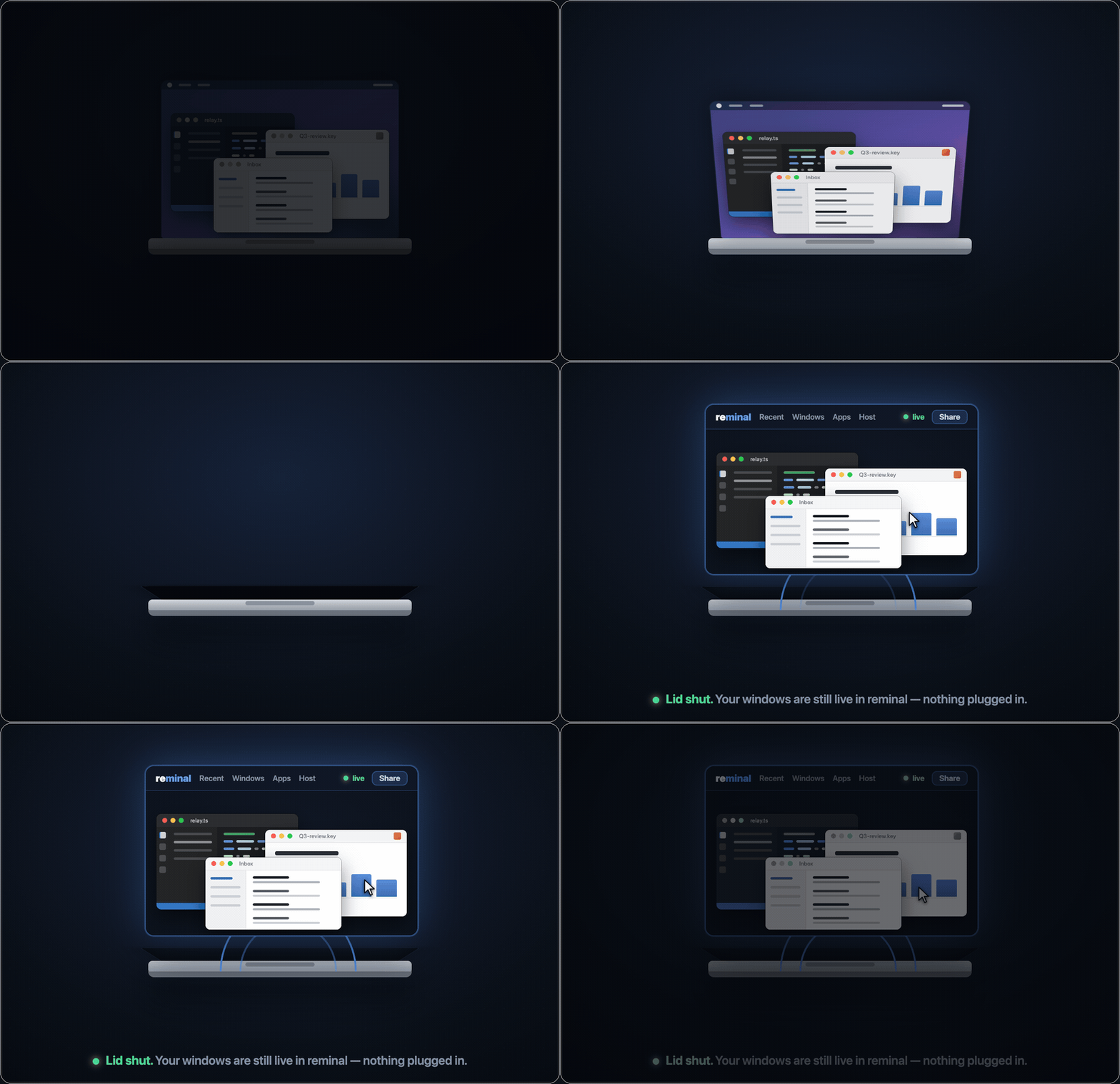
The lid shuts with no monitor and no dongle attached — and the windows keep streaming, live and controllable, into a browser.
No monitor. No dummy plug. No dongle.
Close a MacBook's lid and macOS puts it to sleep — unless it's on power with a monitor and keyboard attached. The usual fix is a hardware "dummy" HDMI plug that fakes a display, or just leaving the lid propped open on your desk.
Closed-lid mode does it in software. Flip it on and leave — no monitor, no dongle, in any order. reminal disables clamshell sleep and, because GUI apps need a screen to draw on, spins up a virtual display the moment the Mac goes headless — so window mirroring keeps working with nothing plugged in. Toggle it off and everything is undone.
Closed-lid mode is macOS-only; everything else below works on macOS, Linux and Windows alike.
Set it up in one line
curl -fsSL https://raw.githubusercontent.com/harshalgajjar/Reminal/main/install.sh | sh
reminal
On Windows (PowerShell):
irm https://raw.githubusercontent.com/harshalgajjar/Reminal/main/install.ps1 | iex
reminal
That's the whole setup — one command on the machine you're leaving behind. Everything else you own is already a client, because the client is a browser.
Reach in and drive the apps
Any app window streams live into your browser — and you don't just watch it, you drive it: cursor, click and right-click, type, scroll, drag, pinch-zoom. Not open yet? Launch any installed app on the host from the Apps menu, then drive it. Or tap Host → View full desktop to run the whole machine at once. On a phone the screen becomes a trackpad — your Mac, fully hands-on, from your pocket.

Real capture, unedited. The phone picks a window, types into it — the words appear in the real app on the Mac — then mirrors the whole desktop. Native capture, streamed peer-to-peer.
60 fps, from a machine that isn't here
And nothing about those windows says stream. Drag it, scrub a video inside it, watch a build scroll past — it stays fluid the whole way, on hotel Wi-Fi or a phone on cellular. Sixty frames a second, 17 ms from its screen to yours.
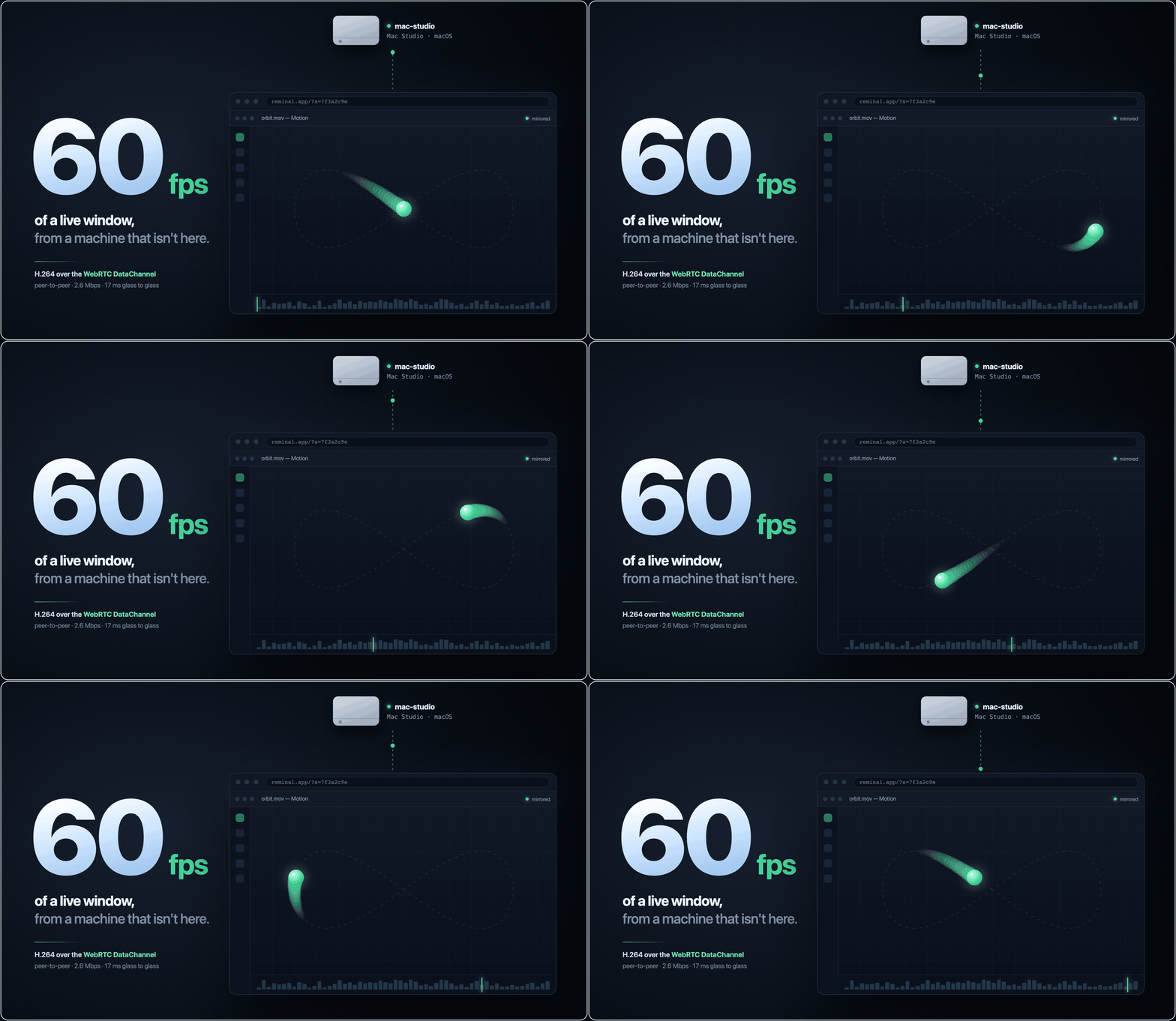
H.264 down the session's own DataChannel — peer-to-peer, about 2.6 Mbps. Relay-only viewers get the same video at 30 fps.
A full terminal, too — scan a QR and you're in
reminal prints a session ID, a PIN, and a QR code. Scan it, and your phone is a full terminal on your machine — real color, touch text-selection, on-screen modifier keys. No port forwarding. No keys to manage. Nothing to install on the phone; the browser is the client.
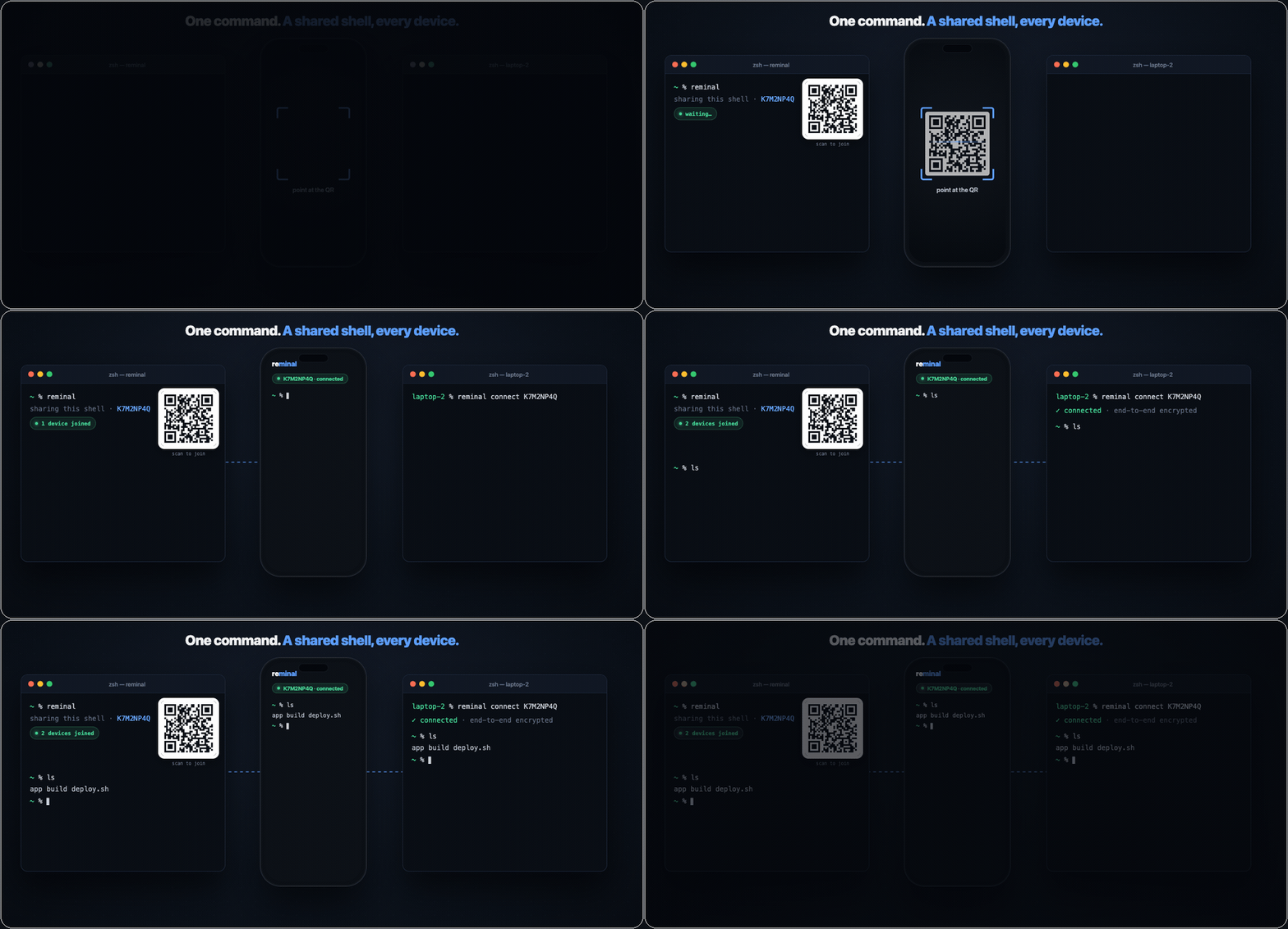
The fastest SSH you'll ever configure — because there's nothing to configure.
Interact with your machines like they're right here
Pop any remote window out onto your desktop and it sits there like its own app window — except it's running on another machine entirely. Line up an editor from your MacBook, a terminal on a cloud box, and a dashboard from the Mac mini at home, and work across all of them as if they were local.
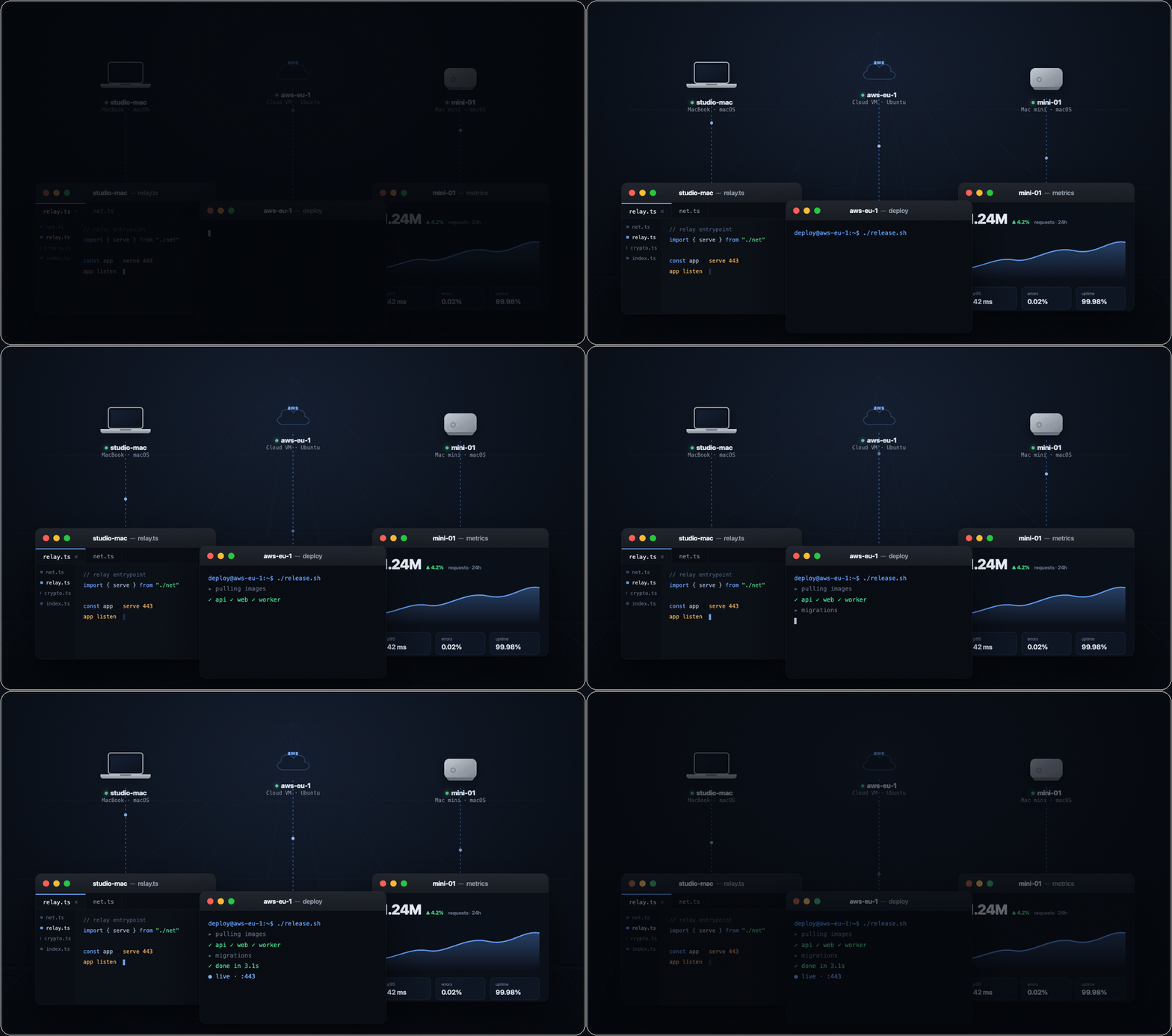
Own your machines. Watch them all.
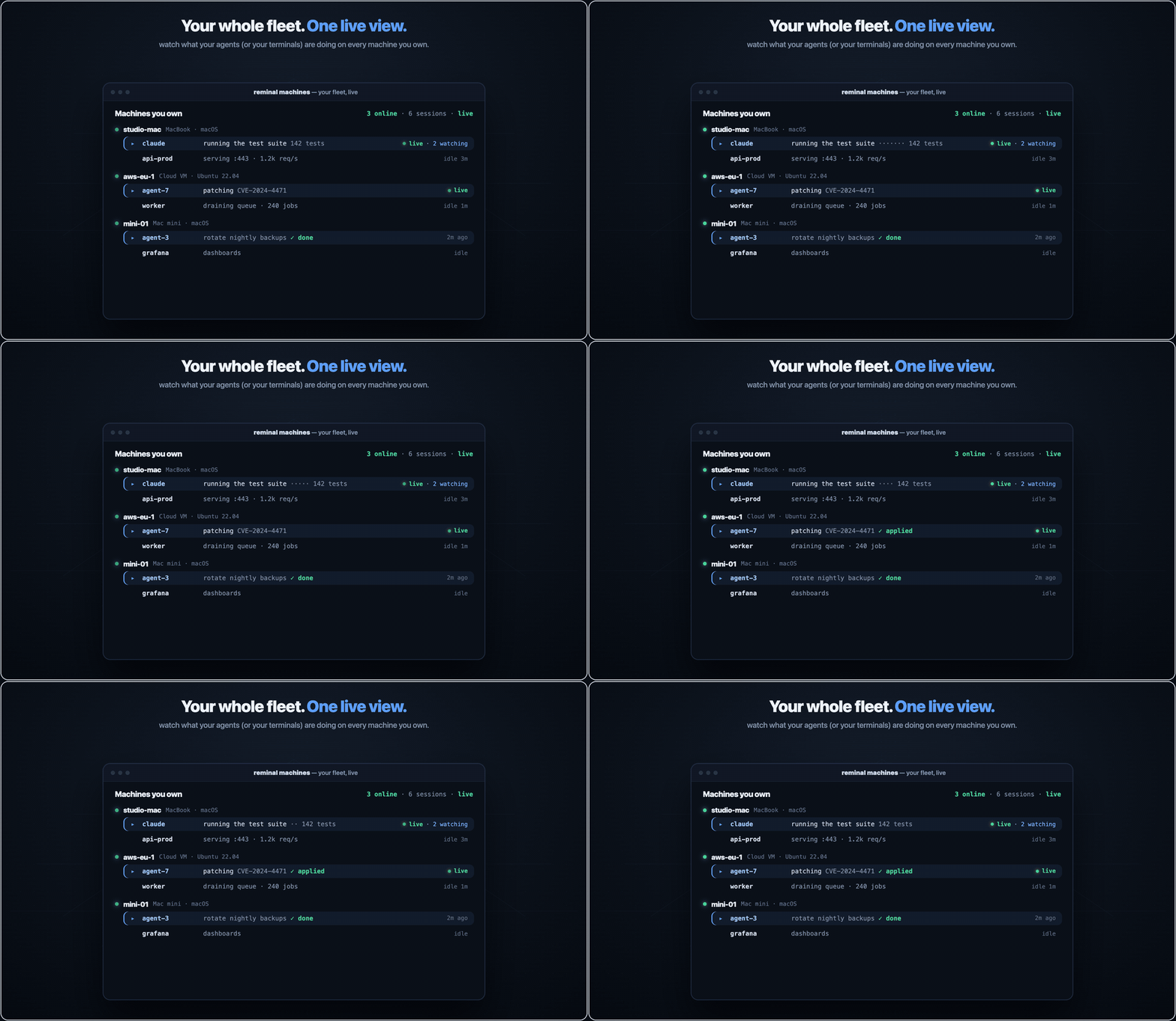
The moment your work spans more than one machine — a rack of servers, or agents let loose on several boxes at once — the hard part isn't starting it, it's seeing it. reminal machines is one live view of everything you own: every machine, every terminal on it, what's running right now, who's watching, how long it's been idle. An agent running a test suite on your laptop, patching a CVE on a cloud VM, and rotating backups on the Mac mini — or just your own sessions — all at a glance. It's on the CLI and in the web Machines panel, where you can jump into any session, rename it, spawn a new one, or kill it on any box.
That single pane works because you own the machines. Enroll a device once — reminal own prints its id, you paste sudo reminal add owner <id> on each machine — and from then on it reaches every session with no PIN. The trust is a per-device key: revocable one at a time, sudo-gated to grant, and the relay still only ever sees ciphertext.
Know when a machine needs you
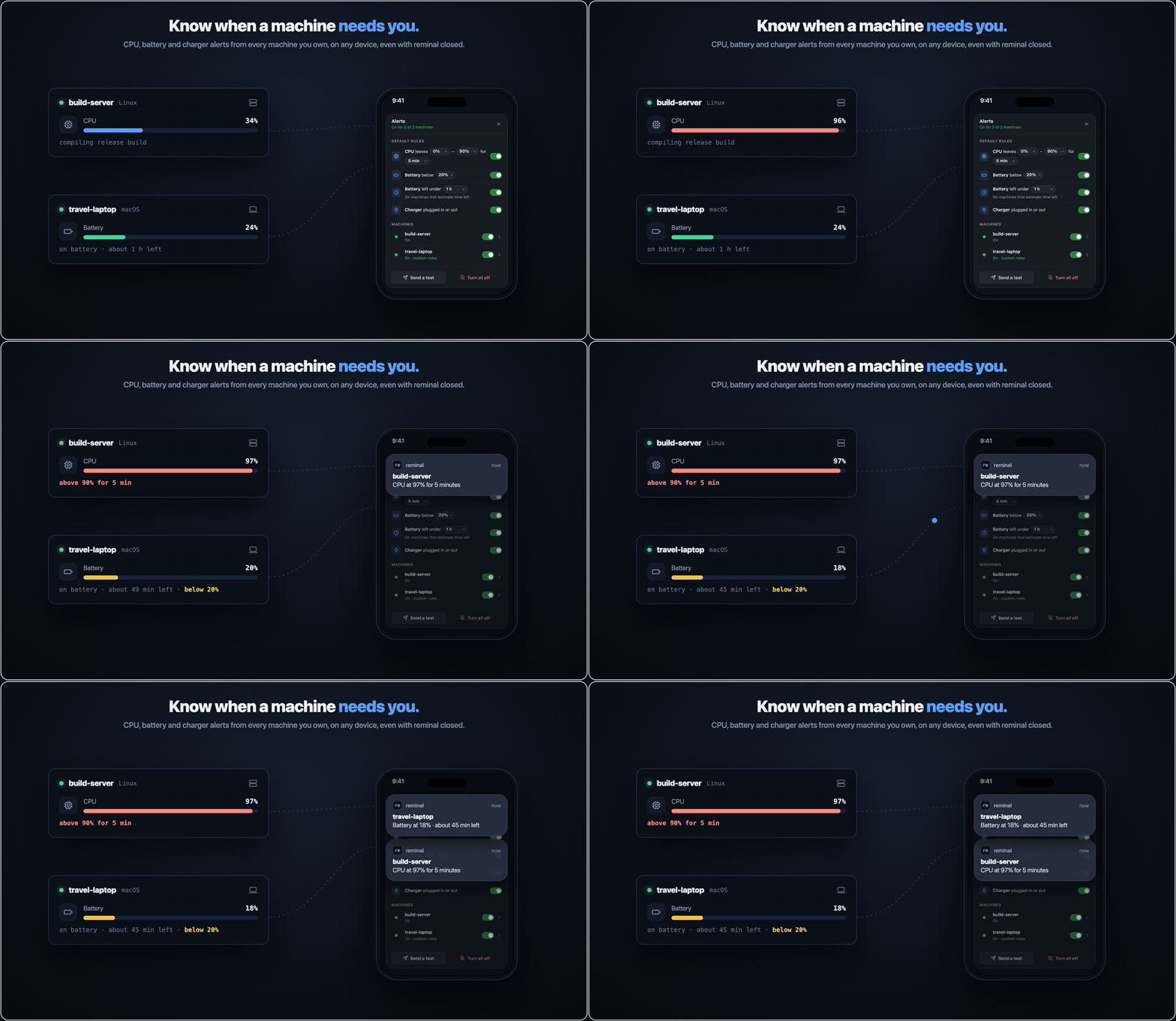
Tap the bell in the Machines panel and every machine you own can notify this device, even with reminal closed: when its CPU stays outside a range you pick, when its battery drops below a level or below an amount of time left, or when its charger is plugged in or out. Set one set of rules for all your machines, or custom rules for any one of them. It works in Chrome, Edge, Firefox and Safari; on iPhone and iPad, add reminal to your Home Screen first.
Each machine watches itself and seals every alert to your browser's own keys before it leaves, so the relay forwards a notification it can't read and keeps no list of your devices.
Your agents can see each other
reminal integrate
One command registers reminal's MCP server with every agent CLI you have — Claude Code, Codex, Cursor, Gemini, Qwen, OpenCode, Antigravity, Amp, and pi (which takes a native extension instead). From then on your agents can:
list_sessions— every session you own, on this machine and every enrolled boxsearch_sessions— regex across live terminal scrollback, on all of themread_transcript— read another session's terminal as plain textsend_keys— type into another session's PTY, across machines
Which means an agent on your laptop can watch what an agent on your build box is doing, and answer it. They don't have to be the same agent, or from the same vendor — Claude Code can drive a Codex session. There's no protocol to adopt and nothing to integrate against: the bus is the terminal. If it runs in a PTY, it can be read and typed into.
Agents can also raise a hand. add_note pins a badge on the actual window it's about — the editor, the browser it's driving — and that reaches your phone, where you can answer it.
send_keystypes real keystrokes into a real shell on a machine you own. It only reaches boxes you've enrolled yourself, and everything it does is visible live in the viewer — but treat it with the respect you'd give any tool that can type Ctrl+C into your terminal.
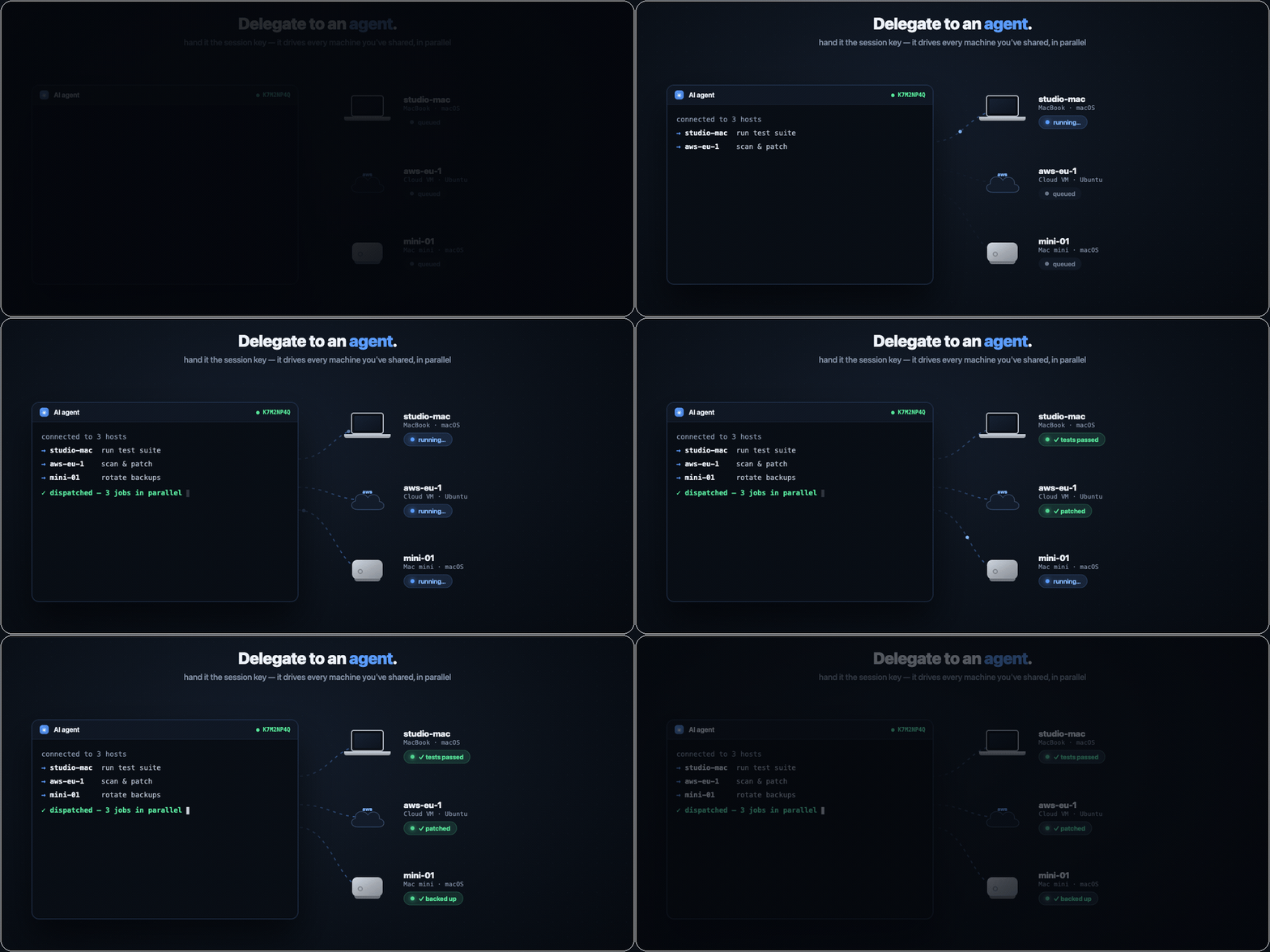
Prefer no MCP? Hand an agent a session ID and PIN and it connects like any other viewer, to every machine you've shared.
Share a local port with the world
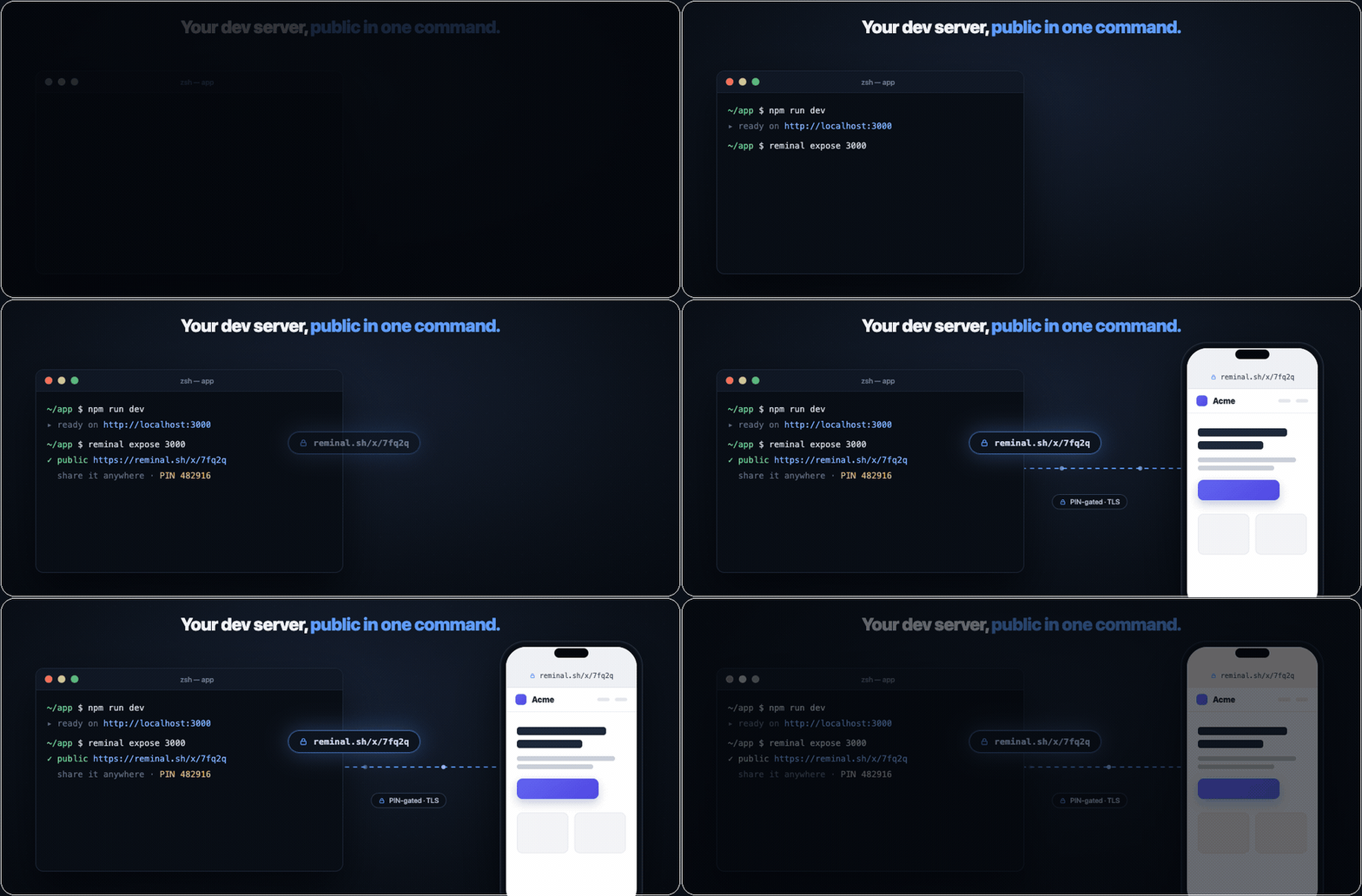
reminal expose 3000 turns whatever's running on localhost into a public HTTPS URL — a dev server, a webhook target, a build to show a client. PIN-gated by default (or --public to open it up), so you can share the link without deploying anything. It's a built-in ngrok, on the tool you already have running.
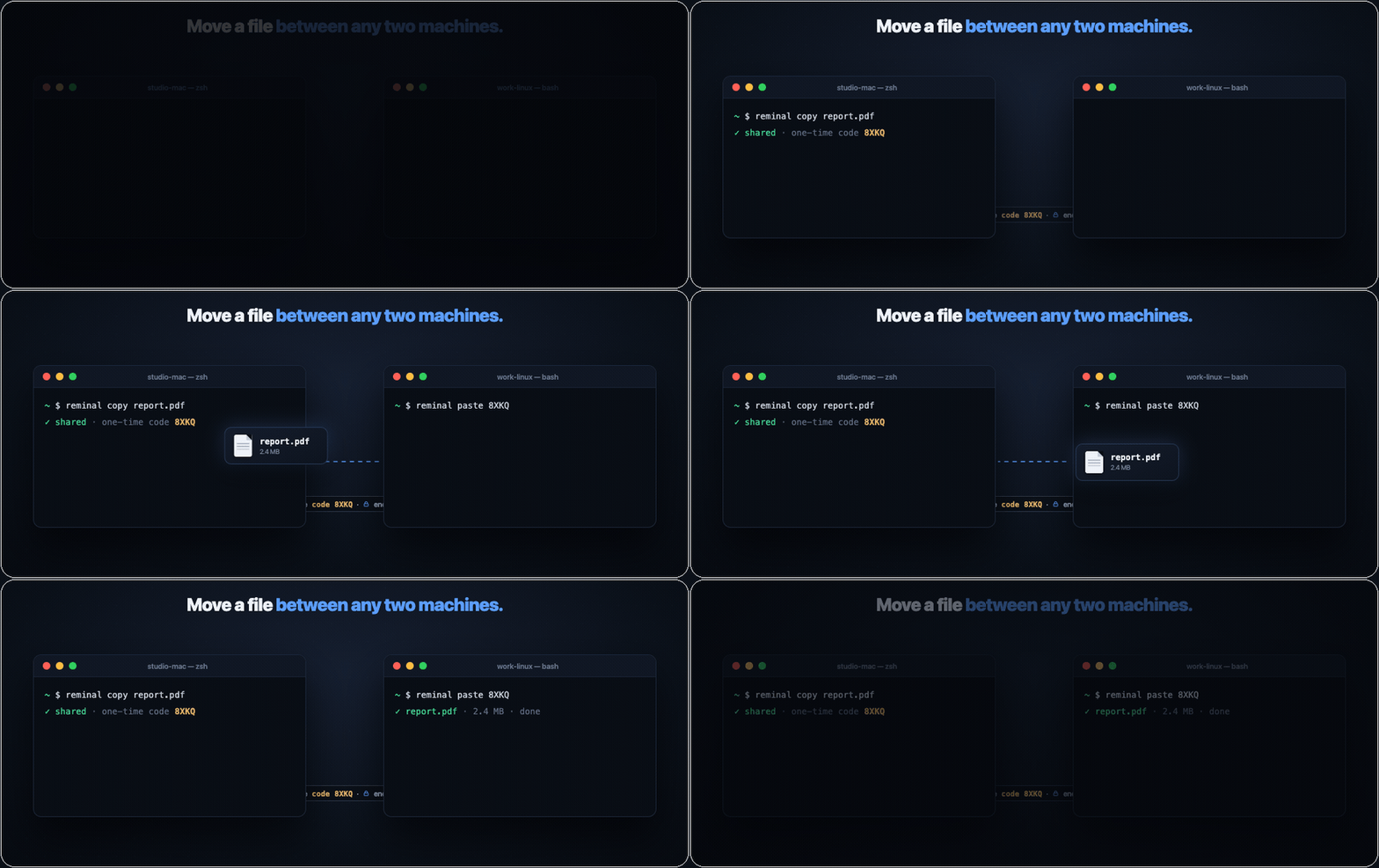
Move a file between any two machines
reminal copy report.pdf on one machine prints a one-time code; reminal paste <code> on another pulls the file down — Mac to Linux, Windows to Mac, laptop to server, anywhere to anywhere. End-to-end encrypted, no cloud drive, no account. AirDrop, for every machine you own.
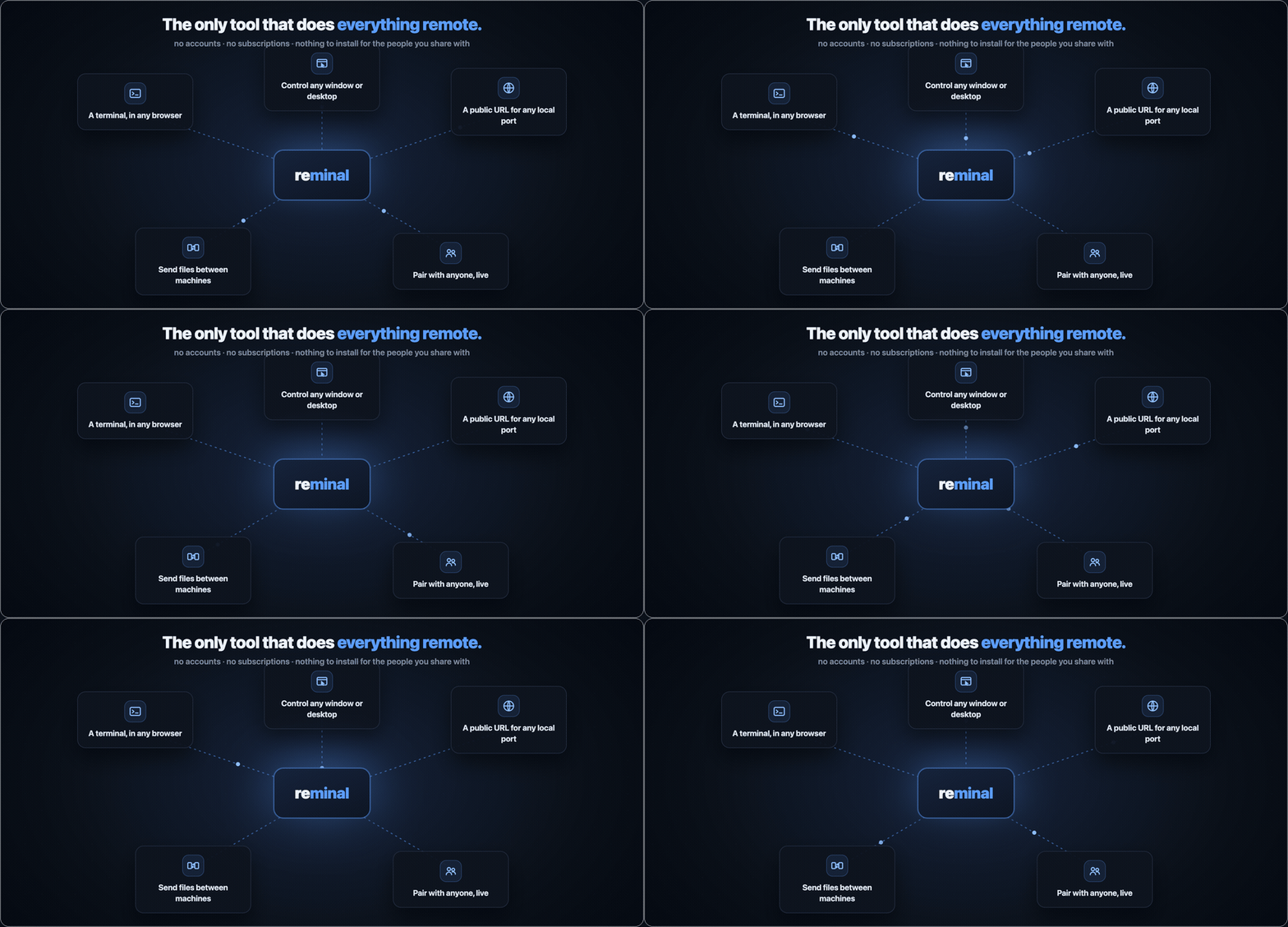
The last thing you'll install standing at your computer
Set it up once, in person — then you never have to sit at that machine again. From any browser you get its terminal, any window, the whole desktop, a public link to a local port, files to and from it, even a live session shared with someone else. One tool, every remote job.
How it works
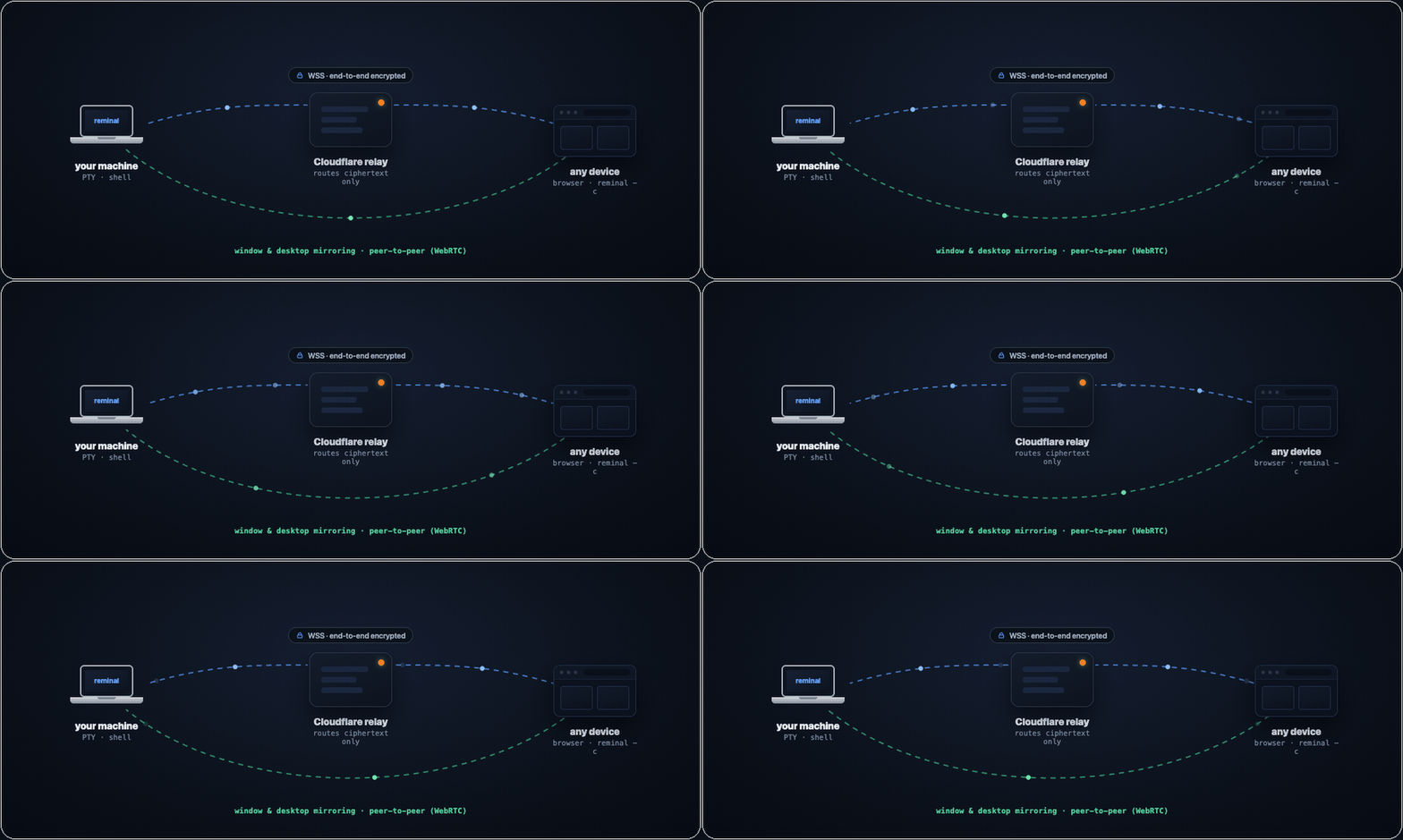
Your machine dials out to a relay over WSS; viewers dial out to the same relay. Nothing ever listens on your machine. Everything through the relay is encrypted end-to-end — it routes ciphertext it cannot read. Window and desktop frames don't even take that path: they ride a direct WebRTC connection between browser and host.
You trust Cloudflare to deliver packets — the same way you trust your ISP with SSH traffic. Neither can read what you send. The difference: reminal never opens your machine to the internet.
Everything you get
Join a session from anywhere — phone (scan the QR), any browser (open the URL, type the PIN), or another terminal (reminal --connect <id> --pin <pin>). Then:
Persistent, resilient shellClose the laptop, switch to your phone, reconnect from a different city — your shell is right where you left it, and the current screen paints instantly (a snapshot, no slow fast-forward). Wi-Fi drop, tunnel, elevator? Auto-reconnect with backoff, 2 MiB of scrollback intact. |
Pair with anyoneSend a session ID and PIN to a teammate over any channel and they join the same live shell — or a window mirror — from a browser. No account, no install, multiple viewers at once. Ctrl+C ends it; there's nothing to revoke. |
Sessions that outlive your terminalKick off a long job and close the lid — it keeps running. |
Zero-install web terminalA full xterm.js terminal is built into the relay. Any browser is the client — phone, iPad, locked-down work laptop, hotel-lobby PC. Pinch-zoom, text selection with draggable handles, on-screen modifier keys, voice dictation, find-in-scrollback. |
Files, ports & pings
|
Secure by constructionNo open ports, ephemeral session ID + PIN, AES-256-GCM end-to-end with a PIN-authenticated X25519 handshake the relay can't crack offline. Ctrl+C and the credentials are gone. Details below. |
Own a machine, skip the PINEnroll a device as an owner — |
Every machine, one list
|
Security
Built to be as secure as a properly configured SSH — and safer by default.
SSH leaves port 22 open, stores long-lived keys on disk, and trusts you to configure everything correctly. reminal takes the opposite approach: nothing to expose, nothing permanent to steal, encryption end-to-end.
| Layer | What it does |
|---|---|
| No open ports | Your machine only initiates outbound connections. There is nothing on the network to scan, brute-force, or zero-day. |
| Ephemeral credentials | Session ID and PIN exist only while reminal is running. Ctrl+C and they are gone forever. |
| Owner devices, revocable | A device you enroll as an owner connects without the PIN using its own key — a separate trust path from the ephemeral PIN, gated behind sudo to enroll and revocable per-device (or self-revoked from any browser). The relay still only routes ciphertext. |
| Dual-factor by design | An attacker needs both the session ID (~1 trillion combinations) and the 6-digit PIN. Knowing one is useless. |
| Rate-limited by the agent | Every PIN guess costs a full online handshake with your machine, and the agent answers at most ~6 per minute (burst of 8, one token per 10s). Exhausting a 6-digit PIN at that rate takes months — far longer than a session lives. |
| End-to-end encryption | AES-256-GCM with a fresh random 256-bit session key per agent run. Distributed to each viewer via a PIN-authenticated X25519 handshake (EKE-style) — the relay never sees the key or anything offline-brute-forceable from it. |
| Forward-secret handshake | Each WebSocket connection runs its own ephemeral X25519 exchange. Even if a future attacker recovers the PIN, recorded ciphertext stays unreadable. |
| Relay-blind | Cloudflare Workers route ciphertext. A relay that records traffic cannot recover the session key offline — wrong PIN guesses are detectable only by attempting a full handshake online (one shot each, bounded by the agent's kex throttle). |
| P2P you can trust | WebRTC signaling (SDP, ICE) rides inside the already-encrypted session channel, so the relay can't tamper with DTLS fingerprints — no man-in-the-middle window. Frames on the DataChannel are DTLS-protected end-to-end. |
| TLS in transit | WSS / TLS on every hop in production. |
One deliberate exception: reminal expose port-forwards are not end-to-end encrypted — the visitor is an ordinary browser with no reminal key, so that traffic passes through the relay in plaintext (PIN-gated, but readable by the relay). Everything else above is E2E. Self-host the relay if that matters to you.
Best practices: share the session ID and PIN over different channels (email the ID, text the PIN) · Ctrl+C when done — credentials die instantly · keep the client current with reminal upgrade.
Digging deeper: Security architecture · Threat model · Subprocessors & data handling · Self-assessment · Report a vulnerability
reminal vs SSH, at a glance
SSH was designed in 1995 — it assumes a static IP, a router you can configure, and keys you keep rotated. reminal assumes none of that, so the trade-offs line up differently:
| reminal | SSH | |
|---|---|---|
| Setup time | One command | Keys, configs, port-forwarding, firewalls |
| Listening port | None | TCP 22 exposed to the internet |
| Credentials | Ephemeral session ID + PIN | Permanent keys on disk |
| Behind NAT / hotel Wi-Fi | Just works | VPN or jump host required |
| Client required on viewer | None — a browser is the client | ssh + a configured key per device |
| Phone friendly | Scan QR → in | No native client |
| Session survives disconnect | Shell keeps running, hop between devices | Drop the connection, lose your work (unless you wrapped it in tmux) |
| Network blips | Auto-reconnect, scrollback replay | Write failed: Broken pipe |
| GUI apps | Mirror & control any window — or the whole desktop | X11 forwarding, if you dare |
| Laptop lid shut, no monitor | Closed-lid mode keeps serving on a virtual display | Terminal only |
| If laptop is stolen | Sessions already dead | Old keys still grant access |
| Encryption | End-to-end through relay | End-to-end direct (if configured right) |
Run your own relay (free, one time)
The relay runs on Cloudflare Workers + Durable Objects. The free tier handles thousands of sessions a month — and window frames go peer-to-peer, so the heavy traffic never touches it.
cd cloudflare
npm install
npx wrangler login
npm run deploy
Then copy reminal.build.env.example to the gitignored
reminal.build.env, put your workers.dev URL there, and run
./scripts/build.sh. No source edit is needed. Full guide in
cloudflare/README.md.
Local development
# Build once; source builds retain the upstream public relay by default
./scripts/build.sh

# Terminal 1 — your own relay on localhost:8080
./dist/reminal relay

# Terminal 2 — share a session via the local relay
REMINAL_LOCAL=1 ./dist/reminal

# Terminal 3 — connect from another shell or the browser
REMINAL_LOCAL=1 ./dist/reminal connect <session_id> <pin>
# or http://localhost:8080/?s=<session_id>
To test against a remote relay without rebuilding, set either runtime URL; reminal derives its counterpart automatically:
REMINAL_RELAY=wss://your-relay.example/ws ./dist/reminal
# or: REMINAL_WEB=https://your-relay.example ./dist/reminal
Reference
Platform support
The mirroring you see above isn't macOS-only — window capture and full control (click, type, scroll, drag) work on Linux/X11 and Windows as well.
| Capability | macOS | Linux | Windows |
|---|---|---|---|
| Terminal sharing · sessions · files · port forwarding | ✅ | ✅ | ✅ ConPTY |
Owner connect (PIN-free) · reminal machines |
✅ | ✅ | ✅ |
| Window & desktop mirroring + control | ✅ ScreenCaptureKit — H.264 up to 60 fps | ✅ X11 — wmctrl · xdotool · ImageMagick |
✅ Win32 — PrintWindow · SendInput |
| Closed-lid mode (auto virtual display) | ✅ | — | — |
Hot restart (reminal restart) |
✅ | ✅ | ✅ (foreground sessions convert to background + attached viewer) |
Linux capture needs an X11 session (or Xwayland) — native Wayland blocks synthetic input, so it isn't supported yet. Apple Silicon, x86_64, and Windows ARM64 all supported.
Windows notes
- Shell: sessions open PowerShell 7 (
pwsh) when installed, else Windows PowerShell, elsecmd— set$env:SHELLto override. Terminals run through ConPTY, the same API Windows Terminal uses, so colors, TUIs, and resizing behave like a native console. - No permission prompts: unlike macOS's Screen Recording grant, window mirroring and input injection need nothing enabled — it works out of the box.
- Firewall prompt on first mirror: when a viewer first attaches to a window/desktop pane, Windows Firewall asks about reminal — that's the direct peer-to-peer (WebRTC) stream binding a UDP port, the same prompt any video-call app gets. Allow enables P2P; Cancel is also fine — streaming falls back to the encrypted relay path.
- Streaming: Windows uses the JPEG capture path (~5–15 fps). The 60 fps H.264 pipeline is currently macOS-only.
- Mirroring needs a logged-in desktop — a machine sitting at the login screen (or a service session) has no windows to capture; terminal sharing works regardless.
- Upgrades & hot restart:
reminal upgradeswaps the exe in place (the running one is renamed aside), andreminal restarthot-swaps a session's agent onto the new binary without touching the shell inside — each session's shell lives in a tiny ConPTY-holder process, so the agent can be replaced under it (the session's PID changes, unlike Unix). A foreground session restarts by converting: it moves to the background and your terminal becomes an attached viewer of it — same shell, same keystrokes, Ctrl-] detaches. The background host also restarts itself automatically after an upgrade.
Commands
| Command | What it does |
|---|---|
reminal [--name <name>] |
Share this terminal session |
reminal new [name] |
Spawn a fresh background session (detached — survives this terminal closing) |
reminal list [filter] [-v] |
List sessions, recent-first; filter by id/name/cwd/title (--idle, --viewers, --headless) |
reminal attach [id|name] |
Re-connect to a local session as a viewer (no arg → interactive picker) |
reminal connect <id-or-url> [pin] |
Connect to a remote session from your terminal (PIN prompted if omitted) |
reminal rename [id|name] <new-name> |
Rename a running session (inside a session: reminal rename <new-name>) |
reminal stop [id|name|port] |
Stop the reminal layer — kicks viewers, keeps your shell/server running |
reminal kill [id|name] |
Fully terminate a session (kills the shell — irreversible) |
reminal prune [dur] [-y] |
Kill idle, unwatched sessions in one go (default idle ≥ 30m) |
reminal restart [--all] |
Hot-swap the running agent(s) onto the latest binary — the shell stays alive |
reminal integrate [--remove] |
Register reminal's MCP server with your agent CLIs (Claude Code, Codex, Cursor, Gemini, Qwen, OpenCode, Antigravity, Amp, pi) |
reminal mcp |
Run the MCP server on stdio — list, search, read and type into sessions across your machines |
reminal expose <port> [--public] |
Forward a local HTTP port to a public URL (PIN-protected by default) |
reminal send <file> |
Push a file to every connected viewer (web client auto-downloads) |
reminal copy [--ttl <dur>] <file> |
Offer a file for pickup anywhere; prints a one-time code |
reminal paste <code> [dest] |
Fetch a file offered by reminal copy on another machine |
reminal notify <message> |
Push a notification to viewers (browser notification on web) |
reminal connections |
List currently attached viewers with connect time |
reminal own |
Print this device's owner id + the add owner line to paste on machines you want to own |
reminal add owner <id> [--label <name>] |
Enroll an owner device on this machine (needs sudo / an Administrator terminal on Windows) — lets it connect PIN-free |
reminal owners [rename|revoke|restore <id|label> …] |
List / relabel / revoke / restore this machine's owner devices |
reminal machines [rename <id|name> <new-name>] |
List every machine you own and its live sessions (web Machines panel manages them) |
reminal info [id|name] [--all] [--qr] [--json] |
Show connect details — ID / PIN / URL / QR |
reminal qr [id|name] |
Print just the join QR (for a second screen) |
reminal settings |
Settings page: keep the Mac unlocked for remote control; closed-lid mode (serve with the lid shut and nothing plugged in — disables clamshell sleep, auto-creates a virtual display while headless) |
reminal doctor |
Self-diagnostic: version, relay reachability, terminal, shell |
reminal permissions |
macOS: grant Screen Recording to reminal once, so background (+) sessions can mirror windows |
reminal completion <bash|zsh|fish|powershell> |
Print a shell completion script |
reminal upgrade |
Upgrade to the latest release |
reminal relay [port] |
Start a local relay (development only) |
reminal version [--verbose] |
Print version |
Sessions resolve by exact id, exact name, unique id prefix, or unique substring of name / cwd / title — reminal attach deploy just works.
Environment variables
| Variable | Default | What it does |
|---|---|---|
REMINAL_RELAY |
Upstream public relay | Relay WebSocket base URL; also derives REMINAL_WEB when that is unset |
REMINAL_WEB |
Upstream public web UI | Web UI URL; also derives REMINAL_RELAY when that is unset |
REMINAL_LOCAL |
— | Set to 1 to point everything at localhost |
REMINAL_OWNERS_DIR |
/etc/reminal (%ProgramData%\reminal on Windows) |
Where the machine's owner list lives (the admin-gated trust store) — override for tests or unusual layouts |
REMINAL_NO_KEEP_AWAKE |
— | Set to 1 to let the host sleep while reminal runs (defaults to keeping it awake via caffeinate / systemd-inhibit / SetThreadExecutionState) |
REMINAL_TURN / REMINAL_TURN_USER / REMINAL_TURN_PASS |
— | Optional TURN server for P2P window mirroring behind hostile NATs (or REMINAL_TURN_CF_KEY + REMINAL_TURN_CF_TOKEN for Cloudflare TURN). Without one, un-punchable viewers stay on the relay fallback |
REMINAL_NO_CAPTURE_HELPER |
— | Set to 1 to force the screenshot capture path (skip the native ScreenCaptureKit helper) |
REMINAL_DEBUG |
— | Set to 1 to append the raw error string to status lines, for diagnosing connection problems |
SHELL |
$SHELL, then probes /bin/zsh, /bin/bash, /bin/sh (Windows: pwsh → powershell → cmd) |
Which shell to spawn inside the session |
Installs to ~/.local/bin/reminal (macOS/Linux) or %LOCALAPPDATA%\Programs\reminal (Windows) — no sudo/admin needed. Apple Silicon, x86_64, and Windows ARM64. Build from source with ./scripts/build.sh (Go 1.25+, Swift toolchain on macOS for the native capture helper); on Windows it's a plain go build ./cmd/reminal.
For a persistent custom default in local builds, copy
reminal.build.env.example to reminal.build.env and set
REMINAL_DEFAULT_RELAY and/or REMINAL_DEFAULT_WEB. The local file is ignored
by git and is parsed as inert KEY=VALUE data (not executed as shell code).
Release workflows use repository variables with the same names, so
forks can publish their own defaults; when those variables are absent, the
upstream defaults remain intact so ordinary contributor and upstream builds
continue to work.
Ready to try it?
curl -fsSL https://raw.githubusercontent.com/harshalgajjar/Reminal/main/install.sh | sh
reminal
On Windows (PowerShell):
irm https://raw.githubusercontent.com/harshalgajjar/Reminal/main/install.ps1 | iex
reminal
Scan the QR — you're in. No signup, no port-forwarding, no keys on disk. About 30 seconds from this page to your own machine, live in a browser.
License
reminal is dual-licensed under AGPL-3.0. Using it — personally or
inside a company, unmodified — needs nothing from us. A
commercial license covers embedding reminal in a product you
distribute, or running a modified copy as a service. See
LICENSING.md for where that line sits, and CLA.md
if you'd like to contribute.
Built by @harshalgajjar. Stars are appreciated. Issues even more so.
Frequently asked about Reminal
What is Reminal?+
Reminal is a self-hosted AnyDesk alternative built on the Cloudflare developer platform. Control your own desktop, windows and terminal through a browser, using a Cloudflare relay.
What does Reminal replace?+
Reminal is listed as an alternative to AnyDesk. Compare the features and tradeoffs before migrating.
What Cloudflare primitives does Reminal use?+
Reminal is built on Durable Objects, Workers.
How much does Reminal cost to run?+
A small self-hosted relay can fit Workers Free and SQLite Durable Objects allowances. Cloudflare hosts the relay/viewer; your own computer runs the native agent. Free usage depends on request, duration, storage and CPU limits. Optional TURN, domains and other services are separate. Keep the outer Worker within 100,000 requests/day shared across the account and 10 milliseconds CPU per invocation. Performance has not been measured. Use the declared SQLite Durable Objects: 100,000 metered requests/day, 13,000 GB-s duration/day, 5 million rows read/day, 100,000 rows written/day and 5 GB stored data. Free operations fail after the relevant cap. Hibernation-compatible WebSockets reduce idle duration, but active handlers, timers and relay fallback still consume allowances. Sessions-per-month capacity has not been verified. Supply your existing host computer, power/network connection and permissions. Optional TURN, push setup and a custom domain are outside this relay-only assessment. Replace account_id and author-owned routes in cloudflare/wrangler.toml. Point the native host to your relay through REMINAL_RELAY or REMINAL_WEB. The marketing site’s R2 downloads are a separate optional deployment. Check current Cloudflare pricing before deploying.
Is Reminal open source?+
The upstream repository declares the AGPL-3.0 license. Read its terms at https://raw.githubusercontent.com/harshalgajjar/Reminal/a4c10b35d704286009f16d25c540258722ec6161/LICENSE. Source code and contributor credit are available at https://github.com/harshalgajjar/Reminal.
Community rating
No ratings yet. Tried this project? Share your experience.
One rating per verified account. You can change or remove yours. Accounts are email verified; use of the software is self-reported.
Discussion · 0
sign in to comment →