
Source & license
Upstream license: MIT
License TL;DR
You can use it, change it, self-host it and sell it. Keep the original copyright and license notice with copies of the code. You don’t have to publish your changes. The authors don’t promise it will work.
Explain MIT in plain English →Summary of the main license. Separate packages and assets can have different terms.
Inspect repository ↗Read this project’s actual license ↗Repository owner
See the upstream repository for the original creator and contributors.
Maintain this project? Maintainer verification →Cloudflare hosting
Paid services required
A conservative small SSR installation uses Workers Paid from $5 USD/account/month, plus R2 usage beyond its standard free allowance. The collected OpenNext path is deployable, but Free-plan 10ms CPU fit has not been measured. A custom domain is required by the committed routing setup.
Hosting requirements
- The README explicitly says there is no authentication: reachable users can download books and access all profiles. Read-only mode blocks writes, not reading; private access needs an independently configured access boundary.
- Use your own R2 bucket and domain; keep standard R2 under 10GB-month, 1M Class A and 10M Class B operations/month to stay within its included storage allowance.
- Source and configuration review establishes a deployment path and conditional costs; this candidate was not executed or load-tested.
Sources checked 01/10/2026
Repository snapshot: 8888795. Hosting eligibility reflects the deployment documentation and listed assumptions.
- calibre-web ↗
Run it as a Cloudflare Worker over R2, or as a Node server over a directory on your own machine. Both use the same
- workers ↗
{ "$schema": "node_modules/wrangler/config-schema.json", "main": ".open-next/worker.js", "name": "bookshelf", "compatibility_date": "2025-09-27", "compatibility_flags": ["nodejs_compat"], "minify": true, "keep_vars": true, "workers_dev": false, "preview_urls": false, "assets": { "directory": ".open-next/assets", "binding": "ASSETS" }, "services": [ { "binding": "WORKER_SE
- r2 ↗
KER_SELF_REFERENCE", "service": "bookshelf" } ], "observability": { "enabled": false }, "r2_buckets": [ { "binding": "BOOKS", "bucket_name": "books", "jurisdiction": "eu" } ], "ratelimits": [ { "name": "R2_RATE_LIMITER", "namespace_id": "1001", "simple": { "limit": 30, "period": 60 } }, { "name": "DOWNLOAD_RATE_LIMITER", "namespace_id": "1002", "simple": { "limit": 10,
- paid ↗
{ "$schema": "node_modules/wrangler/config-schema.json", "main": ".open-next/worker.js", "name": "bookshelf", "compatibility_date": "2025-09-27", "compatibility_flags": ["nodejs_compat"], "minify": true, "keep_vars": true, "workers_dev": false, "preview_urls": false, "assets": { "directory": ".open-next/assets", "binding": "ASSETS" }, "services": [ { "binding": "WORKER_SELF_REFERENCE", "service": "bookshelf" } ], "observability": { "enabled": false }, "r2_buckets": [ { "binding": "BOOKS", "bucket_name": "books", "jurisdiction": "eu" } ], "ratelimits": [ { "name": "R2_RATE_LIMITER", "namespace_id": "1001", "simple": { "limit": 30, "period": 60 } },
- paid ↗
The Workers Paid plan includes Workers, Pages Functions, Workers KV, Hyperdrive, and Durable Objects usage for a minimum charge of $5 USD per month for an account. The plan includes increased initial usage allotments, with clear charges for usage that exceeds the base plan. There are no additional charges for data transfer (egress) or throughput (bandwidth).
- paid ↗
| Storage | 10 GB-month / month |
- paid ↗
| Class A Operations | 1 million requests / month |
- paid ↗
| Class B Operations | 10 million requests / month |
- MIT ↗
MIT License Copyright (c) 2026 Murat Erkin Cicek Permission is hereby granted, free of charge, to any person obtaining a copy of this software and associated documentation files (the "Software"), to deal in the Software without restriction, including without limitation the rights to use, copy, modify, merge, publish, distribute, sublicense, and/or sell copies of the Software, and to permit persons to whom the Software is furnished to do so, subject to the following conditions: The above copyright notice and this permission notice shall be included in all copies or substantial portions of the Software. THE SOFTWARE IS PROVIDED "AS IS", WITHOUT WARRANTY OF ANY KIND, EXPRESS OR IMPLIED, INCLUDING BUT NOT LIMITED TO THE WARRANTIES OF MERCHANTABILITY, FITNESS FOR A PARTICULAR PURPOSE AND NONINFRINGEMENT. IN NO EVENT SHALL THE AUTHORS OR COPYRIGHT HOLDERS BE LIABLE FOR ANY CLAIM, DAMAGES OR OTHER LIABILITY, WHETHER IN AN ACTION OF CONTRACT, TORT OR OTHERWISE, ARISING FROM, OUT OF OR IN C
- architecture ↗
{ "$schema": "node_modules/wrangler/config-schema.json", "main": ".open-next/worker.js", "name": "bookshelf", "compatibility_date": "2025-09-27", "compatibility_flags": ["nodejs_compat"], "minify": true, "keep_vars": true, "workers_dev": false, "preview_urls": false, "assets": { "directory": ".open-next/assets", "binding": "ASSETS" }, "services": [ { "binding": "WORKER_SELF_REFERENCE", "service": "bookshelf" } ], "observability": { "enabled": false }, "r2_buckets": [ { "binding": "BOOKS", "bucket_name": "books", "jurisdiction": "eu" } ], "ratelimits": [ { "name": "R2_RATE_LIMITER", "namespace_id": "1001", "simple": { "limit": 30, "period": 60 } },
- architecture ↗
{ "$schema": "node_modules/wrangler/config-schema.json", "main": ".open-next/worker.js", "name": "bookshelf", "compatibility_date": "2025-09-27", "compatibility_flags": ["nodejs_compat"], "minify": true, "keep_vars": true, "workers_dev": false, "preview_urls": false, "assets": { "directory": ".open-next/assets", "binding": "ASSETS" }, "services": [ { "binding": "WORKER_SE
- architecture ↗
KER_SELF_REFERENCE", "service": "bookshelf" } ], "observability": { "enabled": false }, "r2_buckets": [ { "binding": "BOOKS", "bucket_name": "books", "jurisdiction": "eu" } ], "ratelimits": [ { "name": "R2_RATE_LIMITER", "namespace_id": "1001", "simple": { "limit": 30, "period": 60 } }, { "name": "DOWNLOAD_RATE_LIMITER", "namespace_id": "1002", "simple": { "limit": 10,
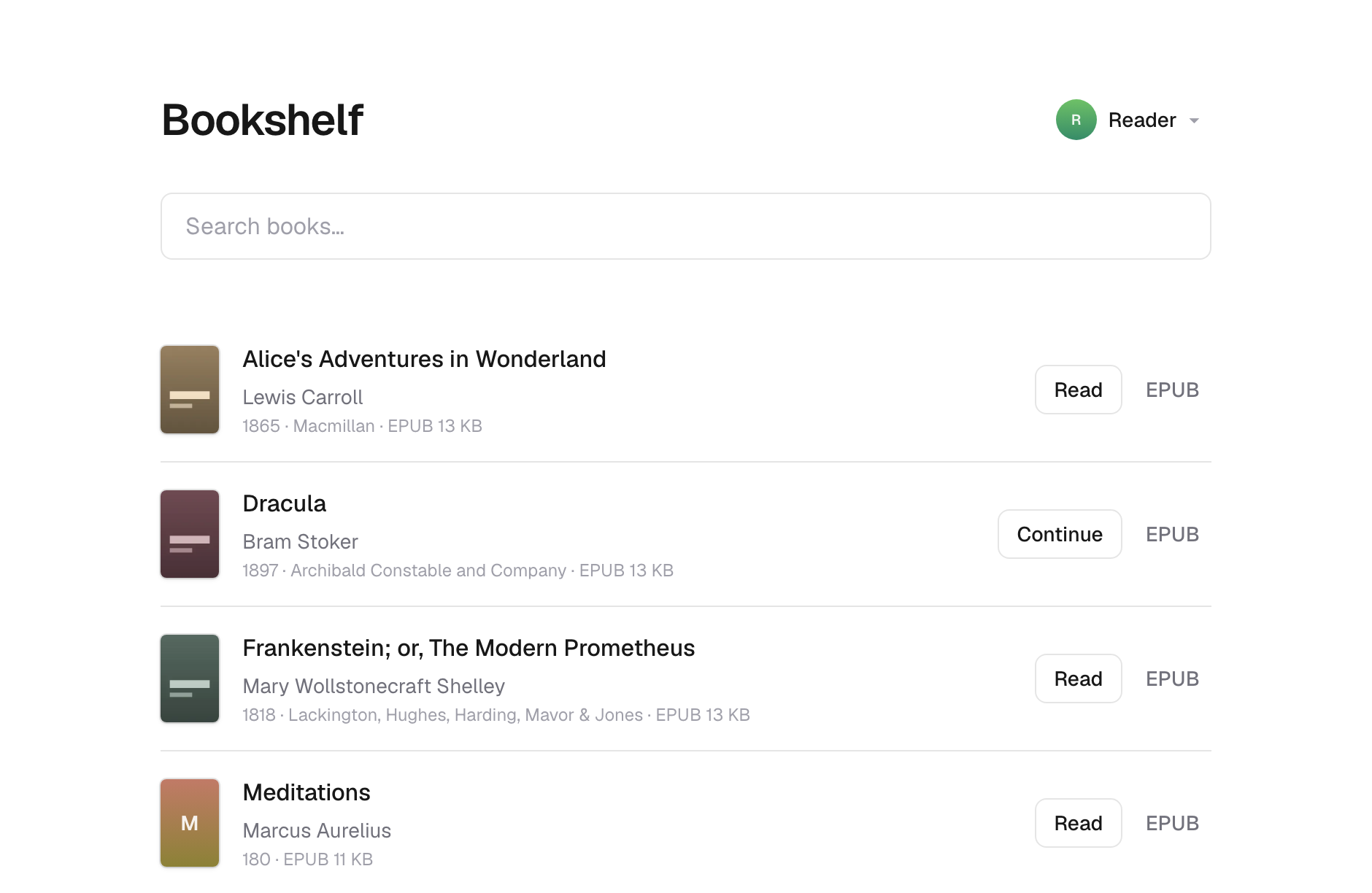
Upstream screenshot · murerkinn/bookshelf repository contributors ↗. Depicts the upstream project. We have not deployed and tested a fresh installation here.
What it can replace
Compare the workflow you need. These mappings describe overlap; full feature parity requires a separate comparison.
 Calibre Web ↗
Browser ebook-library browsing and OPDS access to owned EPUB/PDF files; no format-conversion, DRM or complete library-platform parity claim.
See supporting source ↗How it works
The shape of Bookshelf on Cloudflare, and how it stacks up against the rented tools it replaces.
Architecture
Diagram of deployment declarations at the reviewed commit. Each app has its own entrypoint; declared resources do not prove runtime calls. Follow file and line sources below.
View upstream source ↗Configuration and workflow sources
Reviewed commit 8888795162ff. Files were read as data; upstream applications and CI jobs were not executed.
Deployment configuration · 1 files
Cloudflare Workers · compatibility 2025-09-27
bookshelf · default
Entrypoint: .open-next/worker.js
Static assets: .open-next/assets
BOOKS→ R2WORKER_SELF_REFERENCE→ Worker service · service bookshelfASSETS→ Static assets
Named environments are separate deployments. Bindings are shown only where declared. Configured routes are URL patterns, not verified application endpoints.
Runtime source · handlers, binding usage and workflow steps
Observed TypeScript/JavaScript declarations from Worker entrypoints and resolved relative imports. Calls and workflow steps may run conditionally; their listed order is not a proven end-to-end request flow. Router declarations may be mounted under a prefix or may not be registered. This shows code wiring, not a successful deployment or runtime test. Dynamic wiring, aliases and generated code may not resolve.
No direct runtime declarations resolved from this snapshot. Generated framework bundles or dynamic entrypoints need manual tracing.
Build and deployment pipeline · 1 GitHub Actions workflows
Repository CI declarations, separate from runtime request processing. Job dependencies and conditions are shown as written; long commands are shortened with an ellipsis; a workflow file does not prove a recent successful run.
Triggers: push, pull_request
Lint, build and types · no job dependencies declared
- actions/checkout@v7
actions/checkout@v7 - actions/setup-node@v7
actions/setup-node@v7 - Shell command
npm ci - Shell command
npm run lint - Shell command
npm run build - Shell command
npm run check-types
Bundle the Worker · no job dependencies declared
- actions/checkout@v7
actions/checkout@v7 - actions/setup-node@v7
actions/setup-node@v7 - Shell command
npm ci - Shell command
npm run bundle
Tests · no job dependencies declared
- actions/checkout@v7
actions/checkout@v7 - actions/setup-node@v7
actions/setup-node@v7 - Shell command
npm ci - Shell command
npx turbo run test
build: turbo run builddeploy: turbo run deploy --log-prefix=none --
build: next builddeploy: opennextjs-cloudflare build && opennextjs-cloudflare deploy
build: tsc --build
build: tsc --build
build: tsc --build
build: tsc --build
build: tsc --build
Repository README
View original on GitHub ↗Full upstream document by @murerkinn · README.md · snapshot 8888795
Bookshelf

A self-hosted library for the ebooks you already own. Put your EPUBs and PDFs in a folder, publish them, and read them in any browser — or on your Kobo, through the OPDS catalog.

Run it as a Cloudflare Worker over R2, or as a Node server over a directory on your own machine. Both use the same code and the same library.
Try it in a minute
You'll need Node 24 or newer and a Unix-like system. Windows isn't supported —
the sync tool looks for its image tools with which.
git clone https://github.com/murerkinn/bookshelf.git
cd bookshelf
npm install
npm run demo
npm run demo writes nine generated public-domain books into books/ — eight
EPUBs and a PDF, so both readers are one click away. It downloads nothing. Then
publish and run them by whichever route below.
The checked-in bookshelf.config.json points at Cloudflare R2, so npm run sync goes there unless you change it. For a local look, switch it to the
filesystem provider first:
// bookshelf.config.json
{ "storage": { "provider": "fs", "directory": "shelf-data" } }
Set up your own
Put your books in books/, then pick where the library should live.
With Docker
The shortest route, and the image ships the tools that make covers.
mkdir books && cp ~/Downloads/*.epub books/
docker compose run --rm sync --create
docker compose up -d
Your shelf is on http://localhost:3000. Sync flags pass through, so
docker compose run --rm sync --force works as it does locally.
Back up the library volume — it holds your published books and your reading
positions. To bind-mount a host directory instead, chown it first:
chown -R 1000:1000 /srv/bookshelf
On a machine you own
No account anywhere.
// bookshelf.config.json
{ "storage": { "provider": "fs", "directory": "shelf-data" } }
npm run sync -- --create
npm run build
npm start -w @bookshelf/app
More in the filesystem provider.
On Cloudflare
You'll need a Cloudflare account. Edit bookshelf.config.json and
apps/bookshelf/wrangler.jsonc so they name your bucket and Worker — if they
disagree, the sync tool stops before uploading.
npx wrangler login
npm run sync -- --create
npm run deploy
More in the R2 provider.
Before you commit a library to it
There is no authentication. Anyone who can reach your shelf can download every book in it, and pick any profile while doing it. The OPDS catalog makes it machine-enumerable as well. Put it on a network you trust, or behind something that asks who's calling.
Nothing is encrypted. Your library is stored in the clear, and object keys are slugified titles — a listing of your storage names your shelf. With the filesystem provider you can keep it on an encrypted volume today.
Two devices reading one profile at once is last-write-wins.
What's missing has the full list.
Configuration
| variable | what it does |
|---|---|
BOOKSHELF_READ_ONLY |
set to 1 and storage keeps serving but stops accepting. Profiles can't be added, renamed or deleted, and reading positions stay in the browser. Set this on anything strangers can reach |
BOOKSHELF_PROVIDER |
override the provider the build was made with |
BOOKSHELF_DIRECTORY |
override where the filesystem provider looks |
BOOKSHELF_SITE_URL |
the public address, for link previews and canonical URLs. Set it behind a proxy that doesn't say so |
Everything else lives in bookshelf.config.json — see
publishing.
Commands
All from the repository root.
npm run dev          # local dev server, against the local R2 bucket
npm run sync         # build the library and publish it
npm run build        # build every workspace
npm run check-types  # typecheck every workspace
npm run preview      # build + run the Worker locally
npm run deploy       # build + deploy to Cloudflare Workers
npm test             # the test suite
npm run lint         # biome, across the repo
npm run cf-typegen -w @bookshelf/app regenerates cloudflare-env.d.ts after
you edit wrangler.jsonc.
Documentation
Published at https://murerkinn.github.io/bookshelf/.
| Publishing a library | the sync tool, its flags, and covers |
| The library format | what ends up in storage, and what to back up |
| Storage providers | choosing where your library lives |
| Cloudflare R2 | setup, deploying, publishing locally |
| Filesystem | your own machine or a VPS |
| Profiles | who is reading, and where they got to |
| Reading in the browser | the readers and their controls |
| The OPDS catalog | reading on a Kobo, a Kindle, or any OPDS client |
| Architecture | for working on the code |
| What's missing | limitations, and what's planned |
Contributing
See CONTRIBUTING.md. In short: Node 24, npm install, and
npm run lint, npm run check-types and npm test before you push. Say what
you verified — the tests reach the packages and the app's service layer but not
its pages.
Storage providers are the extension point, and yours doesn't have to live here. A package published by anyone can be installed and named in the config.
License
MIT — see LICENSE.
That covers the code in this repository. The app and the Docker image also ship other people's, under their own terms, listed in THIRD-PARTY-NOTICES.md.
None of it says anything about the books you put in a library built with it, whose copyright is between you and their publishers.
Frequently asked about Bookshelf
What is Bookshelf?+
Bookshelf is a self-hosted Calibre Web alternative built on the Cloudflare developer platform. A browser and OPDS library for your own EPUB and PDF collection
What does Bookshelf replace?+
Bookshelf is listed as an alternative to Calibre Web. Compare the features and tradeoffs before migrating.
What Cloudflare primitives does Bookshelf use?+
Bookshelf is built on R2, Workers.
How much does Bookshelf cost to run?+
A conservative small SSR installation uses Workers Paid from $5 USD/account/month, plus R2 usage beyond its standard free allowance. The collected OpenNext path is deployable, but Free-plan 10ms CPU fit has not been measured. A custom domain is required by the committed routing setup. The README explicitly says there is no authentication: reachable users can download books and access all profiles. Read-only mode blocks writes, not reading; private access needs an independently configured access boundary. Use your own R2 bucket and domain; keep standard R2 under 10GB-month, 1M Class A and 10M Class B operations/month to stay within its included storage allowance. Source and configuration review establishes a deployment path and conditional costs; this candidate was not executed or load-tested. Check current Cloudflare pricing before deploying.
Is Bookshelf open source?+
The upstream repository declares the MIT license. Read its terms at https://raw.githubusercontent.com/murerkinn/bookshelf/8888795162ff76285f246957cc34cc9988253a60/LICENSE. Source code and contributor credit are available at https://github.com/murerkinn/bookshelf.
Discussion · 0
sign in to comment →