
Source & license
Upstream license: MIT
License TL;DR
You can use it, change it, self-host it and sell it. Keep the original copyright and license notice with copies of the code. You don’t have to publish your changes. The authors don’t promise it will work.
Explain MIT in plain English →Summary of the main license. Separate packages and assets can have different terms.
Inspect repository ↗Read this project’s actual license ↗Repository owner
See the upstream repository for the original creator and contributors.
Maintain this project? Maintainer verification →Cloudflare hosting
Free tier eligible within limits
The reviewed Cloudflare deployment is eligible for Free-plan allowances for the stated small workload and feature scope. Usage limits, CPU, required account setup and separate services apply.
Hosting requirements
- Small booking traffic and the five-minute cron must fit Workers/Pages Functions, D1 and KV quotas; CPU/workload has not been benchmarked.
- Supply Google OAuth/admin-account credentials required by the default workflow; Outlook credentials are optional and provider permission requirements remain separate.
- Emailit is optional and separately billed; domain purchase and Google/Microsoft account features are outside Cloudflare allowances.
- Workers Free dynamic requests are shared across this account (100,000/day), with 10 ms CPU per invocation; workload fit is conditional and has not been measured.
- Dynamic Pages Functions requests share the Workers account allowance; only requests that do not invoke Functions count as free unlimited static asset requests.
- D1 Free allowance: 5 million rows read/day, 100,000 rows written/day and 5 GB total storage; unindexed scans and history retention consume quota.
- KV Free allowance: 100,000 keys read/day and 1,000 each writes/deletes/list requests/day; this may constrain updates before Worker request limits.
Sources checked 01/10/2026
Repository snapshot: 5a9f0e3. Hosting eligibility reflects the deployment documentation and listed assumptions.
- calendly ↗
, or both calendars together - Automatic event creation with Google Meet or Microsoft Teams links - Customizable availability and working hours - Multiple event types (30 min, 1 hour, etc.) - Configurable email notifications (confirmation, cancellation, reminders) - Email settings dashboard to enable/disable and customize emails - One-click deploy and update via GitHub Actions - Runs entirely on Cloudflare's free tier ## Quick Start ### 1. Create Cloudflare API Token 1. Go to [Cloudflare API Tokens](https://dash.cloudflare.com/profile/api-tokens) 2. Click **Cre
- cal-com ↗
creation with Google Meet or Microsoft Teams links - Customizable availability and working hours - Multiple event types (30 min, 1 hour, etc.) - Configurable email notifications (confirmation, cancellation, reminders) - Email settings dashboard to enable/disable and customize emails - One-click deploy and update via GitHub Actions - Runs entirely on Cloudflare's free tier ## Quick Start ### 1. Create Cloudflare API Token 1. Go to [Cloudflare API Tokens](https://dash.cloudflare.com/profile/api-tokens) 2. Click **Create Token** 3. Select **Edit Cloudflare Worker
- pages ↗
name = "cloudmeet" compatibility_date = "2024-01-01" pages_build_output_dir = ".svelte-kit/cloudflare" [[d1_databases]] binding = "DB" database_name = "cloudmeet" database_id = "YOUR_DATABASE_ID" [[kv_namespaces]] binding = "KV" id = "YOUR_KV_NAMESPACE_ID"
- d1 ↗
_date = "2024-01-01" pages_build_output_dir = ".svelte-kit/cloudflare" [[d1_databases]] binding = "DB" database_name = "cloudmeet" database_id = "YOUR_DATABASE_ID" [[kv_namespaces]] binding = "KV" id = "YOUR_KV_NAMESPACE_ID"
- kv ↗
g = "DB" database_name = "cloudmeet" database_id = "YOUR_DATABASE_ID" [[kv_namespaces]] binding = "KV" id = "YOUR_KV_NAMESPACE_ID"
- workers ↗
name = "cloudmeet-cron" main = "worker.js" compatibility_date = "2024-01-01" [triggers] crons = ["*/5 * * * *"] # These will be set via wrangler secret: # wrangler secret put APP_URL # wrangler secret put CRON_SECRET
- free-tier-eligible ↗
name = "cloudmeet" compatibility_date = "2024-01-01" pages_build_output_dir = ".svelte-kit/cloudflare" [[d1_databases]] binding = "DB" database_name = "cloudmeet" database_id = "YOUR_DATABASE_ID" [[kv_namespaces]] binding = "KV" id = "YOUR_KV_NAMESPACE_ID"
- free-tier-eligible ↗
s.cloudflare.com/workers/platform/pricing/#how-to-switch-usage-models). ### Static asset requests On both free and paid plans, requests to static assets are free and unlimited. A request is considered static when it does not invoke Functions. Refer to [Functions invocation routes](https://developers.cloudflare.com/pages/functions/routing/#functions-invocation-routes) to learn more about when Functions are invoked. ## Free Plan Requests to your Pages Functions count towards your quota for the Workers Free plan. For example, you could use 50,000 Functions reques
- free-tier-eligible ↗
rs Paid](https://developers.cloudflare.com/workers/platform/pricing/#workers) | | --- | --- | --- | | Rows read | 5 million / day | First 25 billion / month included + $0.001 / million rows | | Rows written | 100,000 / day | First 50 million / month included + $1.00 / million rows | | Storage (per GB stored) | 5 GB (total) | First 5 GB included + $0.75 / GB-mo | Track your D1 usage To accurately track your usage, use the [meta object](https://developers.cloudflare.com/d1/worker-api/return-object/), [GraphQL Analytics API](https://developers.cloudflare.com/d1/obs
- free-tier-eligible ↗
flare.com/workers/platform/pricing/). | | Free plan<sup>1</sup> | Paid plan | | --- | --- | --- | | Keys read | 100,000 / day | 10 million/month, + $0.50/million | | Keys written | 1,000 / day | 1 million/month, + $5.00/million | | Keys deleted | 1,000 / day | 1 million/month, + $5.00/million | | List requests | 1,000 / day | 1 million/month, + $5.00/million | | Stored data | 1 GB | 1 GB, + $0.50/ GB-month | <sup>1</sup> The Workers Free plan includes limited Workers KV usage. All limits reset daily at 00:00 UTC. If you exceed any one of these limits, further o
- free-tier-eligible ↗
ount Manager. | | Requests<sup>1, 2, 3, 4</sup> | Duration | CPU time | | --- | --- | --- | --- | | **Free** | 100,000 per day | No charge for duration | 10 milliseconds of CPU time per invocation | | **Standard** | 10 million included per month <br> +$0.30 per additional million | No charge or limit for duration | 30 million CPU milliseconds included per month<br> +$0.02 per additional million CPU milliseconds<br><br> Max of [5 minutes of CPU time](https://developers.cloudflare.com/workers/platform/limits/#account-plan-limits) per invocation (default: 30 second
- MIT ↗
MIT License Copyright (c) 2024 Permission is hereby granted, free of charge, to any person obtaining a copy of this software and associated documentation files (the "Software"), to deal in the Software without restriction, including without limitation the rights to use, copy, modify, merge, publish, distribute, sublicense, and/or sell copies of the Software, and to permit persons to whom the Software is furnished to do so, subject to the following conditions: The above copyright notice and this
- architecture ↗
name = "cloudmeet" compatibility_date = "2024-01-01" pages_build_output_dir = ".svelte-kit/cloudflare" [[d1_databases]] binding = "DB" database_name = "cloudmeet" database_id = "YOUR_DATABASE_ID" [[kv_namespaces]] binding = "KV" id = "YOUR_KV_NAMESPACE_ID"
- architecture ↗
name = "cloudmeet-cron" main = "worker.js" compatibility_date = "2024-01-01" [triggers] crons = ["*/5 * * * *"] # These will be set via wrangler secret: # wrangler secret put APP_URL # wrangler secret put CRON_SECRET
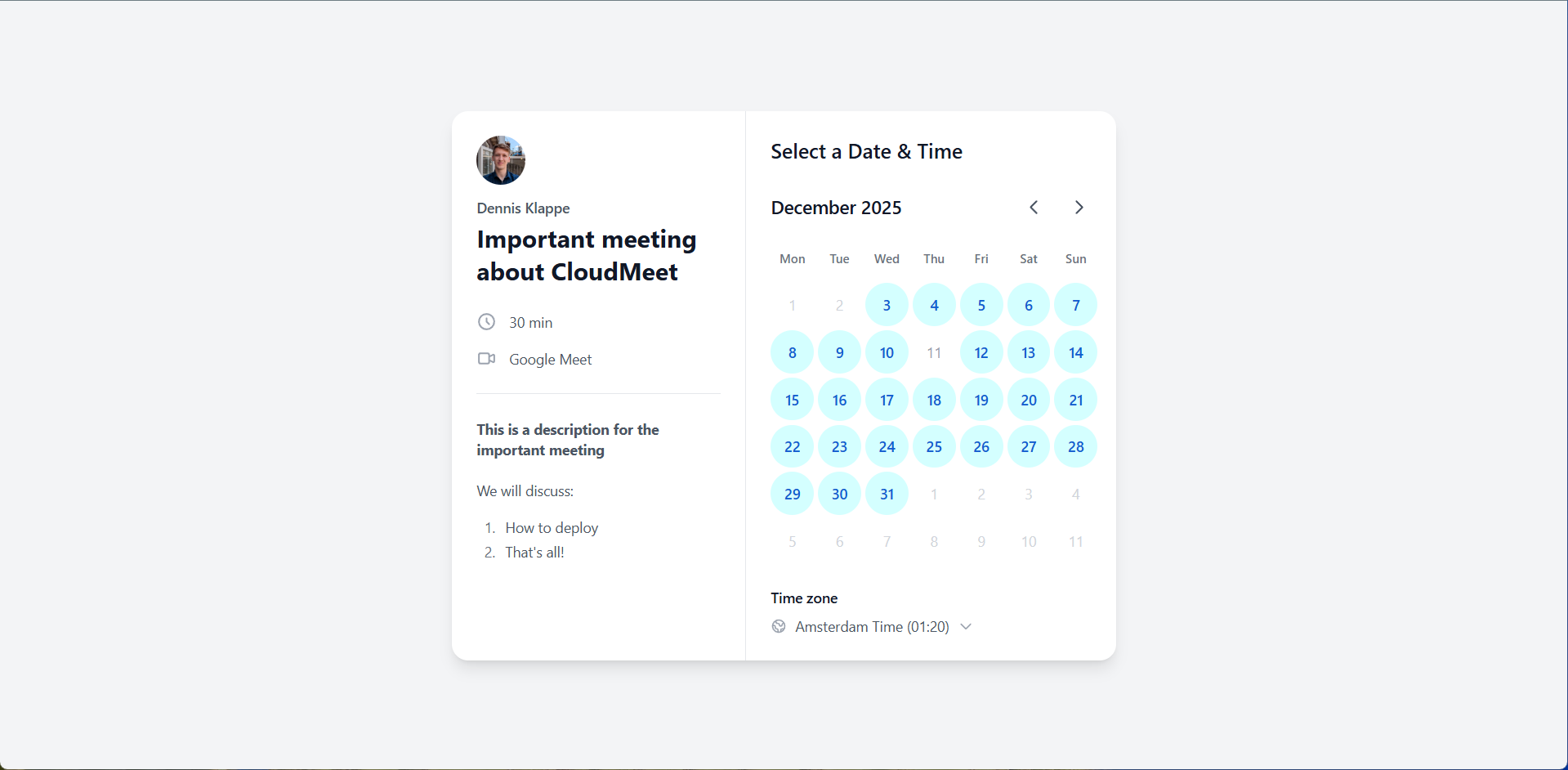
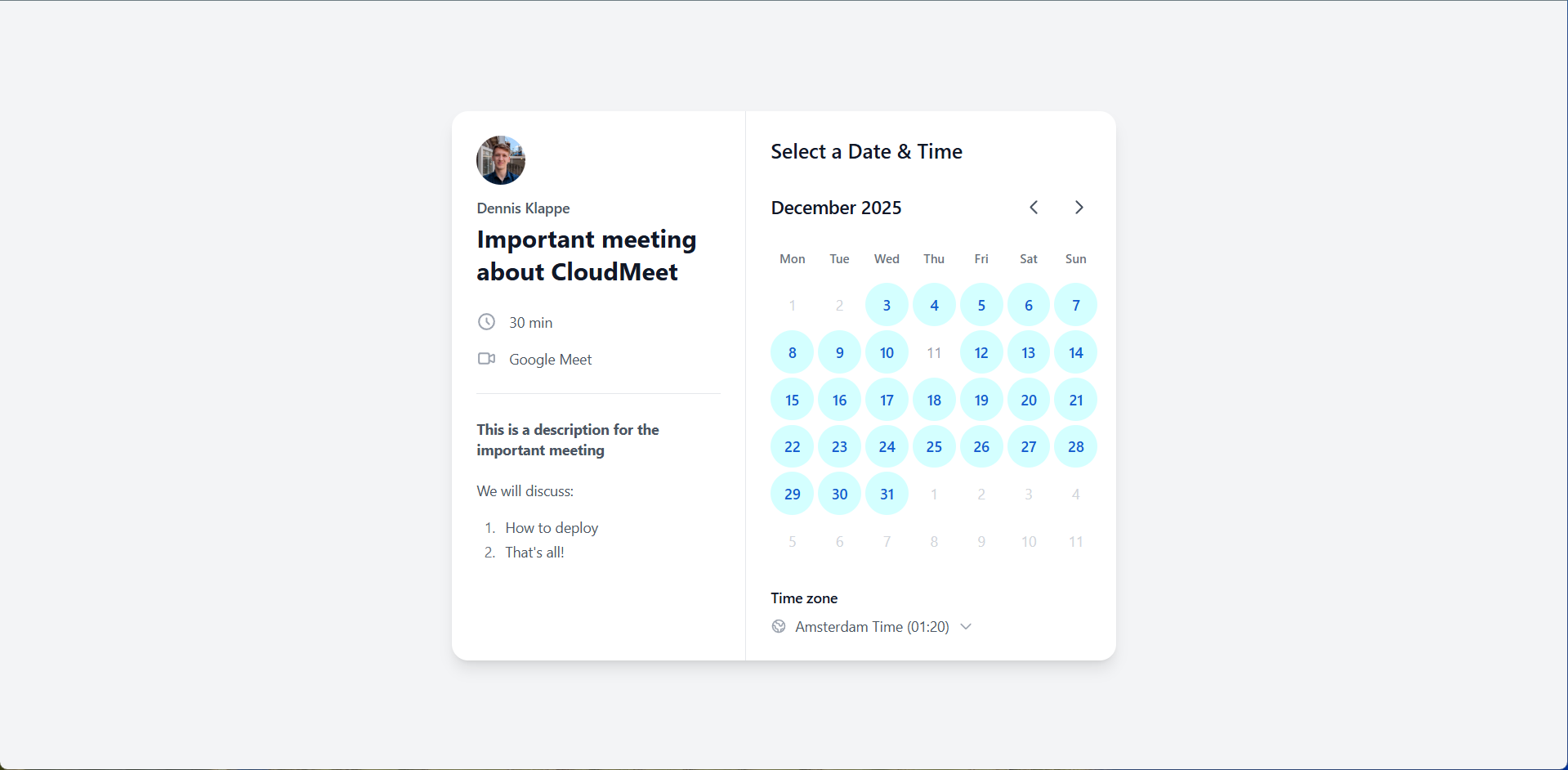
Upstream screenshot · dennisklappe/CloudMeet repository contributors ↗. Depicts the upstream project. We have not deployed and tested a fresh installation here.
What it can replace
Compare the workflow you need. These mappings describe overlap; full feature parity requires a separate comparison.
 Calendly ↗
Editorial workflow alternative: Owner booking pages, configurable event lengths, calendar availability and booking-event creation; team routing and full scheduling-platform parity not asserted.
See supporting source ↗ Cal.com ↗
Editorial workflow alternative: Individual availability-based booking pages with Google/Outlook integration; complete team, workflow and migration support not asserted.
See supporting source ↗How it works
The shape of CloudMeet on Cloudflare, and how it stacks up against the rented tools it replaces.
Architecture
Diagram of deployment declarations at the reviewed commit. Each app has its own entrypoint; declared resources do not prove runtime calls. Follow file and line sources below.
View upstream source ↗Configuration and workflow sources
Reviewed commit 5a9f0e3c8ec2. This configuration evidence comes from reading source files. Execution checks, when available, appear in the project's runtime review.
Deployment configuration · 2 files
Cloudflare Workers · compatibility 2024-01-01
cloudmeet-cron · default
Entrypoint: worker.js
Cron triggers (UTC): */5 * * * *
No resource bindings declared in this scope.
Named environments are separate deployments. Bindings are shown only where declared. Configured routes are URL patterns, not verified application endpoints.
Runtime source · handlers, binding usage and workflow steps
Observed TypeScript/JavaScript declarations from Worker entrypoints and resolved relative imports. Calls and workflow steps may run conditionally; their listed order is not a proven end-to-end request flow. Router declarations may be mounted under a prefix or may not be registered. This shows code wiring, not a successful deployment or runtime test. Dynamic wiring, aliases and generated code may not resolve.
- L7 · scheduled handler exported · references APP_URL, CRON_SECRET · calls fetch, response.json, console.log, console.error
Environment references: env.APP_URL · env.CRON_SECRET
Build and deployment pipeline · 3 GitHub Actions workflows
Repository CI declarations, separate from runtime request processing. Job dependencies and conditions are shown as written; long commands are shortened with an ellipsis; a workflow file does not prove a recent successful run.
Triggers: workflow_dispatch
deploy · no job dependencies declared
- Validate required secrets
missing=() [ -z "$CLOUDFLARE_API_TOKEN" ] && missing+=("CLOUDFLARE_API_TOKEN") [ -z "$CLOUDFLARE_ACCOUNT_ID" ] && missing+=("CLOUDFLARE_ACCOUNT_ID") [ -z "$ADMIN_EMAIL" ] && missing+=("ADMIN_EMAIL") [ -z "$JWT_SECRET" ] && missing+=("JWT_SECRET") [ -z "$APP_URL" ] && missing+=("APP_URL") [ -z "$GOOGLE_CLIENT_ID" ] && missing+=("GOOGLE_CLIENT_ID") [ -z "$GOOGLE_CLIENT_SECRET" ] && missing+=("GOOGLE_CLIENT_SECRET") if [ ${#missing[@]} -gt 0 ]; then echo "::error::Missing required secrets: ${missi… - Checkout
actions/checkout@v4 - Setup Node.js
actions/setup-node@v4 - Install dependencies
npm ci - Setup Cloudflare resources
# Create D1 database if it doesn't exist echo "Checking D1 databases..." npx wrangler d1 list if ! npx wrangler d1 list 2>/dev/null | grep -q "cloudmeet-db"; then echo "Creating D1 database..." npx wrangler d1 create cloudmeet-db fi # Get database ID echo "Getting D1 database ID..." DB_ID=$(npx wrangler d1 list --json | jq -r '.[] | select(.name=="cloudmeet-db") | .uuid') echo "D1 database ID: $DB_ID" if [ -n "$DB_ID" ] && [ "$DB_ID" != "null" ]; then sed -i "s/database_id = \"YOUR_DATABASE_ID\… - Build
npm run build - Create Pages project if needed
if ! npx wrangler pages project list 2>/dev/null | grep -q "cloudmeet"; then echo "Creating Pages project..." npx wrangler pages project create cloudmeet --production-branch=main || true fi # Clear any existing env vars to avoid conflicts with wrangler.toml echo "Clearing existing env vars..." curl -X PATCH "https://api.cloudflare.com/client/v4/accounts/$CLOUDFLARE_ACCOUNT_ID/pages/projects/cloudmeet" \ -H "Authorization: Bearer $CLOUDFLARE_API_TOKEN" \ -H "Content-Type: application/json" \ --d… - Deploy to Cloudflare Pages
# Add env vars to wrangler.toml before deploy cat >> wrangler.toml << EOF [vars] ADMIN_EMAIL = "$ADMIN_EMAIL" APP_URL = "$APP_URL" GOOGLE_CLIENT_ID = "$GOOGLE_CLIENT_ID" GOOGLE_CLIENT_SECRET = "$GOOGLE_CLIENT_SECRET" JWT_SECRET = "$JWT_SECRET" EMAILIT_API_KEY = "$EMAILIT_API_KEY" EMAIL_FROM = "$EMAIL_FROM" CRON_SECRET = "$CRON_SECRET" MICROSOFT_CLIENT_ID = "$MICROSOFT_CLIENT_ID" MICROSOFT_CLIENT_SECRET = "$MICROSOFT_CLIENT_SECRET" EOF echo "Final wrangler.toml:" cat wrangler.toml npx wrangler p… - Deploy Cron Worker
cd workers/cron-reminders # Deploy the worker npx wrangler deploy # Set secrets for the worker echo "$APP_URL" | npx wrangler secret put APP_URL echo "$CRON_SECRET" | npx wrangler secret put CRON_SECRET echo "Cron worker deployed with 5-minute schedule"
Triggers: workflow_dispatch
sync · no job dependencies declared
- Checkout
actions/checkout@v4 - Sync with upstream
git config user.name "github-actions[bot]" git config user.email "github-actions[bot]@users.noreply.github.com" # Add upstream remote git remote add upstream https://github.com/dennisklappe/CloudMeet.git || true git fetch upstream # Check if there are changes if git diff --quiet HEAD upstream/main; then echo "No changes to sync" echo "changes=false" >> $GITHUB_OUTPUT else echo "changes=true" >> $GITHUB_OUTPUT # Merge upstream changes git merge upstream/main --allow-unrelated-histories -m "Sync …
deploy · after sync
- Validate required secrets
missing=() [ -z "$CLOUDFLARE_API_TOKEN" ] && missing+=("CLOUDFLARE_API_TOKEN") [ -z "$CLOUDFLARE_ACCOUNT_ID" ] && missing+=("CLOUDFLARE_ACCOUNT_ID") [ -z "$ADMIN_EMAIL" ] && missing+=("ADMIN_EMAIL") [ -z "$JWT_SECRET" ] && missing+=("JWT_SECRET") [ -z "$APP_URL" ] && missing+=("APP_URL") [ -z "$GOOGLE_CLIENT_ID" ] && missing+=("GOOGLE_CLIENT_ID") [ -z "$GOOGLE_CLIENT_SECRET" ] && missing+=("GOOGLE_CLIENT_SECRET") if [ ${#missing[@]} -gt 0 ]; then echo "::error::Missing required secrets: ${missi… - Checkout
actions/checkout@v4 - Setup Node.js
actions/setup-node@v4 - Install dependencies
npm ci - Setup Cloudflare resources
# Create D1 database if it doesn't exist echo "Checking D1 databases..." npx wrangler d1 list if ! npx wrangler d1 list 2>/dev/null | grep -q "cloudmeet-db"; then echo "Creating D1 database..." npx wrangler d1 create cloudmeet-db fi # Get database ID echo "Getting D1 database ID..." DB_ID=$(npx wrangler d1 list --json | jq -r '.[] | select(.name=="cloudmeet-db") | .uuid') echo "D1 database ID: $DB_ID" if [ -n "$DB_ID" ] && [ "$DB_ID" != "null" ]; then sed -i "s/database_id = \"YOUR_DATABASE_ID\… - Build
npm run build - Create Pages project if needed
if ! npx wrangler pages project list 2>/dev/null | grep -q "cloudmeet"; then echo "Creating Pages project..." npx wrangler pages project create cloudmeet --production-branch=main || true fi # Clear any existing env vars to avoid conflicts with wrangler.toml echo "Clearing existing env vars..." curl -X PATCH "https://api.cloudflare.com/client/v4/accounts/$CLOUDFLARE_ACCOUNT_ID/pages/projects/cloudmeet" \ -H "Authorization: Bearer $CLOUDFLARE_API_TOKEN" \ -H "Content-Type: application/json" \ --d… - Deploy to Cloudflare Pages
# Add env vars to wrangler.toml before deploy cat >> wrangler.toml << EOF [vars] ADMIN_EMAIL = "$ADMIN_EMAIL" APP_URL = "$APP_URL" GOOGLE_CLIENT_ID = "$GOOGLE_CLIENT_ID" GOOGLE_CLIENT_SECRET = "$GOOGLE_CLIENT_SECRET" JWT_SECRET = "$JWT_SECRET" EMAILIT_API_KEY = "$EMAILIT_API_KEY" EMAIL_FROM = "$EMAIL_FROM" CRON_SECRET = "$CRON_SECRET" MICROSOFT_CLIENT_ID = "$MICROSOFT_CLIENT_ID" MICROSOFT_CLIENT_SECRET = "$MICROSOFT_CLIENT_SECRET" EOF echo "Final wrangler.toml:" cat wrangler.toml npx wrangler p…
Triggers: workflow_dispatch
sync · no job dependencies declared
- Checkout
actions/checkout@v4 - Sync with upstream
git config user.name "github-actions[bot]" git config user.email "github-actions[bot]@users.noreply.github.com" # Add upstream remote git remote add upstream https://github.com/dennisklappe/CloudMeet.git || true git fetch upstream # Merge upstream changes, accepting all upstream changes on conflict git merge upstream/main --allow-unrelated-histories -X theirs -m "Sync with upstream CloudMeet" || { echo "Merge conflict detected. Accepting all upstream changes..." git checkout --theirs . || true …
build: vite builddeploy: npm run build && wrangler pages deploy .svelte-kit/cloudflareprebuild: node scripts/prebuild.js
Repository README
View original on GitHub ↗Full upstream document by @dennisklappe · README.md · snapshot 5a9f0e3
CloudMeet
A free, open-source meeting scheduler that runs on Cloudflare. Open-source Calendly alternative with Google Calendar and Outlook Calendar integration.
Features
- Google Calendar and Outlook Calendar integration
- Use Google alone, Outlook alone, or both calendars together
- Automatic event creation with Google Meet or Microsoft Teams links
- Customizable availability and working hours
- Multiple event types (30 min, 1 hour, etc.)
- Configurable email notifications (confirmation, cancellation, reminders)
- Email settings dashboard to enable/disable and customize emails
- One-click deploy and update via GitHub Actions
- Runs entirely on Cloudflare's free tier
Quick Start
1. Create Cloudflare API Token
- Go to Cloudflare API Tokens
- Click Create Token
- Select Edit Cloudflare Workers template
- Under Account Resources, select your account
- Click + Add more and add: Account → D1 → Edit
- Click Continue to summary → Create Token
- Copy the token for step 4
2. Setup Google OAuth
- Go to Google Cloud Console
- Create a new project
- Go to APIs & Services > Library > Enable Google Calendar API
- Go to APIs & Services > Credentials
- Click Create Credentials > OAuth 2.0 Client ID
- Application type: Web application
- Add authorized redirect URI:
https://YOUR-PROJECT.pages.dev/auth/callback- Replace
YOUR-PROJECTwith your Cloudflare Pages project name (you'll get this URL after first deploy, or use your custom domain if you already have one) - You can add multiple redirect URIs, so add both the default and custom domain if needed
- Replace
- Save your Client ID and Client Secret for step 4
3. Create your repository
Click Use this template > Create a new repository.
4. Add Repository Secrets
Go to your new repo's Settings > Secrets and variables > Actions > New repository secret.
Add these secrets (click "New repository secret" for each one):
| Secret | Required | Description |
|---|---|---|
CLOUDFLARE_API_TOKEN |
Yes | Your Cloudflare API token from step 1 |
CLOUDFLARE_ACCOUNT_ID |
Yes | Your Cloudflare Account ID (right sidebar) |
ADMIN_EMAIL |
Yes | Your Google email (only this account can login) |
JWT_SECRET |
Yes | Random string for session tokens (generate one) |
APP_URL |
Yes | Your app URL (e.g., https://YOUR-PROJECT.pages.dev or your custom domain) |
GOOGLE_CLIENT_ID |
Yes | From step 2 (ends with .apps.googleusercontent.com) |
GOOGLE_CLIENT_SECRET |
Yes | From step 2 |
EMAILIT_API_KEY |
No | Emailit API key for booking emails |
EMAIL_FROM |
No | From address (e.g., noreply@yourdomain.com) |
CRON_SECRET |
No | Secures reminder endpoint (generate one) |
MICROSOFT_CLIENT_ID |
No | For Outlook Calendar integration (see below) |
MICROSOFT_CLIENT_SECRET |
No | For Outlook Calendar integration (see below) |
5. Deploy
Go to Actions > Deploy to Cloudflare Pages > Run workflow > Run workflow.
Your app will be live at https://YOUR-PROJECT.pages.dev.
Custom Domain (Optional)
- Go to Cloudflare Dashboard > Pages > cloudmeet > Custom domains
- Add your domain
- Update
APP_URLsecret to your new domain - Update redirect URI in Google Cloud Console to
https://yourdomain.com/auth/callback - Re-run the deploy workflow
Updating
To get the latest updates from the template and deploy:
- Go to Actions > Sync and Deploy > Run workflow > Run workflow
This will sync with the upstream CloudMeet template and automatically deploy to Cloudflare.
Alternatively, you can run Upstream Sync and Deploy to Cloudflare Pages separately.
If sync fails with a permissions error, create a personal access token with Contents and Workflows permissions, and paste it in the token field when running the workflow.
Email Reminders
Email reminders are automatically enabled when you deploy. A Cloudflare Worker runs every 5 minutes to check for and send scheduled reminders (24h, 1h before meetings).
Note: The CRON_SECRET is optional but recommended. Without it, the reminder endpoint is publicly accessible (anyone could trigger reminder sends). With it, only the cron worker can trigger reminders.
To add the secret:
- Add a
CRON_SECRETto your GitHub secrets (any random string) - Re-deploy via Actions > Deploy to Cloudflare Pages
The cron worker is deployed automatically alongside the main app.
Outlook Calendar Integration (Optional)
CloudMeet supports Microsoft Outlook Calendar in addition to Google Calendar. You can use Google alone, Outlook alone, or both together. When both are connected, availability is checked across both calendars.
Setup Microsoft OAuth
- Go to Azure Portal > App registrations > New registration
- Name:
CloudMeet(or your preferred name) - Supported account types: Accounts in any organizational directory (Any Microsoft Entra ID tenant - Multitenant) and personal Microsoft accounts (e.g. Skype, Xbox)
- Redirect URI: Web >
https://YOUR-DOMAIN/auth/outlook/callback - Click Register
- Copy the Application (client) ID - this is your
MICROSOFT_CLIENT_ID - Go to Certificates & secrets > New client secret
- Copy the secret value - this is your
MICROSOFT_CLIENT_SECRET - Go to API permissions > Add a permission > Microsoft Graph > Delegated permissions
- Add these permissions:
Calendars.ReadWriteUser.ReadOnlineMeetings.ReadWrite(for Teams meeting links)
- Click Grant admin consent (if you have admin access, otherwise users consent on first login)
Add Secrets
Add MICROSOFT_CLIENT_ID and MICROSOFT_CLIENT_SECRET to your GitHub secrets and re-deploy.
Usage
Once configured, users can connect their Outlook calendar from the dashboard:
- Go to Dashboard > Calendar Integrations
- Click Connect next to Outlook Calendar
- Choose which calendars to use for availability checking
- Select preferred meeting provider (Google Meet, Teams, or none)
Local Development
cp .env.example .dev.vars  # Add your credentials
npm install
npm run db:init
npm run dev
License
MIT
Frequently asked about CloudMeet
What is CloudMeet?+
CloudMeet is a self-hosted Cal.com/Calendly alternative built on the Cloudflare developer platform. Booking pages with Google or Outlook calendar availability and meeting links.
What does CloudMeet replace?+
CloudMeet is listed as an alternative to Cal.com, Calendly. Compare the features and tradeoffs before migrating.
What Cloudflare primitives does CloudMeet use?+
CloudMeet is built on D1, KV, Pages, Workers.
How much does CloudMeet cost to run?+
The reviewed Cloudflare deployment is eligible for Free-plan allowances for the stated small workload and feature scope. Usage limits, CPU, required account setup and separate services apply. Small booking traffic and the five-minute cron must fit Workers/Pages Functions, D1 and KV quotas; CPU/workload has not been benchmarked. Supply Google OAuth/admin-account credentials required by the default workflow; Outlook credentials are optional and provider permission requirements remain separate. Emailit is optional and separately billed; domain purchase and Google/Microsoft account features are outside Cloudflare allowances. Workers Free dynamic requests are shared across this account (100,000/day), with 10 ms CPU per invocation; workload fit is conditional and has not been measured. Dynamic Pages Functions requests share the Workers account allowance; only requests that do not invoke Functions count as free unlimited static asset requests. D1 Free allowance: 5 million rows read/day, 100,000 rows written/day and 5 GB total storage; unindexed scans and history retention consume quota. KV Free allowance: 100,000 keys read/day and 1,000 each writes/deletes/list requests/day; this may constrain updates before Worker request limits. Check current Cloudflare pricing before deploying.
Is CloudMeet open source?+
The upstream repository declares the MIT license. Read its terms at https://raw.githubusercontent.com/dennisklappe/CloudMeet/5a9f0e3c8ec29485e8221893c8712be10ec0e122/LICENSE. Source code and contributor credit are available at https://github.com/dennisklappe/CloudMeet.
Community rating
No ratings yet. Tried this project? Share your experience.
One rating per verified account. You can change or remove yours. Accounts are email verified; use of the software is self-reported.
Discussion · 0
sign in to comment →