
Source & license
Upstream license: MIT
License TL;DR
You can use it, change it, self-host it and sell it. Keep the original copyright and license notice with copies of the code. You don’t have to publish your changes. The authors don’t promise it will work.
Explain MIT in plain English →Summary of the main license. Separate packages and assets can have different terms.
Inspect repository ↗Read this project’s actual license ↗Repository owner
See the upstream repository for the original creator and contributors.
Maintain this project? Maintainer verification →Cloudflare hosting
Free tier eligible within limits
The documented Cloudflare Worker Blog deployment can use Cloudflare Free allowances for a small workload under the request, CPU and service-specific quotas below. This is conditional eligibility, not a measured zero-cost deployment; optional features, domains and external providers can add costs.
Hosting requirements
- Workers Free allows 100,000 requests per day shared across the account and 10 ms CPU per invocation; measure CPU-heavy authentication, parsing and rendering before assuming it fits.
- Use a small personal or team workload; domain registration and optional third-party providers are separate costs. Provision your own IDs, secrets and migrations.
Sources checked 01/10/2026
Repository snapshot: 1ed1e63. Hosting eligibility reflects the deployment documentation and listed assumptions.
- ghost ↗
Cloudflare workers + Github 实现的动态博客系统,使用边缘计算,无需服务器
- wordpress ↗
Cloudflare workers + Github 实现的动态博客系统,使用边缘计算,无需服务器
- workers ↗
/** * * Cloudflare Workers Blog * * https://github.com/kasuganosoras/cloudflare-worker-blog * */ // 定义 Github 项目,文章会从这里读取 const github_base = "kasuganosoras/cloudflare-worker-blog"; // 站点名称 const site_name = "CloudFlare Workers Blog"; // 站点介绍 const site_desc = "一个用 CloudFlare Worker 搭建的博客"; // 资源文件 const highlight_css = "https://cn.tql.ink:4443/css/highlight.js/github.css"; const highlight_main = "https://cn.tql.ink:4443/js/highlight.min.js"; const highlight_pack = "https://cn.tql.ink:4443/js/highlight.pack.js"; // Copyright const copyright = `© 2019 ${site_name} | <a href="https://github.com/kasuganosoras/cloudflare-worker-blog" target="_blank">
- free-tier-eligible ↗
/** * * Cloudflare Workers Blog * * https://github.com/kasuganosoras/cloudflare-worker-blog * */ // 定义 Github 项目,文章会从这里读取 const github_base = "kasuganosoras/cloudflare-worker-blog"; // 站点名称 const site_name = "CloudFlare Workers Blog"; // 站点介绍 const site_desc = "一个用 CloudFlare Worker 搭建的博客"; // 资源文件 const highlight_css = "https://cn.tql.ink:4443/css/highlight.js/github.css"; const highlight_main = "https://cn.tql.ink:4443/js/highlight.min.js"; const highlight_pack = "https://cn.tql.ink:4443/js/highlight.pack.js"; // Copyright const copyright = `© 2019 ${site_name} | <a href="https://github.com/kasuganosoras/cloudflare-worker-blog" target="_blank">
- free-tier-eligible ↗
kasuganosoras/cloudflare-worker-blog * */ // 定义 Github 项目,文章会从这里读取 const github_base = "kasuganosoras/cloudflare-worker-blog"; // 站点名称 const site_name = "CloudFlare Workers Blog"; // 站点介绍 const site_desc = "一个用 CloudFlare Worker 搭建的博客"; // 资源文件 const highlight_css = "https://cn.tql.ink:4443/css/highlight.js/github.css"; const highlight_main = "https://cn.tql.ink:4443/js/highlight.min.js"; const highlight_pack = "https://cn.tql.ink:4443/js/highlight.pack.js"; // Copyright const copyright = `© 2019 ${site
- free-tier-eligible ↗
data = header; if($_GET['p'] == undefined) { var url = "https://raw.githubusercontent.com/" + github_base + "/master/list.json"; const init = { method: "GET" }; const response = await fetch(url, init); var resptxt = await response.text(); var json = JSON.parse(resptxt); console.log(json); data += `<p>所有文章</p>`; for(var i = 0;i <= json.length;i++) { try { var filename = encodeURIComponent(json[i].file.replace(/"/g, "")); var time = json[i].time; var title = json[i].title; data += `<a
- free-tier-eligible ↗
up>1, 2, 3, 4</sup> | Duration | CPU time | | --- | --- | --- | --- | | **Free** | 100,000 per day | No charge for duration | 10 milliseconds of CPU time per invocation | | **Standard** | 10 million included per month <br> +$0.30 per additional million | No charge or limit for duration | 30 million CPU milliseconds included per month<br> +$0.02 per additional million CPU milliseconds<br><br> Max of [5 minutes of CPU time](https://developers.cloudflare.com/workers/platform/limits/#account-plan-limits) per invocation (default: 30 seconds)<br> Max of 15 minutes of CPU time per [Cron Trigger](https://developers.cloudflare.com/workers/configuration/cron-triggers/) or [Queue Consumer](https://developers.cloudflare.co
- MIT ↗
MIT License Copyright (c) 2019 Akkariin Meiko Permission is hereby granted, free of charge, to any person obtaining a copy of this software and associated documentation files (the "Software"), to deal in the Software without restriction, including without limitation the rights to use, copy, modify, merge, publish, distribute, sublicense, and/or sell copies of the Software, and to permit persons to whom the Software is furnished to do so, subject to the following conditions: The above copyright notice and this permission notice shall be included in all copies or substantial portions of the Software. THE SOFTWARE IS PROVIDED "AS IS", WITHOUT WARRANTY OF ANY KIND, EXPRESS OR IMPLIED, INCLUDING BUT NOT LIMITED TO THE WARRANTIES OF MERCHANTABILITY, FITNESS FOR A PARTICULAR PURPOSE AND NONIN
- architecture ↗
/** * * Cloudflare Workers Blog * * https://github.com/kasuganosoras/cloudflare-worker-blog * */ // 定义 Github 项目,文章会从这里读取 const github_base = "kasuganosoras/cloudflare-worker-blog"; // 站点名称 const site_name = "CloudFlare Workers Blog"; // 站点介绍 const site_desc = "一个用 CloudFlare Worker 搭建的博客"; // 资源文件 const highlight_css = "https://cn.tql.ink:4443/css/highlight.js/github.css"; const highlight_main = "https://cn.tql.ink:4443/js/highlight.min.js"; const highlight_pack = "https://cn.tql.ink:4443/js/highlight.pack.js"; // Copyright const copyright = `© 2019 ${site_name} | <a href="https://github.com/kasuganosoras/cloudflare-worker-blog" target="_blank">
- architecture ↗
kasuganosoras/cloudflare-worker-blog * */ // 定义 Github 项目,文章会从这里读取 const github_base = "kasuganosoras/cloudflare-worker-blog"; // 站点名称 const site_name = "CloudFlare Workers Blog"; // 站点介绍 const site_desc = "一个用 CloudFlare Worker 搭建的博客"; // 资源文件 const highlight_css = "https://cn.tql.ink:4443/css/highlight.js/github.css"; const highlight_main = "https://cn.tql.ink:4443/js/highlight.min.js"; const highlight_pack = "https://cn.tql.ink:4443/js/highlight.pack.js"; // Copyright const copyright = `© 2019 ${site
- architecture ↗
data = header; if($_GET['p'] == undefined) { var url = "https://raw.githubusercontent.com/" + github_base + "/master/list.json"; const init = { method: "GET" }; const response = await fetch(url, init); var resptxt = await response.text(); var json = JSON.parse(resptxt); console.log(json); data += `<p>所有文章</p>`; for(var i = 0;i <= json.length;i++) { try { var filename = encodeURIComponent(json[i].file.replace(/"/g, "")); var time = json[i].time; var title = json[i].title; data += `<a
What it can replace
Compare the workflow you need. These mappings describe overlap; full feature parity requires a separate comparison.
 Ghost ↗
Publishing Markdown blog posts and an index through a Worker; visual CMS administration, subscriptions, plugins and managed hosting operations are excluded.
See supporting source ↗ WordPress ↗
Publishing Markdown blog posts and an index through a Worker; visual CMS administration, subscriptions, plugins and managed hosting operations are excluded.
See supporting source ↗How it works
The shape of Cloudflare Worker Blog on Cloudflare, and how it stacks up against the rented tools it replaces.
Architecture
Services observed in deployment configuration. Routes, jobs and runtime behavior still need verification.
View upstream source ↗No additional bindings recorded.
Configuration and workflow sources
Reviewed commit 1ed1e6364ec4. Files were read as data; upstream applications and CI jobs were not executed.
Deployment configuration · 0 files
No Wrangler file found in the collected snapshot. The documented architecture above needs separate deployment verification.
Named environments are separate deployments. Bindings are shown only where declared. Configured routes are URL patterns, not verified application endpoints.
Runtime source · handlers, binding usage and workflow steps
Observed TypeScript/JavaScript declarations from Worker entrypoints and resolved relative imports. Calls and workflow steps may run conditionally; their listed order is not a proven end-to-end request flow. Router declarations may be mounted under a prefix or may not be registered. This shows code wiring, not a successful deployment or runtime test. Dynamic wiring, aliases and generated code may not resolve.
- L64 · getRequestParams calls (conditional paths may differ): str.indexOf, str.substring, console.log, str.split, split
- L81 · bloghandle calls (conditional paths may differ): getRequestParams, fetch, response.text, JSON.parse, console.log, encodeURIComponent, file.replace, resptxt.replace
- L171 · handleRequest calls (conditional paths may differ): bloghandle, resp.headers.set
Build and deployment pipeline · 0 GitHub Actions workflows
Repository CI declarations, separate from runtime request processing. Job dependencies and conditions are shown as written; long commands are shortened with an ellipsis; a workflow file does not prove a recent successful run.
No GitHub Actions workflow was found in the collected tree. Deployment may be manual or configured elsewhere.
Repository README
View original on GitHub ↗Full upstream document by @kasuganosoras · README.md · snapshot 1ed1e63
Cloudflare workers blog
Cloudflare workers + Github 实现的动态博客系统,使用边缘计算,无需服务器
Workers 是 Cloudflare 提供的边缘计算服务,原本是收费的,现在免费了,每天有 10 万次请求的免费额度。
用户可以使用 JavaScript 编写自己的程序,然后可以直接通过域名访问运行。
演示博客地址:https://blog.16lab.io/
如何部署
首先在 Cloudflare 控制面板创建一个新的 workers
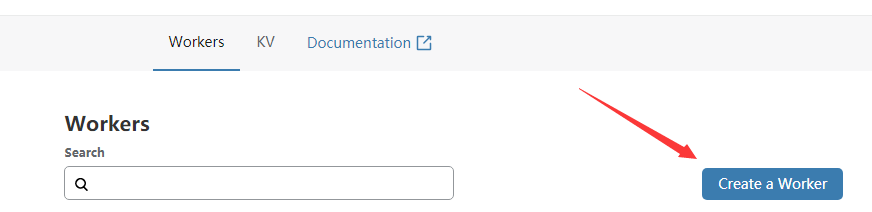
将 workers.js(或者 workers-sakurafrp.js) 的内容根据自己情况修改,然后替换 Cloudflare 在线编辑器的默认代码。
点击 Save and deploy 保存。
如何编写文章
首先创建一个 Github 项目,名字随意,然后将这个项目 clone 到本地。
# 示例
git clone https://github.com/kasuganosoras/cloudflare-worker-blog
cd cloudflare-worker-blog/
进入项目文件夹,新建一个 posts 文件夹
mkdir posts/
在里面编写文章,内容一般用 .md 后缀即可,例如 helloworld.md
写完之后回到项目根目录(就是上级目录),然后新建一个 list.json
touch list.json
编辑 list.json,在里面写入以下内容
[
  {
    "title":"文章名称",
    "time":"发布时间",
    "file":"posts/helloworld.md(或者其他名字)"
  }
]
如果你有多篇文章就这样写:
[
  {
    "title":"文章1",
    "time":"2019-06-01",
    "file":"posts/1.md"
  },
  {
    "title":"文章2",
    "time":"2019-06-03",
    "file":"posts/2.md"
  },
  {
    "title":"文章3",
    "time":"2019-06-07",
    "file":"posts/3.md"
  } <--注意json格式,最后一篇文章的这里不需要逗号
]
一切就绪后,使用 git push 命令将代码推送到仓库上。
然后修改你的 workers,设置 github_base 为你的仓库名称,例如 kasuganosoras/cloudflare-worker-blog
现在访问你的 Workers 即可看到文章。
自定义 Workers 绑定域名
请阅读此文章:https://blog.16lab.io/workers-custom-domain
JavaScript 资源
如果你仔细查看 workers.js,你会看到一些 https://cdn.zerodream.net/ 的资源文件
我建议在实际使用时将这些资源下载下来放到其他地方,或者使用 CDN,因为这是我自己的演示环境域名,并不稳定。
WBS 管理工具
这个工具使用 PHP 开发,需要安装 PHP 运行环境,文件就是 wbs.php,用于快捷管理文章。
将 wbs.php 复制到任意目录,例如 /usr/local/tools/,然后编辑 ~/.bashrc,结尾新增一行
alias wbs='php /usr/local/tools/wbs.php'
接着输入 source ~/.bashrc 更新。
现在你就可以使用 wbs 命令来进行文章操作了,第一次运行会要求输入项目目录(就是你储存文章的项目)
- wbs n / wbs new 写一篇新文章
- wbs u / wbs upload 上传已经写好的文章
- wbs c / wbs config 重新配置 wbs
评论系统
workers-sakurafrp.js 默认使用了 Sakura Comments 评论系统,你可以在我的博客下方留言申请域名白名单,或者更换为其他的评论系统。
文章地址:https://blog.16lab.io/2 (你还可以在 Issues 里提出,通过任意方式告诉我即可)
开源协议
本项目使用 MIT 协议开源,在遵守协议的前提下可任意修改,创作自己的主题等。
Frequently asked about Cloudflare Worker Blog
What is Cloudflare Worker Blog?+
Cloudflare Worker Blog is a self-hosted Ghost/WordPress alternative built on the Cloudflare developer platform. Publish Markdown posts from a GitHub repository through a Cloudflare Worker.
What does Cloudflare Worker Blog replace?+
Cloudflare Worker Blog is listed as an alternative to Ghost, WordPress. Compare the features and tradeoffs before migrating.
What Cloudflare primitives does Cloudflare Worker Blog use?+
Cloudflare Worker Blog is built on Workers.
How much does Cloudflare Worker Blog cost to run?+
The documented Cloudflare Worker Blog deployment can use Cloudflare Free allowances for a small workload under the request, CPU and service-specific quotas below. This is conditional eligibility, not a measured zero-cost deployment; optional features, domains and external providers can add costs. Workers Free allows 100,000 requests per day shared across the account and 10 ms CPU per invocation; measure CPU-heavy authentication, parsing and rendering before assuming it fits. Use a small personal or team workload; domain registration and optional third-party providers are separate costs. Provision your own IDs, secrets and migrations. Check current Cloudflare pricing before deploying.
Is Cloudflare Worker Blog open source?+
The upstream repository declares the MIT license. Read its terms at https://raw.githubusercontent.com/kasuganosoras/cloudflare-worker-blog/1ed1e6364ec48c9839b7eb7461d9c5805f62eaf3/LICENSE. Source code and contributor credit are available at https://github.com/kasuganosoras/cloudflare-worker-blog.
Discussion · 0
sign in to comment →