
Wormhole
Own a Cloudflare relay for local HTTP tunnels, WebSockets and traffic inspection.
Wormhole is a self-hosted ngrok alternative built on Cloudflare (D1, Durable Objects, Workers). Free tier eligible within limits. Inspect the source and license in the linked repository.
Source & license
Upstream license: MIT
License TL;DR
You can use it, change it, self-host it and sell it. Keep the original copyright and license notice with copies of the code. You don’t have to publish your changes. The authors don’t promise it will work.
Explain MIT in plain English →Summary of the main license. Separate packages and assets can have different terms.
Inspect repository ↗Read this project’s actual license ↗Repository owner
See the upstream repository for the original creator and contributors.
Maintain this project? Maintainer verification →Cloudflare hosting
Free tier eligible within limits
The reviewed Cloudflare deployment is eligible for Free-plan allowances for the stated small workload and feature scope. Usage limits, CPU, required account setup and separate services apply.
Hosting requirements
- Cloudflare hosts the relay only; provide an existing local machine, running application and network connection.
- Replace upstream account, zone and D1 IDs, configure your own wildcard hostname and database schema; domain registration is a separate cost.
- Use the SQLite Tunnel migration and keep Worker requests/10 ms CPU, D1 and DO requests/active duration inside free quotas.
- Frequent long-lived tunnels, WebSocket forwarding and large responses consume relay usage and may need Workers Paid.
- GitHub OAuth is optional for anonymous tunnels but needed for the documented custom-subdomain workflow.
- Workers Free dynamic requests are shared across this account (100,000/day), with 10 ms CPU per invocation; workload fit is conditional and has not been measured.
- D1 Free allowance: 5 million rows read/day, 100,000 rows written/day and 5 GB total storage; unindexed scans and history retention consume quota.
- Only SQLite Durable Objects qualify for Workers Free. Keep DO requests below 100,000/day, active duration below 13,000 GB-s/day and SQLite storage/operations inside the captured allowances.
Sources checked 01/10/2026
Repository snapshot: c53fd29. Hosting eligibility reflects the deployment documentation and listed assumptions.
- ngrok ↗
e edge. | | **Custom subdomains** | Request a memorable address after signing in with GitHub. | | **Traffic inspector** | Inspect request and response details in a local dashboard with a live request stream. | | **Replay and export** | Replay captured requests and export traffic in HAR format. | | **WebSocket support** | Forward WebSocket connections through the tunnel. | | **Automatic recovery** | Reconnect with exponential backoff when the connection drops. | | **Terminal or headless mode** | Follow a color-coded request log or use plain log output. | | **Open s
- workers ↗
name = "wormhole-relay" main = "src/index.ts" compatibility_date = "2025-02-14" account_id = "c766c312cd089545cd36afdede71bb89" [durable_objects] bindings = [ { name = "TUNNEL", class_name = "Tunnel" } ] [[migrations]] tag = "v1" new_sqlite_classes = ["Tunnel"] [[routes]] pattern = "*.wormhole.bar/*" zone_id = "9c072e7ba0809f3a6ec55b6fdaa53ad1" [[d1_databases]] binding = "DB" database_name = "wormhole-db" database_id = "bb72debb-382b-431d-ac81-9df6fd84b765" migrations_dir = "migratio
- d1 ↗
tern = "*.wormhole.bar/*" zone_id = "9c072e7ba0809f3a6ec55b6fdaa53ad1" [[d1_databases]] binding = "DB" database_name = "wormhole-db" database_id = "bb72debb-382b-431d-ac81-9df6fd84b765" migrations_dir = "migrations"
- durable-objects ↗
-02-14" account_id = "c766c312cd089545cd36afdede71bb89" [durable_objects] bindings = [ { name = "TUNNEL", class_name = "Tunnel" } ] [[migrations]] tag = "v1" new_sqlite_classes = ["Tunnel"] [[routes]] pattern = "*.wormhole.bar/*" zone_id = "9c072e7ba0809f3a6ec55b6fdaa53ad1" [[d1_databases]] binding = "DB" database_name = "wormhole-db" database_id = "bb72debb-382b-431d-ac81-9df6fd84b765" migrations_dir = "migrations"
- free-tier-eligible ↗
name = "wormhole-relay" main = "src/index.ts" compatibility_date = "2025-02-14" account_id = "c766c312cd089545cd36afdede71bb89" [durable_objects] bindings = [ { name = "TUNNEL", class_name = "Tunnel" } ] [[migrations]] tag = "v1" new_sqlite_classes = ["Tunnel"] [[routes]] pattern = "*.wormhole.bar/*" zone_id = "9c072e7ba0809f3a6ec55b6fdaa53ad1" [[d1_databases]] binding = "DB" database_name = "wormhole-db" database_id = "bb72debb-382b-431d-ac81-9df6fd84b765" mi
- free-tier-eligible ↗
ount Manager. | | Requests<sup>1, 2, 3, 4</sup> | Duration | CPU time | | --- | --- | --- | --- | | **Free** | 100,000 per day | No charge for duration | 10 milliseconds of CPU time per invocation | | **Standard** | 10 million included per month <br> +$0.30 per additional million | No charge or limit for duration | 30 million CPU milliseconds included per month<br> +$0.02 per additional million CPU milliseconds<br><br> Max of [5 minutes of CPU time](https://developers.cloudflare.com/workers/platform/limits/#account-plan-limits) per invocation (default: 30 second
- free-tier-eligible ↗
rs Paid](https://developers.cloudflare.com/workers/platform/pricing/#workers) | | --- | --- | --- | | Rows read | 5 million / day | First 25 billion / month included + $0.001 / million rows | | Rows written | 100,000 / day | First 50 million / month included + $1.00 / million rows | | Storage (per GB stored) | 5 GB (total) | First 5 GB included + $0.75 / GB-mo | Track your D1 usage To accurately track your usage, use the [meta object](https://developers.cloudflare.com/d1/worker-api/return-object/), [GraphQL Analytics API](https://developers.cloudflare.com/d1/obs
- free-tier-eligible ↗
ute and storage. Note Durable Objects are available both on Workers Free and Workers Paid plans. - **Workers Free plan**: Only Durable Objects with [SQLite storage backend](https://developers.cloudflare.com/durable-objects/best-practices/access-durable-objects-storage/#create-sqlite-backed-durable-object-class) are available. - **Workers Paid plan**: Durable Objects with the SQLite storage backend are available. The [key-value storage backend](https://developers.cloudflare.com/durable-objects/reference/durable-objects-migrations/#storage-backends) is only avail
- MIT ↗
MIT License Copyright (c) 2025 Muhammad Hanan Asghar Permission is hereby granted, free of charge, to any person obtaining a copy of this software and associated documentation files (the "Software"), to deal in the Software without restriction, including without limitation the rights to use, copy, modify, merge, publish, distribute, sublicense, and/or sell copies of the Software, and to permit persons to whom the Software is furnished to do so, subject to the following conditions: The above copyright notice and this
- architecture ↗
name = "wormhole-relay" main = "src/index.ts" compatibility_date = "2025-02-14" account_id = "c766c312cd089545cd36afdede71bb89" [durable_objects] bindings = [ { name = "TUNNEL", class_name = "Tunnel" } ] [[migrations]] tag = "v1" new_sqlite_classes = ["Tunnel"] [[routes]] pattern = "*.wormhole.bar/*" zone_id = "9c072e7ba0809f3a6ec55b6fdaa53ad1" [[d1_databases]] binding = "DB" database_name = "wormhole-db" database_id = "bb72debb-382b-431d-ac81-9df6fd84b765" migrations_dir = "migratio
What it can replace
Compare the workflow you need. These mappings describe overlap; full feature parity requires a separate comparison.
 ngrok ↗
Editorial workflow alternative: Public HTTPS forwarding of an existing local HTTP/WebSocket server plus local request inspection/replay; no managed global service, team or enterprise parity.
See supporting source ↗How it works
The shape of Wormhole on Cloudflare, and how it stacks up against the rented tools it replaces.
Architecture
Diagram of deployment declarations at the reviewed commit. Each app has its own entrypoint; declared resources do not prove runtime calls. Follow file and line sources below.
View upstream source ↗Configuration and workflow sources
Reviewed commit c53fd29e3eb4. Files were read as data; upstream applications and CI jobs were not executed.
Deployment configuration · 1 files
Cloudflare Workers · compatibility 2025-02-14
wormhole-relay · default
Entrypoint: src/index.ts
Configured route patterns: *.wormhole.bar/*
DB→ D1TUNNEL→ Durable Objects · class Tunnel
Named environments are separate deployments. Bindings are shown only where declared. Configured routes are URL patterns, not verified application endpoints.
Runtime source · handlers, binding usage and workflow steps
Observed TypeScript/JavaScript declarations from Worker entrypoints and resolved relative imports. Calls and workflow steps may run conditionally; their listed order is not a proven end-to-end request flow. Router declarations may be mounted under a prefix or may not be registered. This shows code wiring, not a successful deployment or runtime test. Dynamic wiring, aliases and generated code may not resolve.
- L157 · fetch handler exported · references TUNNEL, DB · calls request.headers.get, jsonResponse, isAuthRequest, handleAuth, isRegisterRequest, env.TUNNEL.newUniqueId, env.TUNNEL.get, stub.fetch, extractSubdomain, RESERVED_SUBDOMAINS.has, first, bind, env.DB.prepare, env.TUNNEL.idFromString
- L20 · extractSubdomain calls (conditional paths may differ): host.split, hostname.endsWith, hostname.slice, subdomain.includes
- L36 · isRegisterRequest calls (conditional paths may differ): host.split
- L45 · jsonResponse calls (conditional paths may differ): JSON.stringify
- L52 · isAuthRequest calls (conditional paths may differ): host.split
- L59 · handleAuth calls (conditional paths may differ): url.searchParams.get, btoa, JSON.stringify, githubUrl.searchParams.set, Response.redirect, githubUrl.toString, jsonResponse, fetch, tokenResp.json, userResp.json, String, Math.floor, Date.now, crypto.subtle.importKey, encoder.encode, crypto.subtle.sign, String.fromCharCode, run, bind, env.DB.prepare
Environment references: env.GITHUB_CLIENT_ID · env.GITHUB_CLIENT_SECRET · env.AUTH_SECRET · env.DB · env.TUNNEL
- L495 · generateSubdomain calls (conditional paths may differ): crypto.getRandomValues, join, Array.from
Environment references: env.DB · env.TUNNEL
Build and deployment pipeline · 0 GitHub Actions workflows
Repository CI declarations, separate from runtime request processing. Job dependencies and conditions are shown as written; long commands are shortened with an ellipsis; a workflow file does not prove a recent successful run.
No GitHub Actions workflow was found in the collected tree. Deployment may be manual or configured elsewhere.
deploy: wrangler deploy
Repository README
View original on GitHub ↗Full upstream document by @MuhammadHananAsghar · README.md · snapshot c53fd29


Website · Installation · Quick start · CLI reference · Report an issue
Local development. Public URLs.
Wormhole gives your local server a public HTTPS URL with one command. Share a development server, test incoming webhooks, or preview an app on another device. Start a tunnel without an account or configuration file; sign in with GitHub when you need a custom subdomain.
wormhole http 3000
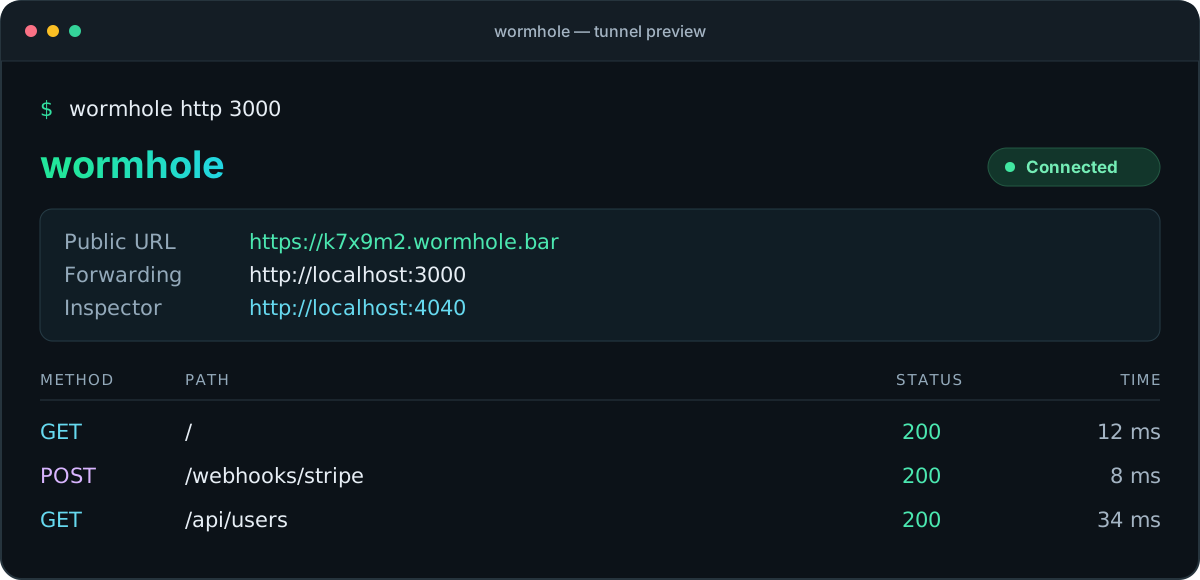
Illustrative session · Your public URL is assigned when the tunnel connects.
Features
| Capability | What you get |
|---|---|
| Instant HTTPS tunnels | A public URL for your local HTTP server, with TLS handled at the Cloudflare edge. |
| Custom subdomains | Request a memorable address after signing in with GitHub. |
| Traffic inspector | Inspect request and response details in a local dashboard with a live request stream. |
| Replay and export | Replay captured requests and export traffic in HAR format. |
| WebSocket support | Forward WebSocket connections through the tunnel. |
| Automatic recovery | Reconnect with exponential backoff when the connection drops. |
| Terminal or headless mode | Follow a color-coded request log or use plain log output. |
| Open source | A Go client and Cloudflare Workers relay, licensed under MIT. |
Installation
Quick install (macOS / Linux)
curl -fsSL https://wormhole.bar/install.sh | sh
Homebrew (macOS)
brew install MuhammadHananAsghar/tap/wormhole
Release binaries
Download a prebuilt binary from GitHub Releases.
Build from source
Requires Go 1.26.1 or later and Make.
git clone https://github.com/MuhammadHananAsghar/wormhole.git
cd wormhole
make build
# Binary: ./wormhole
Quick start
Expose a local HTTP server
# Start your local server on any port
wormhole http 3000
# => https://k7x9m2.wormhole.bar -> http://localhost:3000
Custom subdomain (free)
# One-time login via GitHub
wormhole login

# Use your own subdomain
wormhole http 3000 --subdomain myapp
# => https://myapp.wormhole.bar -> http://localhost:3000
Traffic inspector
Every tunnel automatically starts a traffic inspector at http://localhost:4040:
- Live request/response stream via WebSocket
- Request detail view with headers and body
- One-click request replay
- Filter by method, status code, path
- Export as HAR file
# Custom inspector port
wormhole http 3000 --inspect localhost:5050

# Disable inspector
wormhole http 3000 --no-inspect
CLI reference
wormhole http <port>                    # Expose local HTTP server
wormhole http <port> --subdomain NAME   # Custom subdomain
wormhole http <port> --headless         # No TUI, plain log output
wormhole http <port> --inspect ADDR     # Custom inspector address
wormhole http <port> --no-inspect       # Disable inspector

wormhole login                          # Authenticate via GitHub
wormhole logout                         # Remove stored credentials
wormhole status                         # Show auth status
wormhole uninstall                      # Remove wormhole from system
wormhole uninstall --purge              # Also remove config (~/.wormhole/)
wormhole update                         # Update to the latest version
wormhole version                        # Print version
How it works
flowchart LR
    visitor[Public client] -->|HTTPS| edge[Cloudflare Worker]
    edge --> tunnel[Durable Object]
    tunnel <-->|Encrypted WebSocket| cli[Wormhole CLI]
    cli <-->|HTTP / WebSocket| local["localhost:3000"]
- The CLI opens a WebSocket connection to the Cloudflare edge and receives a public subdomain.
- Requests to that subdomain reach a Worker, which routes them to the tunnel's Durable Object.
- The Durable Object forwards requests over the connection to the CLI.
- The CLI calls your local server and sends its response back through the tunnel.
The traffic inspector runs locally at http://localhost:4040 and records requests for inspection, replay, and export.
Architecture
| Component | Technology |
|---|---|
| CLI Client | Go, Cobra, Bubbletea, Lipgloss |
| Transport | WebSocket (gorilla/websocket) |
| Edge Relay | Cloudflare Workers + Durable Objects |
| Database | Cloudflare D1 (SQLite) |
| DNS | Cloudflare DNS (wildcard *.wormhole.bar) |
| TLS | Cloudflare automatic SSL |
| Auth | GitHub OAuth |
Project structure
wormhole/
├── cmd/wormhole/          # CLI entry point
├── internal/
│   ├── client/            # Tunnel client (connect, forward, display)
│   ├── transport/         # WebSocket transport layer
│   └── inspect/           # Traffic inspector (recorder, server, replay, HAR)
├── edge/                  # Cloudflare Worker + Durable Object relay
│   ├── src/
│   │   ├── index.ts       # Worker router + auth
│   │   └── tunnel.ts      # Durable Object tunnel proxy
│   └── migrations/        # D1 schema migrations
├── pkg/config/            # User config (~/.wormhole/config.json)
├── deployments/           # install.sh, Docker, etc.
├── Makefile
└── .goreleaser.yml
Security
Wormhole includes hardening measures to protect users who inadvertently expose sensitive local files or infrastructure details through the tunnel.
Sensitive path blocking (CWE-441)
By default, wormhole blocks requests to dot segments and node_modules before they reach your local server. Matching is done after URL unescaping and path cleaning, so encoded or traversal variants are blocked too.
/.env,/.git,/.aws,/.ssh,/.docker, and any other dot segment in the path: return 403 Forbidden/node_modules/anywhere in the path: return 403 Forbidden
This prevents credentials and source control history from being served to the internet even if your local server would normally serve them.
To disable (for users who genuinely need to serve these paths):
WORMHOLE_NO_PATH_FILTER=1 wormhole http 3000
Inspector CORS hardening (CWE-942)
The traffic inspector (localhost:4040) does not set Access-Control-Allow-Origin: *. CORS headers are only returned when the request's Origin is a loopback origin on the inspector's bound port. This prevents malicious websites visited in the same browser session from reading tunnel traffic via cross-origin requests.
The WebSocket upgrader applies the same origin policy.
Error message sanitization (CWE-200)
When the local server is unreachable, wormhole returns a generic message (Tunnel connected, but the local service is not responding.) to the remote caller instead of the raw Go error string. Internal network topology details (host names, port numbers, error codes) are logged locally only and never sent through the tunnel.
Development
Use Go 1.26.1 or later for the client and Node.js with npm for the edge relay.
# Run all Go tests
go test ./... -race

# Run edge tests
(cd edge && npm ci && npm test)

# Build binary
make build

# Cross-compile all platforms
make dist
Test-driven development
This project follows test-driven development. Write failing tests first, then implement.
# Run inspector tests without cached results
go test ./internal/inspect/ -v -count=1

# Coverage
go test ./... -cover
Contributing
Bug reports and focused pull requests are welcome. For a bug report, include your operating system, wormhole version, reproduction steps, and relevant logs with credentials removed.
Before opening a pull request, run the tests for the components you changed. Update the documentation when changing commands or user-facing behavior.
Roadmap
The current CLI uses a Cloudflare Workers relay. Future work includes a self-hosted Go relay, additional transports, and team features. The items below distinguish shipped capabilities from planned work.
View the development roadmap
- Phase 1 — Core tunnel (
wormhole http 3000→ public URL, WebSocket passthrough) - Phase 2 — HTTPS, custom subdomains (auto-reserve, 3/user limit), GitHub OAuth
- Phase 3 — Traffic inspector, request replay, HAR export, curl generation
- Phase 4 — Self-hosted Go relay (
wormhole server, QUIC transport, SQLite persistence) - Phase 5 — Auth & multi-user (API keys, team tokens, CF + self-hosted middleware)
- Phase 6 — Stream multiplexing (virtual streams over single WebSocket, backpressure)
- Phase 7 — Plugin system (request/response pipeline, custom auth, transforms)
- Phase 8 — Observability (Prometheus metrics, structured logs, health endpoints)
- Phase 9 — Protocol evolution (version negotiation, TLS pinning, binary framing)
- Phase 10 — Enterprise hardening (connection limits, mTLS, audit logs, RBAC)
- Phase 11 — P2P mode (
wormhole share, WebRTC direct connections, no relay) - Phase 12 — Polish & ship (homepage, docs site, video demos, package registries)
Contributors
Thanks to everyone who helps improve Wormhole through code, documentation, bug reports, and ideas.
View all contributors · Contribute to Wormhole
Author
Muhammad Hanan Asghar
- GitHub: @MuhammadHananAsghar
- LinkedIn: muhammadhananasghar
License
MIT License. See LICENSE for details.
Built with Go + Cloudflare Workers. Runs on the edge.
Frequently asked about Wormhole
What is Wormhole?+
Wormhole is a self-hosted ngrok alternative built on the Cloudflare developer platform. Own a Cloudflare relay for local HTTP tunnels, WebSockets and traffic inspection.
What does Wormhole replace?+
Wormhole is listed as an alternative to ngrok. Compare the features and tradeoffs before migrating.
What Cloudflare primitives does Wormhole use?+
Wormhole is built on D1, Durable Objects, Workers.
How much does Wormhole cost to run?+
The reviewed Cloudflare deployment is eligible for Free-plan allowances for the stated small workload and feature scope. Usage limits, CPU, required account setup and separate services apply. Cloudflare hosts the relay only; provide an existing local machine, running application and network connection. Replace upstream account, zone and D1 IDs, configure your own wildcard hostname and database schema; domain registration is a separate cost. Use the SQLite Tunnel migration and keep Worker requests/10 ms CPU, D1 and DO requests/active duration inside free quotas. Frequent long-lived tunnels, WebSocket forwarding and large responses consume relay usage and may need Workers Paid. GitHub OAuth is optional for anonymous tunnels but needed for the documented custom-subdomain workflow. Workers Free dynamic requests are shared across this account (100,000/day), with 10 ms CPU per invocation; workload fit is conditional and has not been measured. D1 Free allowance: 5 million rows read/day, 100,000 rows written/day and 5 GB total storage; unindexed scans and history retention consume quota. Only SQLite Durable Objects qualify for Workers Free. Keep DO requests below 100,000/day, active duration below 13,000 GB-s/day and SQLite storage/operations inside the captured allowances. Check current Cloudflare pricing before deploying.
Is Wormhole open source?+
The upstream repository declares the MIT license. Read its terms at https://raw.githubusercontent.com/MuhammadHananAsghar/wormhole/c53fd29e3eb46c7d41f4af21d053a3c3746fe9aa/LICENSE. Source code and contributor credit are available at https://github.com/MuhammadHananAsghar/wormhole.
Discussion · 0
sign in to comment →