 alternatives
Open source ngrok alternatives you can host yourself on Cloudflare
If you want an open source ngrok alternative that runs on Cloudflare, two catalog projects list ngrok as the service they replace: hostc (Apache-2.0), which gives a local port a public HTTPS URL with one npx command and no account, and Wormhole (MIT), which adds a local traffic inspector with replay and HAR export. Both put a Cloudflare Worker and a Durable Object between the visitor and your machine. Neither covers ngrok's managed identity, logging or enterprise policies, and Cloudsteading has not deployed either one.
By Cloudsteading · Sources checked 2026-11-11 · Independent guide
What you can and cannot replace
ngrok puts a public URL in front of a service running on your own computer. Its pricing page lists a Free plan at $0 with a one-time $5 usage credit, up to 3 online endpoints, 1 GB of data transfer and 20,000 HTTP/S requests, and a Hobbyist plan at $10 USD a month ($96 billed annually) (ngrok pricing, checked 11 November 2026). People who search for an ngrok alternative usually want one of three things: a URL for a dev server or a webhook test, a tunnel they host themselves, or a way past a usage limit.
The catalog lists two projects that name ngrok as the service they replace: hostc and Wormhole. Each row below describes what the project's own README and configuration declare. Neither is a test deployment by us, and the catalog's scope notes exclude ngrok's full managed identity, logging and enterprise policies.
ngrok alternatives that run on your own Cloudflare account
| Project | License | Best for | What it lacks next to ngrok |
|---|---|---|---|
| hostc | Apache 2.0 | A public HTTPS URL for a local port from one npx command, with WebSockets and hot reload |
No request inspector in its README; a new URL each time you restart it; no access control on the URL |
| Wormhole | MIT | A tunnel with a local inspector, request replay, HAR export and custom subdomains after a GitHub login | Self-hosted relay listed as future work; catalog review found binary WebSocket frames returned as text |
Both pages show the README, license and a configuration-derived architecture diagram at a pinned commit. The diagrams describe the declared setup, not something we ran.
hostc: the simplest route, and the one you can host yourself
The hostc README describes "one command" that gives a dev server a public HTTPS URL, with WebSockets and hot reload included, "free, open source, no account". You run npx hostc@latest 3000 and it prints a URL such as https://k7m2xq9pa4dn.hostc.app pointing at http://localhost:3000. It lists sharing a build from an AI coding tool, testing webhooks from Stripe, GitHub or Slack, and trying a site on a real phone as uses. A --qr flag prints a QR code of the URL.
Under the hood, the CLI opens one outgoing WebSocket, so nothing on your machine has to be reachable from the internet. A Worker sends each public request to a Durable Object, one per tunnel, which relays it down that socket. The reviewed wrangler.jsonc declares the Tunnel Durable Object class on SQLite storage and a rate limit of 20 tunnel creations per 60 seconds. The README says idle tunnels sleep on the server.
Its README is plain about the limits. The URL is public, so "anyone who has it reaches your server". It also says to always run @latest, because a server update can break an older client, and that a global install stops working when the server moves on. That matters if you self-host: you then control when the server changes.
What it lacks next to ngrok: the README does not describe a traffic inspector, request replay, reserved domains, TCP endpoints or team accounts. License: Apache-2.0.
Wormhole: an inspector and custom subdomains
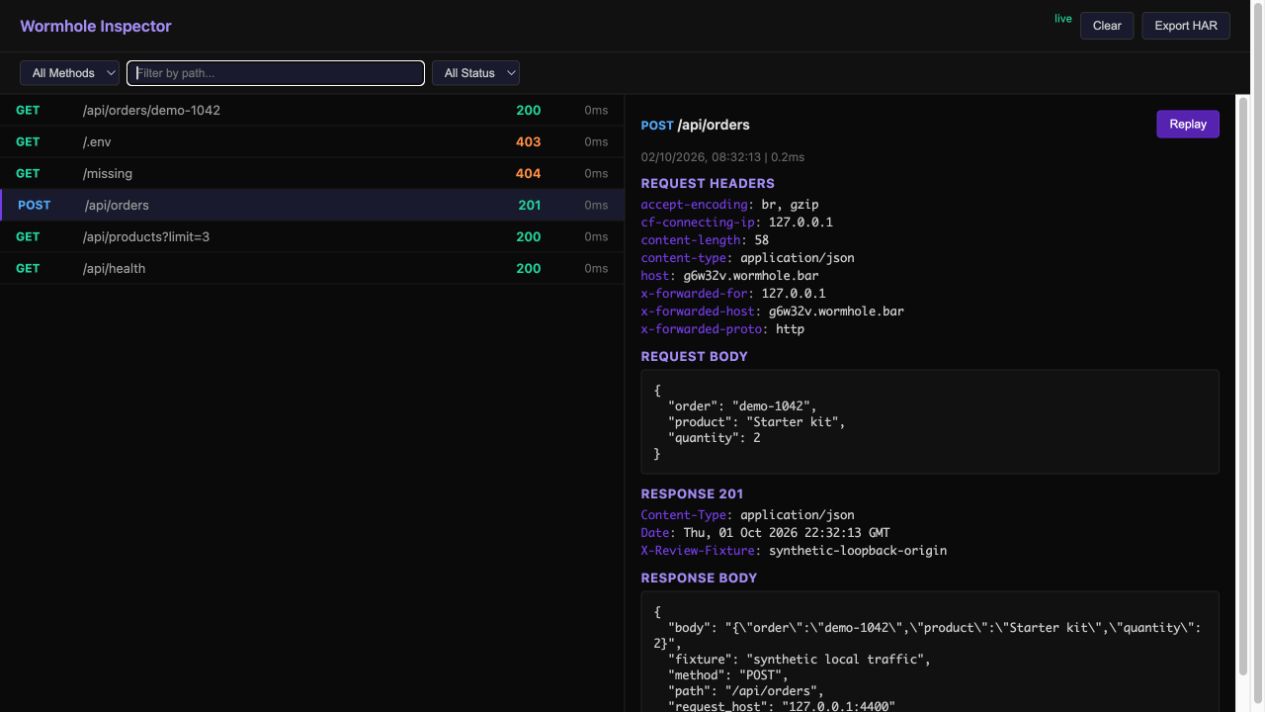
The Wormhole README describes wormhole http 3000 giving a local server a public HTTPS URL. Its feature list adds custom subdomains after signing in with GitHub, a traffic inspector at http://localhost:4040 with a live request stream, one-click replay, filtering by method, status and path, and HAR export. It also forwards WebSocket connections and reconnects with backoff. The client is written in Go, and the relay is a Cloudflare Worker with a SQLite Durable Object and a D1 database, per its configuration.
By default it answers 403 for dot paths such as /.env and /.git and for anything under node_modules, so a local server does not hand out credentials by accident. You can switch that off with WORMHOLE_NO_PATH_FILTER=1.
Two things limit it as a self-hosted option. The README's roadmap marks a "self-hosted Go relay" as not yet built, and the catalog's review notes say the CLI hardcodes wss://relay.wormhole.bar. To run your own relay you would deploy the Worker with your own account, zone and D1 IDs and change that address in the client. The same notes record that, in a local run of the original code, a binary WebSocket message came back as a text message with the same content, so only text WebSocket forwarding was confirmed. Do not assume it fits binary protocols. The README's install paths include a shell installer, release binaries and a build from source.
What it lacks next to ngrok: a managed global service, team features and enterprise parity, which the catalog's scope excludes. License: MIT.
Deploy hostc on your own Cloudflare account
These follow the hostc README's self-hosting section. Cloudsteading has not run them against a production Cloudflare account.
- Add your domains to Cloudflare: one for the API and one for tunnels, for example
example.comandexample.app. They can be the same domain, but the README recommends a separate tunnel domain so tunnel cookies and abuse reports stay away from your main site. - On the tunnel domain, add a proxied wildcard DNS record,
*pointing to192.0.2.1. The README says Cloudflare's Universal SSL covers*.example.app. - Set the token secret once:
pnpm -F @hostc/server exec wrangler secret put TOKEN_SECRET, using at least 32 random bytes. The README suggestsopenssl rand -base64 48. - Deploy:
API_DOMAIN=example.com TUNNEL_DOMAIN=example.app pnpm deploy:server. - Point the client at your server:
npx hostc@latest 3000 --server https://example.com. Alternatively, build the CLI withHOSTC_DEFAULT_SERVER=https://example.com pnpm build.
You need Node.js and pnpm, a Cloudflare account with the domains added, and your own IDs and secrets. The catalog's note adds that a domain and DNS permissions are required, and that tunnels that stay open consume Durable Object duration.
Will it stay free?
Workers Free allows 100,000 requests a day and 10 ms of CPU per invocation. SQLite-backed Durable Objects on the Free plan allow 100,000 requests and 13,000 GB-s of duration a day, with 5 million rows read, 100,000 rows written and 5 GB of storage (Cloudflare pricing pages, as captured in the catalog's reviews). Every request through a tunnel counts against the Workers allowance, and an open tunnel keeps its Durable Object active, which uses duration. Both catalog notes say active sockets and tunnel time consume that allowance. The catalog's note for Wormhole says frequent long-lived tunnels, WebSocket forwarding and large responses may need Workers Paid. A tunnel you use a few hours a day for yourself is a small workload. A tunnel shared by a team all day may not be. The domain is a separate cost, and Cloudsteading has not measured either project's usage.
Other options outside the catalog
The people searching for an ngrok alternative want the whole picture, so here is one more option that is not in the catalog. We have not reviewed it as a listing. Facts are from Cloudflare's documentation, checked 11 November 2026.
- Cloudflare Tunnel has Quick Tunnels:
cloudflared tunnel --url http://localhost:8080creates a temporarytrycloudflare.comURL for a local service, with no Cloudflare account or domain needed, and access can be limited by email one-time PIN. The docs call Quick Tunnels a testing and development tool and send production use to a regular Cloudflare Tunnel. The same page lists a limit of 200 in-flight requests and says Quick Tunnels do not support Server-Sent Events.cloudflaredis a binary you install, which differs from hostc'snpxroute.
A related catalog project, Reminal (AGPL-3.0), is listed in the catalog as an AnyDesk alternative for browser access to your own computer. Its README also describes a reminal expose 3000 command that prints a public HTTPS URL, protected by a PIN by default. We list it here as a pointer only, since it is a remote-access tool first.
Before you switch
- List what you use ngrok for: a quick preview, a webhook endpoint, a fixed domain, TCP, or team access. hostc and Wormhole cover HTTP and WebSocket forwarding to a local server and little else.
- If a webhook sender needs a stable address, check whether the URL survives a restart. hostc's does not; Wormhole's README describes custom subdomains after a GitHub login, on the author's public relay.
- Decide whether to rely on the author's public server or host your own. hostc's README documents hosting; Wormhole's does not yet.
- Keep the URL private. Neither project puts a login in front of a tunnel by default, so only expose what you mean to share.
- Plan for updates. hostc's README says an old client stops at startup when the server moves on.
- Check the Apache 2.0 and MIT terms if you copy or modify either one.
We read each README, configuration and license at the pinned commit linked on its project page. Cloudsteading did not deploy, benchmark or migrate any project named here. For the wider picture, see what self-hosting is and the Durable Objects projects in the catalog. If you maintain one of these projects and something here is wrong, you can ask for a correction or removal through support.
Common questions
What is a good open source alternative to ngrok?
Of the projects in the Cloudsteading catalog, hostc is the simplest: its README says one command, npx hostc@latest 3000, gives a dev server a public HTTPS URL with no sign-up and no auth token, and it documents how to deploy the server to your own Cloudflare account. Wormhole is the one with a request inspector, replay and HAR export, but its README lists a self-hosted relay as future work. Cloudflare's own Quick Tunnels are a well-known option outside the catalog.
Can I run an ngrok alternative on Cloudflare for free?
Possibly, for a small workload. The catalog's hosting notes say both relays can fit Workers Free (100,000 requests a day, 10 ms CPU per invocation) and SQLite-backed Durable Objects (100,000 requests and 13,000 GB-s of duration a day), but open tunnels and WebSocket traffic use Durable Object duration, and Wormhole may need Workers Paid under frequent long-lived tunnels. You also need a domain with a wildcard DNS record, which is a separate cost. Cloudsteading has not measured either.
Do hostc and Wormhole replace everything ngrok does?
No. The catalog scopes them to public HTTP and WebSocket access to a local development server. Complete managed identity, logging and enterprise tunnel policies are excluded for hostc, and the same holds for Wormhole, which also has no managed global service or team features. TCP endpoints, which ngrok's pricing page mentions, are not described in either README.
Can I test webhooks from Stripe or GitHub with them?
hostc's README lists testing webhooks from Stripe, GitHub or Slack against code on your machine as a use. Wormhole's README says it can test incoming webhooks and records requests in a local inspector where you can replay them. Neither was tested by Cloudsteading with a real webhook sender.
Is the public URL private?
No. hostc's README says the URL is public and anyone who has it reaches your server, so expose only what you mean to share. Wormhole blocks requests to dot paths such as /.env and /.git and to node_modules by default, which is a safety net, not access control.
Does hostc or Wormhole keep the same URL after a restart?
hostc's README says restarting hostc gives a new URL, while a network drop or a restart of your local server does not change it. Wormhole's README describes custom subdomains after signing in with GitHub, with a limit of three per user.
Are there other ngrok alternatives outside the catalog?
Yes. Cloudflare Tunnel, including its account-free Quick Tunnels, is documented by Cloudflare and checked 11 November 2026. It is not an open source project in the catalog, so we have not reviewed it as a listing.
Sources and review
- ngrok pricing (checked 11 November 2026) ↗
- hostc pinned README ↗
- hostc server wrangler.jsonc at the reviewed commit ↗
- Wormhole pinned README ↗
- Wormhole relay wrangler.toml at the reviewed commit ↗
- Cloudflare Quick Tunnels ↗
- Cloudflare Workers pricing ↗
- Cloudflare Durable Objects pricing ↗
Recommendations are Cloudsteading’s editorial assessment. Repository review establishes documented capabilities; it does not prove a fresh deployment or complete feature parity. Prices and platform limits can change.